
干货 | YOLOV5 训练自动驾驶数据集,并转Tensorrt,收藏!
本文转载自 AI深度学习视线,作者
准备数据集
环境配置
配置文件修改
训练
推理
转Tensorrt
1
准备数据集
1.1 BDD数据集
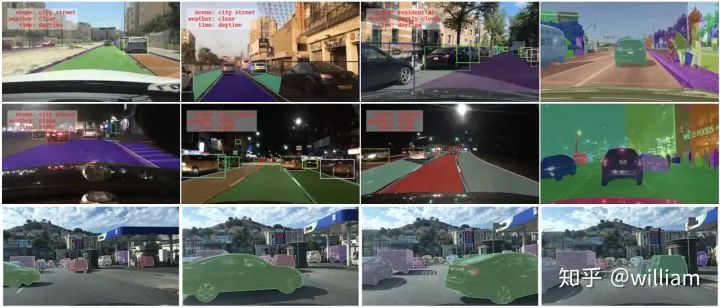
BDD100K是最大的开放式驾驶视频数据集之一,其中包含10万个视频和10个任务,目的是方便评估自动驾驶图像识别算法的的进展。每个高分辨率视频一共40秒。该数据集包括超过1000个小时的驾驶数据,总共超过1亿帧。这些视频带有GPU / IMU数据以获取轨迹信息。该数据集具有地理,环境和天气多样性,从而能让模型能够识别多种场景,具备更多的泛化能力。这些丰富的户外场景和复杂的车辆运动使感知任务更具挑战性。该数据集上的任务包括图像标记,车道检测,可驾驶区域分割,道路对象检测,语义分割,实例分割,多对象检测跟踪,多对象分割跟踪,领域自适应和模仿学习。我们可以在BDD100K数据网站上下载数据。
Bdd100k的标签是由Scalabel生成的JSON格式。- labels [ ]:- id: int32- category: string (classification)- manualShape: boolean (whether the shape of the label is created or modified manually)- manualAttributes: boolean (whether the attribute of the label is created or modified manually)- score: float (the confidence or some other ways of measuring the quality of the label.)- attributes:- occluded: boolean- truncated: boolean- trafficLightColor: "red|green|yellow|none"- areaType: "direct | alternative" (for driving area)- laneDirection: "parallel|vertical" (for lanes)- laneStyle: "solid | dashed" (for lanes)- laneTypes: (for lanes)- box2d:- x1: float- y1: float- x2: float- y2: float
道路对象类别包括以下几类:
["bike","bus","car","motor","person","rider","traffic light","traffic sign","train","truck"]
1.2 YOLO数据格式
每个图片文件.jpg,都有同一命名的标签文件.txt。
标签文件中每个对象独占一行,格式为
其中:
例如:
         =


          /
         =


          /
注意:
如下图所示:
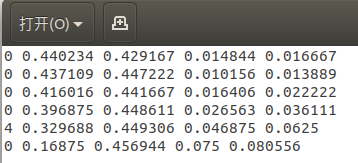
YOLO V5的标签文件和图像文件应位于同一目录下。
1.3 BDD数据转YOLO格式
Berkerley 提供了Bdd100k数据集的标签查看及标签格式转化工具。由于没有直接从bdd100k转换成YOLO的工具,因此我们首先得使用将bdd100k的标签转换为coco格式,然后再将coco格式转换为yolo格式。
bdd to coco
我的目的是识别包括不同颜色交通灯在内的所有交通对象,因此我们需要对原版的bdd2coco.py进行一些修改,以获取交通灯颜色并产生新的类别。
这是修改完的核心代码:
for label in i['labels']:annotation = dict()category=label['category']if (category == "traffic light"):color = label['attributes']['trafficLightColor']category = "tl_" + colorif category in id_dict.keys():empty_image = Falseannotation["iscrowd"] = 0annotation["image_id"] = image['id']x1 = label['box2d']['x1']y1 = label['box2d']['y1']x2 = label['box2d']['x2']y2 = label['box2d']['y2']annotation['bbox'] = [x1, y1, x2-x1, y2-y1]annotation['area'] = float((x2 - x1) * (y2 - y1))annotation['category_id'] = id_dict[category]annotation['ignore'] = 0annotation['id'] = label['id']annotation['segmentation'] = [[x1, y1, x1, y2, x2, y2, x2, y1]]annotations.append(annotation)
在完成bdd100k格式到yolo格式的转换后,会获得bdd100k_labels_images_det_coco_train.json和bdd100k_labels_images_det_coco_val.json两个文件。
Coco to yolo
在完成先前的转换之后,我们需要将训练集和验证集的coco格式标签转换为yolo格式。注意需要分别指定训练集和验证集图片位置,对应的coco标签文件位置,及生成yolo标签的目标位置。
config_train ={"datasets": "COCO","img_path": "bdd100k_images/bdd100k/images/100k/train","label": "labels/bdd100k_labels_images_det_coco_train.json","img_type": ".jpg","manipast_path": "./","output_path": "labels/trains/","cls_list": "bdd100k.names",}config_valid ={"datasets": "COCO","img_path": "bdd100k_images/bdd100k/images/100k/val","label": "labels/bdd100k_labels_images_det_coco_val.json","img_type": ".jpg","manipast_path": "./","output_path": "labels/valids/","cls_list": "bdd100k.names",}
除此之外,我们还得将所有的类别写入bdd100k.names文件。
personridercarbustruckbikemotortl_greentl_redtl_yellowtl_nonetraffic signtraintl_green
运行Bdd_preprocessing中的完整代码可以完成Bdd100k格式标签到YOLO标签格式的转换。
Bdd2coco以及coco2yolo的详细说明可以参看bdd100k代码库和convert2Yolo代码库。
2
环境配置
2.1 官方代码
https://github.com/ultralytics/yolov5/tree/v3.0
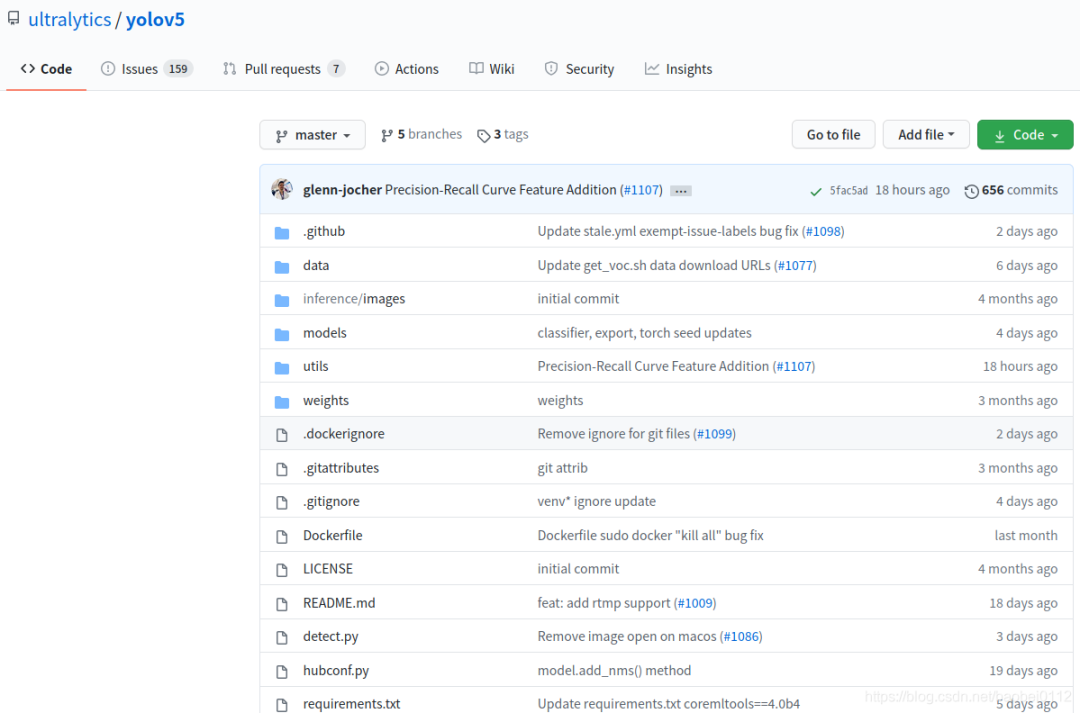
由于后面转tensorrt版本支持yolov5到3.0版本,所以以3.0版本进行实验。
环境配置可通过下面命令进行一键配置。
# pip install -r requirements.txt# base ----------------------------------------Cython=3.2.2=1.18.5=4.1.2pillow=5.3=1.4.1=2.2=1.6.0=0.7.0=4.41.0# coco ----------------------------------------pycocotools>=2.0# export --------------------------------------packaging # for coremltoolscoremltools==4.0b4onnx>=1.7.0scikit-learn==0.19.2 # for coreml quantization# extras --------------------------------------thop # FLOPS computationseaborn # plotting
=3.2.2\nnumpy>=1.18.5\nopencv-python>=4.1.2\npillow\nPyYAML>=5.3\nscipy>=1.4.1\ntensorboard>=2.2\ntorch>=1.6.0\ntorchvision>=0.7.0\ntqdm>=4.41.0\n\n# coco ----------------------------------------\n# pycocotools>=2.0\n\n# export --------------------------------------\n# packaging # for coremltools\n# coremltools==4.0b4\n# onnx>=1.7.0\n# scikit-learn==0.19.2 # for coreml quantization\n\n# extras --------------------------------------\n# thop # FLOPS computation\n# seaborn # plotting","classes":[]}" data-cke-widget-upcasted="1" data-cke-widget-keep-attr="0" data-widget="codeSnippet">
3
配置文件修改
3.1 修改 ./data/coco.yaml
修改./data/coco.yaml--》存为bdd.yaml

修改内容:
(1)train/val/test 路径
其中的txt内容均为各集合图像实际绝对路径。
(2)nc:number class 类别数量,BDD数据类别为10
(3)names:前面bdd数据集介绍时候已经列出
3.2 修改 ./model/yolov5.yaml

修改:nc为BDD数据类别数:10
3.3 修改./train.py
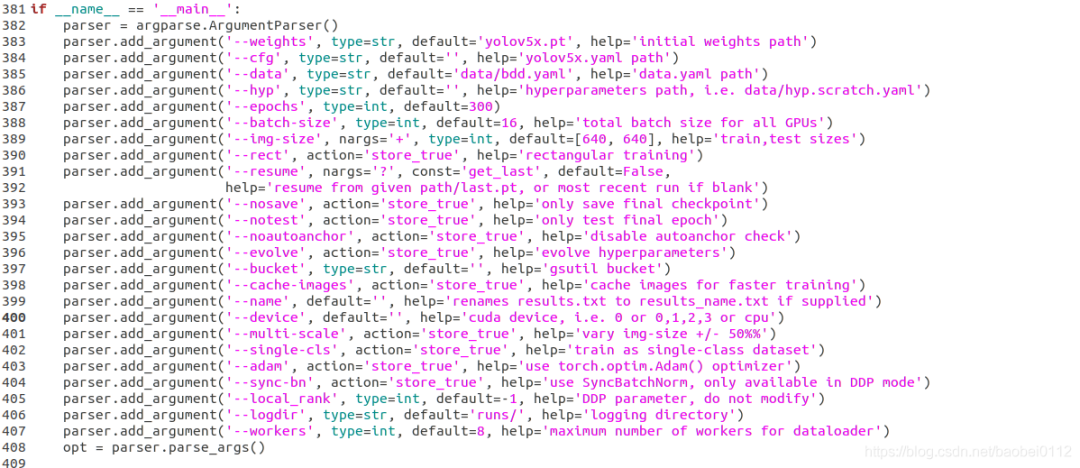
修改:
(1)--weights,这里s/m/l/x四个型号可以选择
(2)--cfg,这里s/m/l/x四个型号可以选择
(3)--data,选择根据coco.yaml修改后的bdd.yaml
(4)--batch-size 和 --img-size 可以再这里修改也可以默认不动,再训练命令行里设定
4
训练
预训练模型
python train.py --img 640 --batch 32 --epochs 300 --data './data/bdd.yaml' --cfg ./models/custom_yolov5x.yaml --weights "./weights/yolov5x.pt" --name yolov5x_bdd_prew --cache从头训练
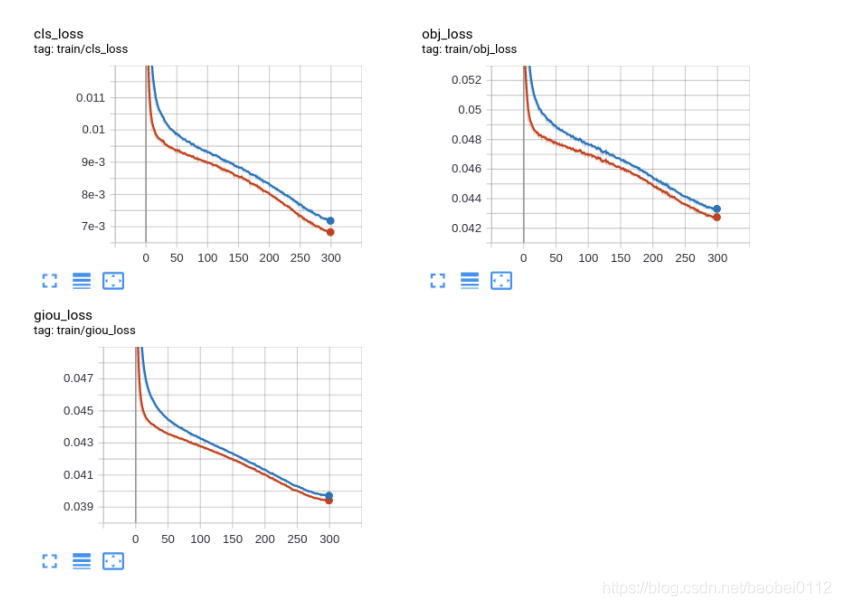
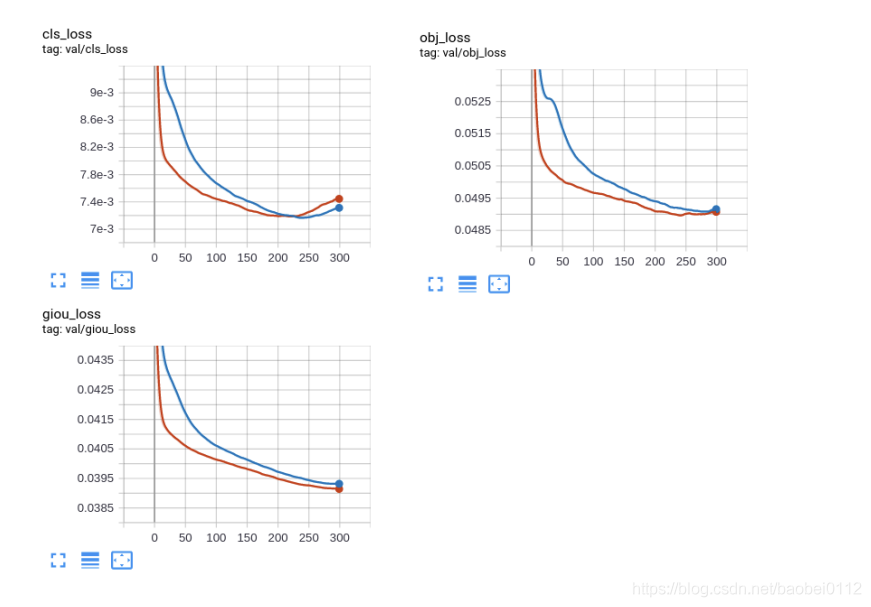
python train.py --img 640 --batch 32 --epochs 300 --data './data/bdd.yaml' --cfg ./models/custom_yolov5x.yaml --weights "" --name yolov5x_bdd --cachetrain_loss:
val_loss:
5
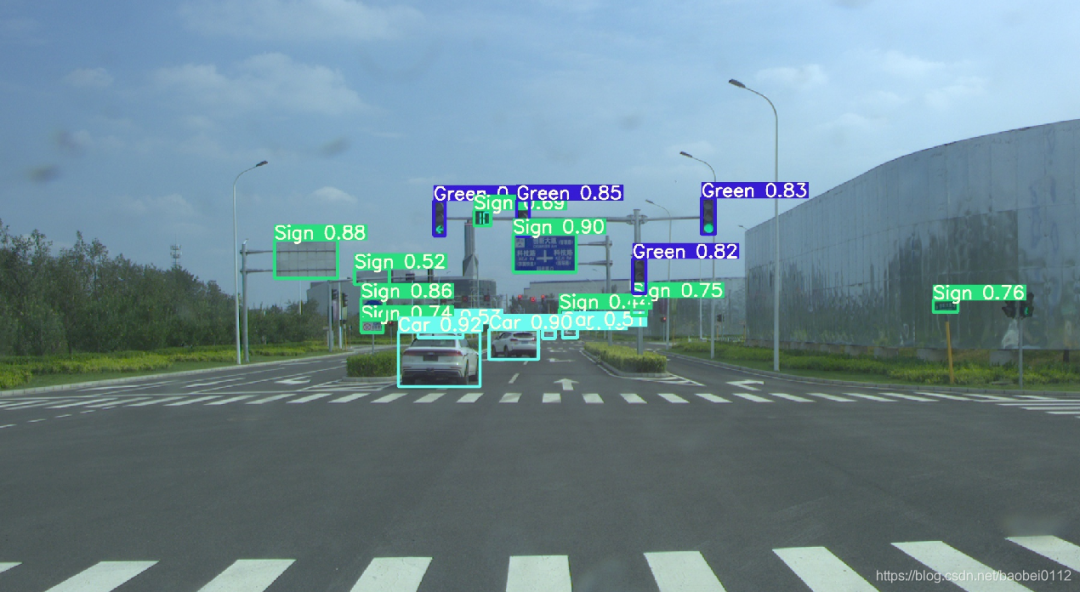
推断
可选参数:
— weights: 训练权重的路径
— source:推理目标的路径,可以是图片,视频,网络摄像头等
— source:推理结果的输出路径
— img-size:推理图片的大小
— conf-thres:对象置信阈值,默认0.4
— iou-thres:NMS的IOU阈值,可以根据实际对象的重叠度调节,默认0.5
— device: 选择使用CUDA或者CPU
— view-img:显示所有推理结果
— save-txt:将每一帧的推理结果及边界框的位置,存入*.txt文件
— classes:类别过滤,意思是只推理目标类别
— agnostic-nms:使用agnostic-nms NMS
python detect.py --source 0 # webcamfile.jpg # imagefile.mp4 # videopath/ # directorypath/*.jpg # globrtsp://170.93.143.139/rtplive/470011e600ef003a004ee33696235daa # rtsp streamrtmp://192.168.1.105/live/test # rtmp streamhttp://112.50.243.8/PLTV/88888888/224/3221225900/1.m3u8 # http stream
5
转Tensorrt
6.1 工程配置
https://github.com/wang-xinyu/tensorrtx/tree/master/yolov5,
该项目提供了一大批常见模型的转Tensorrt方法。
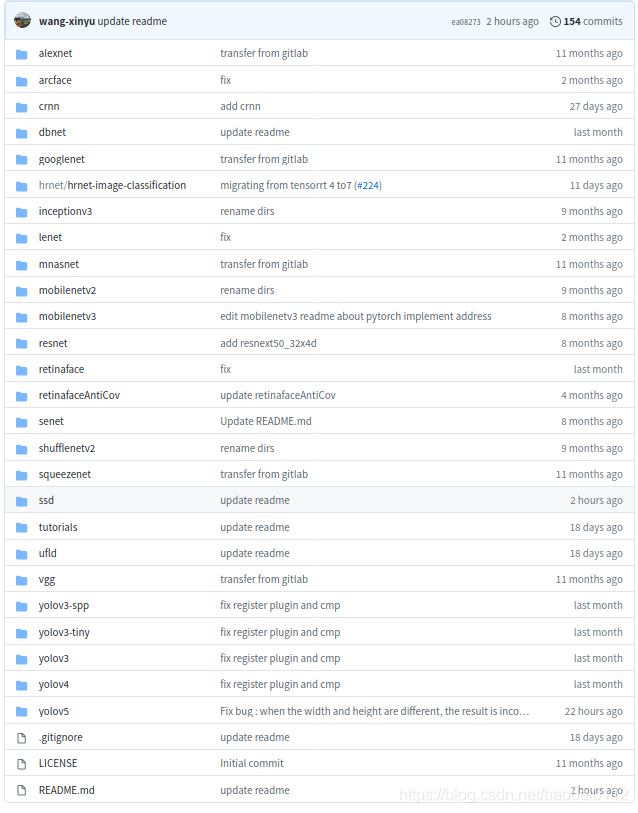
环境要求:
GTX1080 / Ubuntu16.04 / cuda10.0 / cudnn7.6.5 / tensorrt7.0.0 / nvinfer7.0.0 / opencv3.3
高版本tensorrt7的变化如下:
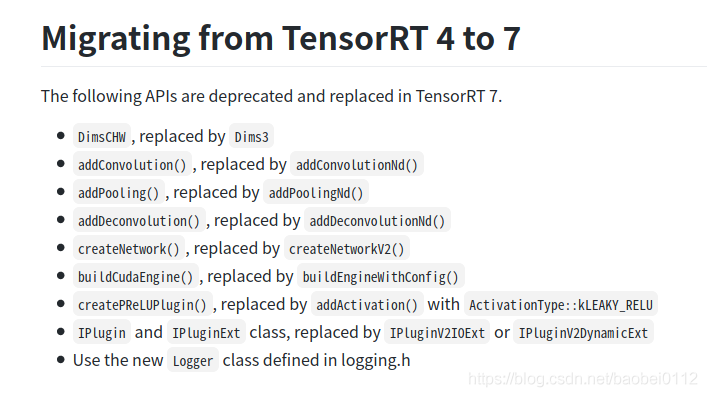
6.2 生成转tensorrt的中间文件 yolov5.wts
拷贝 ./tensorrt/yolov5/gen_wts.py文件到./yolov5 工程下,修改其中加载模型路径,执行该python文件,得到yolov5.wts,并将其拷贝回 ./tensorrt/yolov5/下。
1. generate yolov5s.wts from pytorch with yolov5s.ptgit clone https://github.com/wang-xinyu/tensorrtx.gitgit clone https://github.com/ultralytics/yolov5.git// download its weights 'yolov5s.pt'// copy tensorrtx/yolov5/gen_wts.py into ultralytics/yolov5// ensure the file name is yolov5s.pt and yolov5s.wts in gen_wts.py// go to ultralytics/yolov5python gen_wts.py// a file 'yolov5s.wts' will be generated.
6.3 编译yolov5并生成tensorrt模型yolov5.engine
编译之前需要修改:
(1)选模型

(2)CMakeLists.txt
如果tensorrt是通过tar包解压安装的,还需要在CMakeList.txt中对tensorrt路径进行指定,不然会报错找不到nvinfer

(3)另外,如果系统是Ubuntu18.04的话还会存在opencv的问题,找不到libpng12.so和libjasper.so.
这个问题可通过https://blog.csdn.net/baobei0112/article/details/108991915 该博客内容找到答案。
(4)./tensorrt/yolov5/下新建个samples文件夹,把需要测试的图片放进去。
做好准备工作,下面就可以进行YOLOV5的engine编译工作。
build tensorrtx/yolov5 and run// put yolov5s.wts into tensorrtx/yolov5// go to tensorrtx/yolov5// ensure the macro NET in yolov5.cpp is smkdir buildcd buildcmake ..makesudo ./yolov5 -s // serialize model to plan file i.e. 'yolov5s.engine'sudo ./yolov5 -d ../samples // deserialize plan file and run inference, the images in samples will be processed.
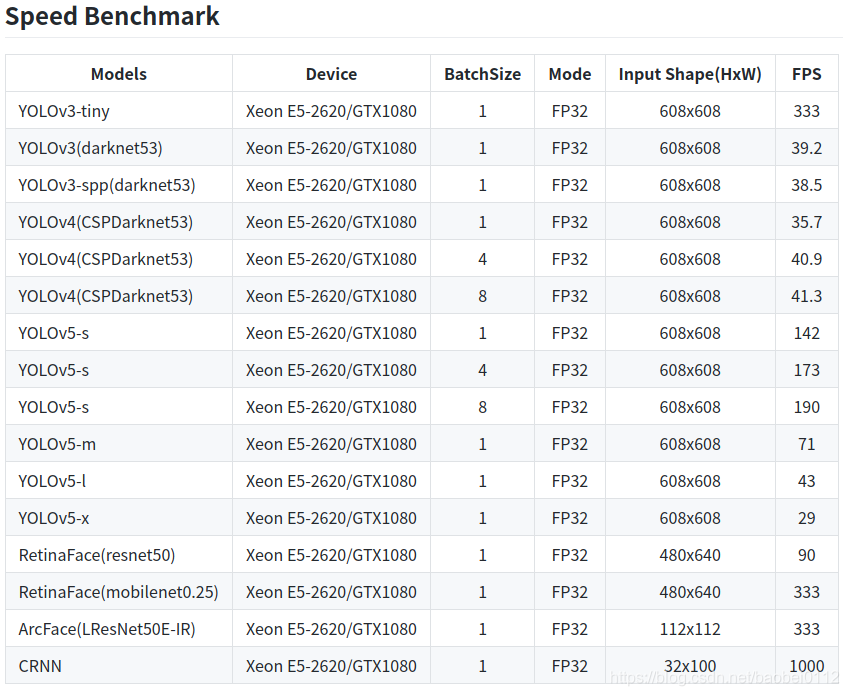
6.4 Tensorrt各yolo模型对比
END
下载 1
在【机器视觉CV】公众号后台回复 CPP,获取 CPP 开发手册
下载 2
在【机器视觉CV】公众号后台回复
YOLO 获取 YOLO 权重,回复 深度学习 获取学习资源,回复 表情识别 获取表情识别实战项目

机器视觉 CV
与你分享 AI 和 CV 的乐趣
分享数据集、电子书、免费GPU
长按二维码关注我们