
深度学习项目示例 | 手把手教你使用自编码器进行模糊图像修复

来源:DeepHub IMBA 本文约2600字,建议阅读9分钟
本文教你如何应用深度学习处理模糊图像。

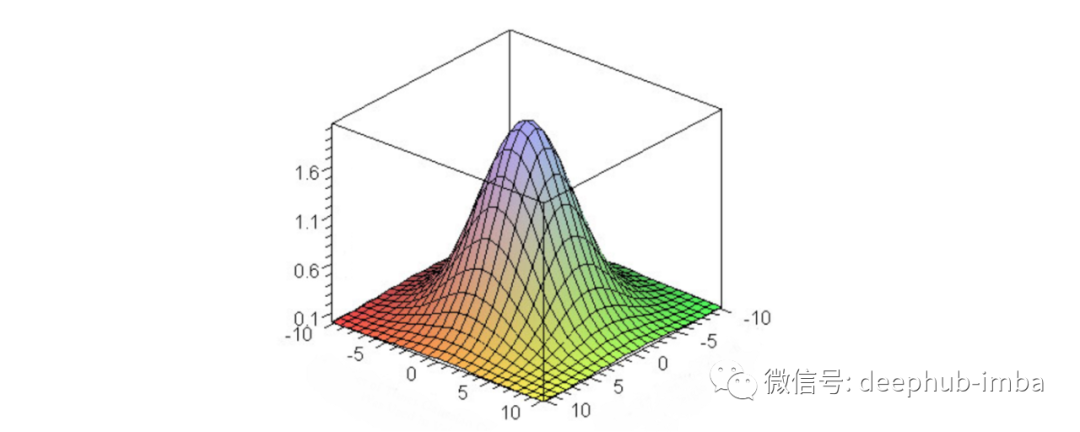
数据集
编写代码
import numpy as npimport pandas as pdimport matplotlib.pyplot as plt%matplotlib inlineimport randomimport cv2import osimport tensorflow as tffrom tqdm import tqdm
good_frames = '/content/drive/MyDrive/mini_clean'bad_frames = '/content/drive/MyDrive/mini_blur'
clean_frames = []for file in tqdm(sorted(os.listdir(good_frames))):if any(extension in file for extension in ['.jpg', 'jpeg', '.png']):image = tf.keras.preprocessing.image.load_img(good_frames + '/' + file, target_size=(128,128))image = tf.keras.preprocessing.image.img_to_array(image).astype('float32') / 255clean_frames.append(image)clean_frames = np.array(clean_frames)blurry_frames = []for file in tqdm(sorted(os.listdir(bad_frames))):if any(extension in file for extension in ['.jpg', 'jpeg', '.png']):image = tf.keras.preprocessing.image.load_img(bad_frames + '/' + file, target_size=(128,128))image = tf.keras.preprocessing.image.img_to_array(image).astype('float32') / 255blurry_frames.append(image)blurry_frames = np.array(blurry_frames)
from keras.layers import Dense, Inputfrom keras.layers import Conv2D, Flattenfrom keras.layers import Reshape, Conv2DTransposefrom keras.models import Modelfrom keras.callbacks import ReduceLROnPlateau, ModelCheckpointfrom keras.utils.vis_utils import plot_modelfrom keras import backend as Krandom.seed = 21np.random.seed = seed
x = clean_frames;y = blurry_frames;from sklearn.model_selection import train_test_splitx_train, x_test, y_train, y_test = train_test_split(x, y, test_size=0.2, random_state=42)
检查训练和测试数据集的形状。
print(x_train[0].shape)print(y_train[0].shape)

r = random.randint(0, len(clean_frames)-1)print(r)fig = plt.figure()fig.subplots_adjust(hspace=0.1, wspace=0.2)ax = fig.add_subplot(1, 2, 1)ax.imshow(clean_frames[r])ax = fig.add_subplot(1, 2, 2)ax.imshow(blurry_frames[r])
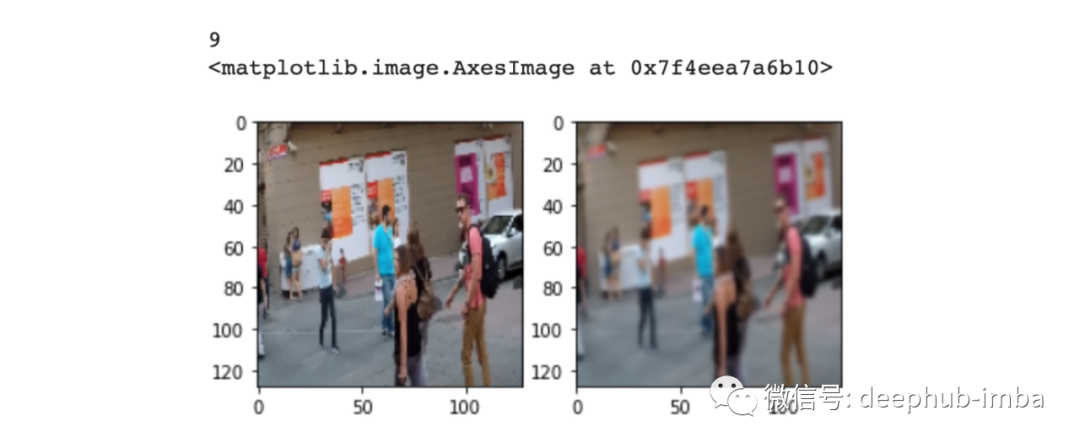
# Network Parametersinput_shape = (128, 128, 3)batch_size = 32kernel_size = 3latent_dim = 256# Encoder/Decoder number of CNN layers and filters per layerlayer_filters = [64, 128, 256]
inputs = Input(shape = input_shape, name = 'encoder_input')x = inputs
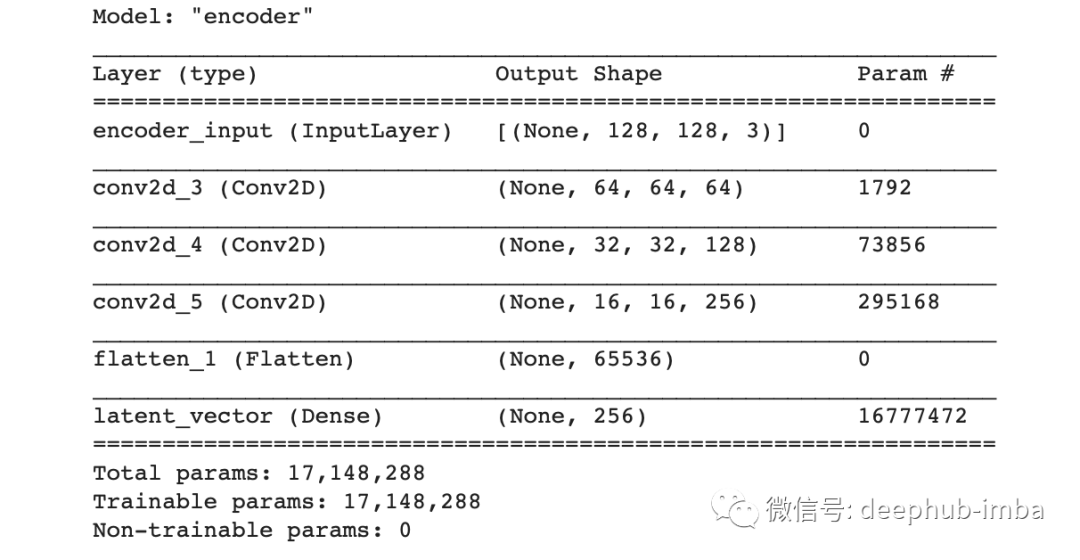
for filters in layer_filters:x = Conv2D(filters=filters,kernel_size=kernel_size,strides=2,activation='relu',padding='same')(x)shape = K.int_shape(x)x = Flatten()(x)latent = Dense(latent_dim, name='latent_vector')(x)
encoder = Model(inputs, latent, name='encoder')encoder.summary()
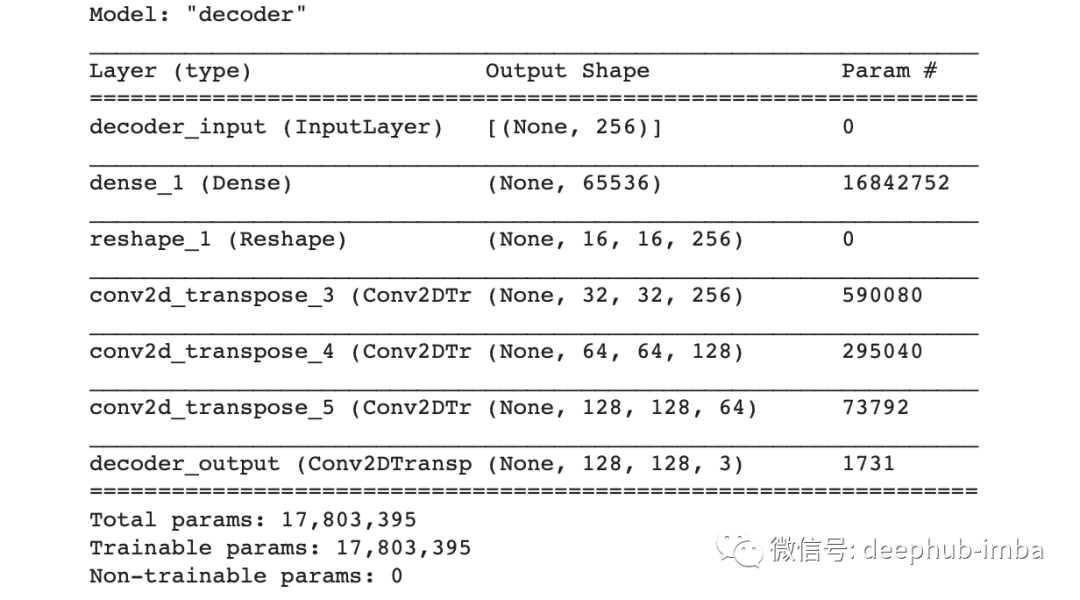
latent_inputs = Input(shape=(latent_dim,), name='decoder_input')x = Dense(shape[1]*shape[2]*shape[3])(latent_inputs)x = Reshape((shape[1], shape[2], shape[3]))(x)for filters in layer_filters[::-1]:x = Conv2DTranspose(filters=filters,kernel_size=kernel_size,strides=2,activation='relu',padding='same')(x)outputs = Conv2DTranspose(filters=3,kernel_size=kernel_size,activation='sigmoid',padding='same',name='decoder_output')(x)
decoder = Model(latent_inputs, outputs, name='decoder')decoder.summary()
autoencoder = Model(inputs, decoder(encoder(inputs)), name='autoencoder')autoencoder.summary()
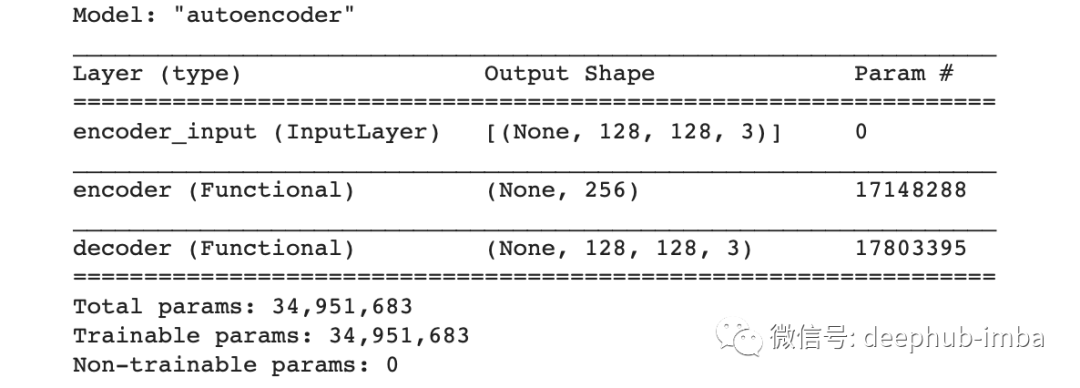
autoencoder.compile(loss='mse', optimizer='adam',metrics=["acc"])我选择损失函数为均方误差,优化器为adam,评估指标为准确率。然后还需要定义学习率调整的计划,这样可以在指标没有改进的情况下降低学习率:
lr_reducer = ReduceLROnPlateau(factor=np.sqrt(0.1),cooldown=0,patience=5,verbose=1,min_lr=0.5e-6)
callbacks = [lr_reducer]history = autoencoder.fit(blurry_frames,clean_frames,validation_data=(blurry_frames, clean_frames),epochs=100,batch_size=batch_size,callbacks=callbacks)

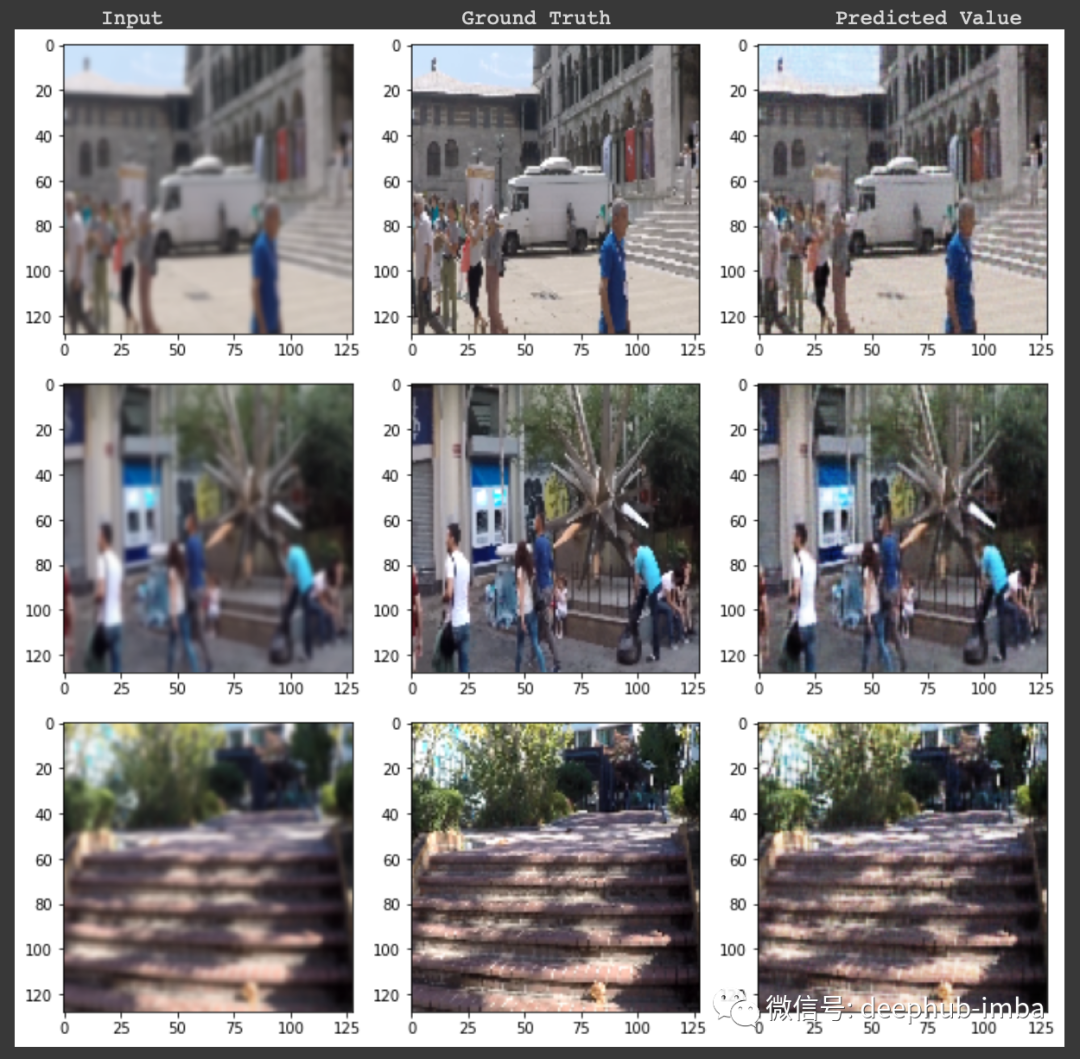
最后结果
print("\n Input Ground Truth Predicted Value")for i in range(3):r = random.randint(0, len(clean_frames)-1)x, y = blurry_frames[r],clean_frames[r]x_inp=x.reshape(1,128,128,3)result = autoencoder.predict(x_inp)result = result.reshape(128,128,3)fig = plt.figure(figsize=(12,10))fig.subplots_adjust(hspace=0.1, wspace=0.2)ax = fig.add_subplot(1, 3, 1)ax.imshow(x)ax = fig.add_subplot(1, 3, 2)ax.imshow(y)ax = fig.add_subplot(1, 3, 3)plt.imshow(result)
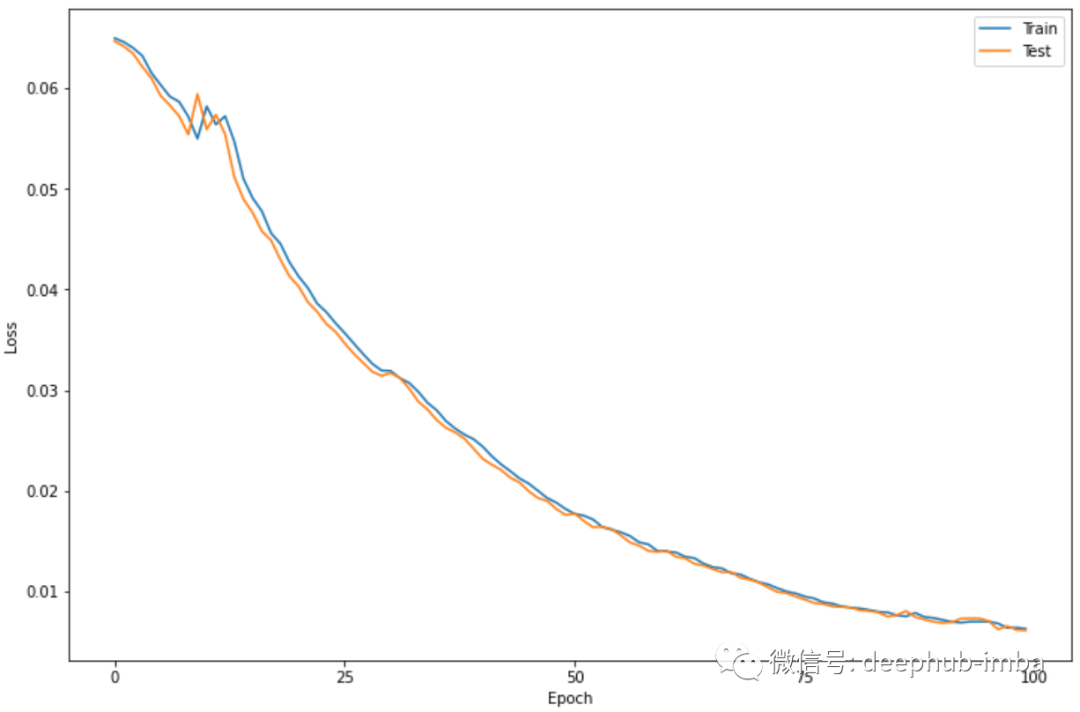
plt.figure(figsize=(12,8))plt.plot(history.history['loss'])plt.plot(history.history['val_loss'])plt.legend(['Train', 'Test'])plt.xlabel('Epoch')plt.ylabel('Loss')plt.xticks(np.arange(0, 101, 25))plt.show()
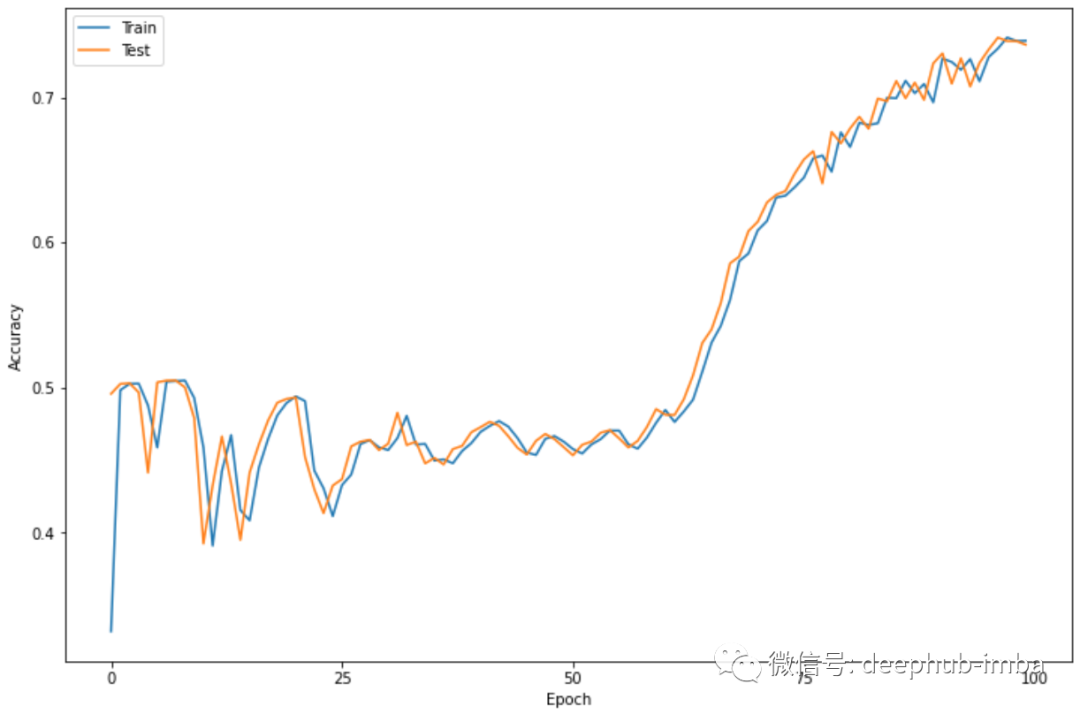
plt.figure(figsize=(12,8))plt.plot(history.history['acc'])plt.plot(history.history['val_acc'])plt.legend(['Train', 'Test'])plt.xlabel('Epoch')plt.ylabel('Accuracy')plt.xticks(np.arange(0, 101, 25))plt.show()
总结
评论