
selenium拉勾网职位信息爬取
点击蓝字“Python学习部落”关注我
让学习变成你的习惯!

本例爬取数据分析师
环境:
1.python 3
2.Anaconda3-Spyder
3.win10
源码:
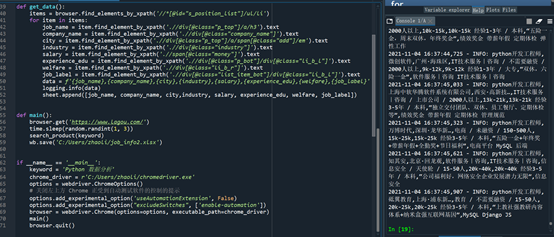
from selenium import webdriverimport timeimport loggingimport randomimport openpyxlwb = openpyxl.Workbook()sheet = wb.activesheet.append(['job_name', 'company_name', 'city','industry', 'salary', 'experience_edu','welfare','job_label'])logging.basicConfig(level=logging.INFO, format='%(asctime)s - %(levelname)s: %(message)s')def search_product(key_word):browser.find_element_by_id('cboxClose').click() # 关闭让你选城市的窗口time.sleep(2)browser.find_element_by_id('search_input').send_keys(key_word) # 定位搜索框 输入关键字browser.find_element_by_class_name('search_button').click() # 点击搜索browser.maximize_window() # 最大化窗口time.sleep(2)#time.sleep(random.randint(1, 3))browser.execute_script("scroll(0,2500)") # 下拉滚动条get_data() # 调用抓取数据的函数# 模拟点击下一页 翻页爬取数据 每爬取一页数据 休眠 控制抓取速度 防止被反爬 让输验证码for i in range(4):browser.find_element_by_class_name('pager_next ').click()time.sleep(1)browser.execute_script("scroll(0,2300)")get_data()time.sleep(random.randint(3, 5))def get_data():items = browser.find_elements_by_xpath('//*[@id="s_position_list"]/ul/li')for item in items:job_name = item.find_element_by_xpath('.//div[@class="p_top"]/a/h3').textcompany_name = item.find_element_by_xpath('.//div[@class="company_name"]').textcity = item.find_element_by_xpath('.//div[@class="p_top"]/a/span[@class="add"]/em').textindustry = item.find_element_by_xpath('.//div[@class="industry"]').textsalary = item.find_element_by_xpath('.//span[@class="money"]').textexperience_edu = item.find_element_by_xpath('.//div[@class="p_bot"]/div[@class="li_b_l"]').textwelfare = item.find_element_by_xpath('.//div[@class="li_b_r"]').textjob_label = item.find_element_by_xpath('.//div[@class="list_item_bot"]/div[@class="li_b_l"]').textdata = f'{job_name},{company_name},{city},{industry},{salary},{experience_edu},{welfare},{job_label}'logging.info(data)sheet.append([job_name, company_name, city,industry, salary, experience_edu, welfare, job_label])def main():browser.get('https://www.lagou.com/')time.sleep(random.randint(1, 3))search_product(keyword)wb.save('C:/Users/liz/job_info.xlsx')if __name__ == '__main__':keyword = 'Python 数据分析'chrome_driver = r'C:/Users/liz/chromedriver.exe' #chromedriver驱动的路径options = webdriver.ChromeOptions()# 关闭左上方 Chrome 正受到自动测试软件的控制的提示options.add_experimental_option('useAutomationExtension', False)options.add_experimental_option("excludeSwitches", ['enable-automation'])browser = webdriver.Chrome(options=options, executable_path=chrome_driver)main()browser.quit()
运行截图:
注意:
1,chromedriver版本必须和运行的谷歌浏览器一致
2,非完全原创,借鉴网上代码运行的
3,可以反反爬:现在很多网站为防止爬虫,加载的数据都使用js的方式加载,如果使用python的request库爬取的话就爬不到数据,selenium库能模拟打开浏览器,浏览器打开网页并加载js数据后,再获取数据,这样就达到反反爬虫。
最后也要有好看的小姐姐

评论