
摊牌了,公开Java业务开发常见错误100例学习笔记
你知道的越多,不知道的就越多,业余的像一棵小草!
成功路上并不拥挤,因为坚持的人不多。
编辑:业余草
blog.csdn.net/qq_40378034
推荐:https://www.xttblog.com/?p=5221
本文是学习极客时间专栏《Java业务开发常见错误100例》的笔记,今天免费公开这份笔记,方便各位网友学习!
多线程相关
ThreadLocal
ThreadLocal 适用于变量在线程间隔离,而在方法或类间共享的场景
程序运行在 Tomcat 中,执行程序的线程是 Tomcat 的工作线程,而 Tomcat 的工作线程是基于线程池的。线程池会重用固定的几个线程,「所以使用 ThreadLocal 来存放一些数据时,需要特别注意在代码运行完后,需要在代码的 finally 代码块中,显式清除 ThreadLocal 中的数据」
ConcurrentHashMap
ConcurrentHashMap 只能保证提供的原子性读写操作是线程安全的
使用了 ConcurrentHashMap,不代表对它的多个操作之间的状态是一致的,如果需要确保需要手动加锁 诸如 size()、isEmpty()和containsValue()等聚合方法,在并发情况下可能会反映 ConcurrentHashMap 的中间状态。因此在并发情况下,这些方法的返回值只能用作参考,而不能用于流程控制诸如 putAll()这样的聚合方法也不能确保原子性,在putAll()的过程中去获取数据可能会获取到部分数据
CopyOnWriteArrayList
CopyOnWriteArrayList 虽然是一个线程安全的 ArrayList,但因为其实现方式是,每次修改数据时都会复制一份数据出来,适用于读多写少或者说希望无锁读的场景。如果读写比例均衡或者有大量写操作的话,使用 CopyOnWriteArrayList 的性能会非常糟糕。
Spring 事务
@Transactional 生效策略
「除非特殊配置(比如使用 AspectJ 静态织入实现 AOP),否则只有定义在 public 方法上的 @Transactional才能生效」。原因是,Spring 默认通过动态代理的方式实现 AOP,对目标方法进行增强,private 方法无法代理到,Spring 自然也无法动态增强事务处理逻辑「必须通过代理过的类从外部调用目标方法才能生效」
事务回滚
只有异常传播出了标记了 @Transactional注解的方法,事务才能回滚默认情况下,出现 RuntimeException或Error的时候,Spring 才会回滚事务
判等问题
对基本类型,比如 int、long,进行判等,只能使用 ==,比较的是直接值。因为基本类型的值就是其数值 对引用类型,比如 Integer、Long 和 String,进行判等,需要使用 equals()进行内容判等。因为引用类型的直接值是指针,使用==的话,比较的是指针,也就是两个对象在内存中的地址,即比较它们是不是同一个对象,而不是比较对象的内容
「比较值的内容,除了基本类型只能使用==外,其他类型都需要使用equals()」
Integer与int
//案例一
Integer a = 127; //Integer.valueOf(127)
Integer b = 127; //Integer.valueOf(127)
System.out.println("\nInteger a = 127;\n" + "Integer b = 127;\n" + "a == b ? " + (a == b)); //true

//案例二
Integer c = 128; //Integer.valueOf(128)
Integer d = 128; //Integer.valueOf(128)
System.out.println("\nInteger c = 128;\n" + "Integer d = 128;\n" + "c == d ? " + (c == d)); //false

//案例三
Integer e = 127; //Integer.valueOf(127)
Integer f = new Integer(127); //new instance
System.out.println("\nInteger e = 127;\n" + "Integer f = new Integer(127);\n" + "e == f ? " + (e == f)); //false

//案例四
Integer g = new Integer(127); //new instance
Integer h = new Integer(127); //new instance
System.out.println("\nInteger g = new Integer(127);\n" + "Integer h = new Integer(127);\n" + "g == h ? " + (g == h)); //false

//案例五
Integer i = 128; //unbox
int j = 128;
System.out.println("\nInteger i = 128;\n" + "int j = 128;\n" + "i == j ? " + (i == j)); //true
案例一,编译器会把Integer a = 127转换为Integer.valueOf(127),转换在内部其实做了缓存,使得两个 Integer 指向同一个对象,所以==返回 true,默认会缓存[-128, 127]的数值,所以案例二==返回 false
public static Integer valueOf(int i) {
    if (i >= IntegerCache.low && i <= IntegerCache.high)
        return IntegerCache.cache[i + (-IntegerCache.low)];
    return new Integer(i);
}

private static class IntegerCache {
    static final int low = -128;
    static final int high;
    static final Integer cache[];

    static {
        // high value may be configured by property
        int h = 127;
        String integerCacheHighPropValue =
            sun.misc.VM.getSavedProperty("java.lang.Integer.IntegerCache.high");
        if (integerCacheHighPropValue != null) {
            try {
                int i = parseInt(integerCacheHighPropValue);
                i = Math.max(i, 127);
                // Maximum array size is Integer.MAX_VALUE
                h = Math.min(i, Integer.MAX_VALUE - (-low) -1);
            } catch( NumberFormatException nfe) {
                // If the property cannot be parsed into an int, ignore it.
            }
        }
        high = h;

        cache = new Integer[(high - low) + 1];
        int j = low;
        for(int k = 0; k < cache.length; k++)
            cache[k] = new Integer(j++);

        // range [-128, 127] must be interned (JLS7 5.1.7)
        assert IntegerCache.high >= 127;
    }

    private IntegerCache() {}
}
案例三和案例四中,new 出来的 Integer 始终是不走缓存的新对象。比较两个新对象,或者比较一个新对象和一个来自缓存的对象,结果肯定不是相同的对象,因此返回 false
案例五中,把装箱的 Integer 和基本类型 int 比较,前者会先拆箱再比较,比较的肯定是数值而不是引用,因此返回 true
String
String a = "1";
String b = "1";
System.out.println("\nString a = \"1\";\n" + "String b = \"1\";\n" + "a == b ? " + (a == b)); //true

String c = new String("2");
String d = new String("2");
System.out.println("\nString c = new String(\"2\");\n" + "String d = new String(\"2\");\n" + "c == d ? " + (c == d)); //false

String e = new String("3").intern();
String f = new String("3").intern();
System.out.println("\nString e = new String(\"3\").intern();\n" + "String f = new String(\"3\").intern();\n" + "e == f ? " + (e == f)); //true

String g = new String("4");
String h = new String("4");
System.out.println("\nString g = new String(\"4\");\n" + "String h = new String(\"4\");\n" + "g == h ? " + g.equals(h)); //true
Java 的字符串常量池机制设计初衷是节省内存。当代码中出现双引号形式创建字符串对象时,JVM 会先对这个字符串进行检查,如果字符串常量池中存在相同内容的字符串对象的引用,则将这个引用返回;否则,创建新的字符串对象,然后将这个引用放入字符串常量池,并返回该引用。这种机制,就是「字符串驻留」或「池化」
案例一返回 true,因为 Java 的字符串驻留机制,直接使用双引号声明出来的两个 String 对象指向常量池中的相同字符串
案例二,new 出来的两个 String 是不同对象,引用当然不同,所以得到 false 的结果
案例三,使用 String 提供的intern()方法也会走常量池机制,所以同样能得到true
案例四,通过equals()对值内容判等,是正确的处理方式,当然会得到 true
虽然使用 new 声明的字符串调用intern()方法,也可以让字符串进行驻留,但在业务代码中滥用intern(),可能会产生性能问题
3、实现equals方法
「对于自定义类型,如果不重写equals()的话,默认就是使用 Object 基类的按引用的比较方式」
String 的equals()的实现:
public boolean equals(Object anObject) {
    if (this == anObject) {
        return true;
    }
    if (anObject instanceof String) {
        String anotherString = (String)anObject;
        int n = value.length;
        if (n == anotherString.value.length) {
            char v1[] = value;
            char v2[] = anotherString.value;
            int i = 0;
            while (n-- != 0) {
                if (v1[i] != v2[i])
                    return false;
                i++;
            }
            return true;
        }
    }
    return false;
}
「重写equals()的步骤」:
考虑到性能,可以先进行指针判等,如果对象是同一个那么直接返回true 需要对另一方进行判空,空对象和自身进行比较,结果一定是 fasle 需要判断两个对象的类型,如果类型都不同,那么直接返回 false 确保类型相同的情况下再进行类型强制转换,然后逐一判断所有字段
「重写 equals 方法时总要重写 hashCode」
public class Point {
    private int x;
    private int y;

    public Point(int x, int y) {
        this.x = x;
        this.y = y;
    }

    @Override
    public boolean equals(Object o) {
        if (this == o) return true;
        if (o == null || getClass() != o.getClass()) return false;
        Point that = (Point) o;
        return x == that.x && y == that.y;
    }

    @Override
    public int hashCode() {
        return Objects.hash(x, y);
    }

}
Lombok 使用
Lombok 的@Data注解会帮我们实现equals()和hashcode()方法
@Data
public class Person {
    private String name; //姓名
    private String identity; //身份证

    public Person(String name, String identity) {
        this.name = name;
        this.identity = identity;
    }
}
「对于身份证相同、姓名相同的两个 Person 对象」:
Person person1 = new Person("xiaoming", "001");
Person person2 = new Person("xiaoming", "001");
System.out.println("person1.equals(person2) ? " + person1.equals(person2)); //true
如果只要身份证一致就认为是同一个人的话,可以使用@EqualsAndHashCode.Exclude注解来修饰 name 字段,从equals()和hashCode()的实现中排除 name 字段:
@Data
public class Person {
    @EqualsAndHashCode.Exclude
    private String name; //姓名

    private String identity; //身份证

    public Person(String name, String identity) {
        this.name = name;
        this.identity = identity;
    }
}
Person person1 = new Person("xiaoming", "001");
Person person2 = new Person("xiaohong", "001");
System.out.println("person1.equals(person2) ? " + person1.equals(person2)); //true
Employee 类继承 Person,并新定义一个公司属性
@Data
public class Employee extends Person {
    private String company;

    public Employee(String name, String identity, String company) {
        super(name, identity);
        this.company = company;
    }
}
声明两个 Employee 实例,它们具有相同的公司名称,但姓名和身份证均不同,结果返回为 true
Employee employee1 = new Employee("zhuye", "001", "bkjk.com");
Employee employee2 = new Employee("Joseph", "002", "bkjk.com");
System.out.println("employee1.equals(employee2) ? " + employee1.equals(employee2)); //true
「@EqualsAndHashCode默认实现没有使用父类属性」,可以手动设置 callSuper 开关为 true
@Data
@EqualsAndHashCode(callSuper = true)
public class Employee extends Person {}
数值计算
BigDecimal 使用
「小数点的加减乘除都使用 BigDecimal 来解决,因为 double 或者 float 会丢失精度」
使用 BigDecimal 表示和计算浮点数,且务必使用字符串的构造方法来初始化 BigDecimal 如果一定要用 Double 来初始化 BigDecimal 的话,可以使用 BigDecimal.valueOf()方法
丢失精度原因
double a = 0.3;
double b = 0.1;
System.out.println(a - b); //0.19999999999999998
BigDecimal bigDecimal = new BigDecimal(0.3);
System.out.println(bigDecimal);
//0.299999999999999988897769753748434595763683319091796875
对于十进制的小数转换成二进制采用乘 2 取整法进行计算,取掉整数部分后,剩下的小数继续乘以 2,直到小数部分全为 0
将0.3转成二进制的过程:
0.3 * 2 = 0.6 => .0 (.6)取0剩0.6
0.6 * 2 = 1.2 => .01 (.2)取1剩0.2
0.2 * 2 = 0.4 => .010 (.4)取0剩0.4
0.4 * 2 = 0.8 => .0100 (.8) 取0剩0.8
0.8 * 2 = 1.6 => .01001 (.6)取1剩0.6
.............
由于 double 不能精确表示为 0.3,因此用 double 构造函数传递的值不完全等于 0.3。使用 BigDecimal 时,必须使用 String 字符串参数构造方法来创建它。BigDecimal 是不可变的,在进行每一步运算时,都会产生一个新的对象。double 的问题是从小数点转换到二进制丢失精度,二进制丢失精度。「而 BigDecimal 在处理的时候把十进制小数扩大 N 倍让它在整数上进行计算,并保留相应的精度信息」
equals 做判等
System.out.println(new BigDecimal("1.0").equals(new BigDecimal("1")));
//false
BigDecimal 的equals()方法比较的是 BigDecimal 的 value 和 scale,1.0 的 scale 是 1,1 的 scale 是 0,所以结果是 false
如果希望只比较 BigDecimal 的 value,可以使用compareTo()方法
System.out.println(new BigDecimal("1.0").compareTo(new BigDecimal("1")) == 0);
//true
BigDecimal 的equals()和hashCode()方法会同时考虑 value 和 scale,如果结合 HashSet 或 HashMap 使用的话就可能会出现麻烦。比如,把值为 1.0 的 BigDecimal 加入 HashSet,然后判断其是否存在值为 1 的BigDecimal,得到的结果是 false:
Set<BigDecimal> hashSet1 = new HashSet<>();
hashSet1.add(new BigDecimal("1.0"));
System.out.println(hashSet1.contains(new BigDecimal("1"))); //false
「解决这个问题的办法有两个」:
1)使用 TreeSet 替换 HashSet。TreeSet 不使用hashCode()方法,也不使用equals()比较元素,而是使用compareTo()方法,所以不会有问题
Set<BigDecimal> treeSet = new TreeSet<>();
treeSet.add(new BigDecimal("1.0"));
System.out.println(treeSet.contains(new BigDecimal("1"))); //true
2)把 BigDecimal 存入 HashSet 或 HashMap 前,先使用stripTrailingZeros()方法去掉尾部的零,比较的时候也去掉尾部的 0,确保 value 相同的 BigDecimal,scale 也是一致的
Set<BigDecimal> hashSet2 = new HashSet<>();
hashSet2.add(new BigDecimal("1.0").stripTrailingZeros());
System.out.println(hashSet2.contains(new BigDecimal("1.000").stripTrailingZeros()));
//true
Arrays.asList 把数据转换为 List
不能直接使用 Arrays.asList 来转换基本类型数组
int[] arr = {1, 2, 3};
List<int[]> list = Arrays.asList(arr);
System.out.println(list.size()); //1
只能是把 int 装箱为 Integer,不可能把 int 数组装箱为 Integer 数组。Arrays.asList()方法传入的是一个泛型 T 类型可变参数,最终 int 数组整体作为了一个对象成为了泛型类型 T
Arrays.asList 返回的 List 不支持增删操作
Arrays.asList()返回的 List 并不是java.util.ArrayList,而是 Arrays 的内部类 ArrayList。ArrayList 内部类继承自 AbstractList 类,并没有覆写父类的add()方法,而父类中add()方法的实现,就是抛出 UnsupportedOperationException
public static <T> List<T> asList(T... a) {
    return new ArrayList<>(a);
}

private static class ArrayList<E> extends AbstractList<E>
    implements RandomAccess, java.io.Serializable
{
    private static final long serialVersionUID = -2764017481108945198L;
    private final E[] a;

    ArrayList(E[] array) {
        a = Objects.requireNonNull(array);
    }

    @Override
    public E get(int index) {
        return a[index];
    }

    @Override
    public E set(int index, E element) {
        E oldValue = a[index];
        a[index] = element;
        return oldValue;
    }

    //...
}
对原始数组的修改会影响到通过 Arrays.asList 获得的那个 List
ArrayList 的实现是直接使用了原始的数组。所以,把通过Arrays.asList()获得的 List 交给其他方法处理,很容易因为共享了数组,相互修改产生 Bug
修复方式比较简单,重新 new一个ArrayList 初始化Arrays.asList()返回的 List 即可
String[] arr = {"1", "2", "3"};
List list = new ArrayList(Arrays.asList(arr));
arr[1] = "4";
list.add("5");
Map 是否支持空值
| key 为 null | value 为 null | |
|---|---|---|
| HashMap | 支持 | 支持 |
| ConcurrentHashMap | 不支持 | 不支持 |
| Hashtable | 不支持 | 不支持 |
| TreeMap | 不支持 | 支持 |
ConcurrentHashMap 和 Hashtable 不允许空值的原因
主要是因为会产生歧义,如果支持空值,在使用map.get(key)时,返回值为 null,可能有两种情况:该 key 映射的值为 null,或者该 key 未映射到。如果是非并发映射中,可以使用map.contains(key)进行检查,但是在并发的情况下,两次调用之间的映射可能已经更改了
TreeMap 对空值的支持
TreeMap 线程不安全,但是因为需要排序,进行 key 的compareTo()方法,所以 key 是不能 null 值,value 是可以的
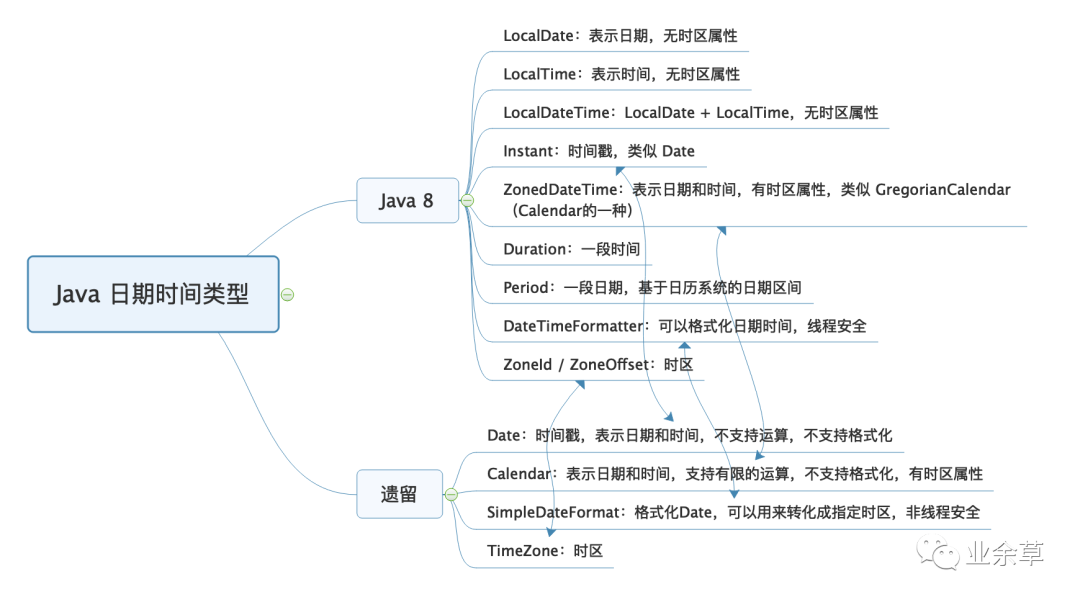
日期类
初始化日期时间
Date 的构造函数中,年应该是和 1900 的差值,月应该是从 0 到 11 而不是从 1 到 12
Date date = new Date(2020 - 1900, 11, 31, 10, 28, 30);
SimpleDateFormat formatter = new SimpleDateFormat("yyyy-MM-dd HH:mm:ss");
//2020-12-31 10:28:30
System.out.println(formatter.format(date));
Calendar 的构造函数中,初始化时年参数直接使用当前年即可,月还是从 0 到 11 而不是从 1 到 12
SimpleDateFormat formatter = new SimpleDateFormat("yyyy-MM-dd HH:mm:ss");
Calendar calendar = Calendar.getInstance();
calendar.set(2020, 11, 31, 10, 28, 30);
//2020-12-31 10:28:30(当前时区)
System.out.println(formatter.format(calendar.getTime()));
Calendar calendar2 = Calendar.getInstance(TimeZone.getTimeZone("America/New_York"));
calendar2.set(2020, Calendar.DECEMBER, 31, 10, 28, 30);
//2020-12-31 23:28:30(纽约时区)
System.out.println(formatter.format(calendar2.getTime()));
时区问题
Date 没有时区的概念,保存的是一个时间戳,代表的是从 1970 年 1 月 1 日 0 点(Epoch 时间)到现在的毫秒数
System.out.println(new Date(0));
System.out.println(TimeZone.getDefault().getID());
得到的是 1970 年 1 月 1 日 8 点。因为我电脑当前的时区是中国上海,相比 UTC 时差 +8 小时:
Thu Jan 01 08:00:00 CST 1970
Asia/Shanghai
「字符串转 Date」
对于同一个时间表示,比如 2020-01-02 22:00:00,不同时区的人转换成 Date 会得到不同的时间(时间戳)
String dateStr = "2020-01-02 22:00:00";
SimpleDateFormat formatter = new SimpleDateFormat("yyyy-MM-dd HH:mm:ss");
//默认时区解析时间表示
Date date1 = formatter.parse(dateStr);
System.out.println(date1);
//纽约时区解析时间表示
formatter.setTimeZone(TimeZone.getTimeZone("America/New_York"));
Date date2 = formatter.parse(dateStr);
System.out.println(date2);
把 2020-01-02 22:00:00 这样的时间表示,对于当前的上海时区和纽约时区,转化为 UTC 时间戳是不同的时间:
Thu Jan 02 22:00:00 CST 2020
Fri Jan 03 11:00:00 CST 2020
对于同一个本地时间的表示,不同时区的人解析得到的 UTC 时间一定是不同的,反过来不同的本地时间可能对应同一个 UTC
「Date 转字符串」
同一个 Date,在不同的时区下格式化得到不同的时间表示。比如,在我的当前时区和纽约时区格式化 2020-01-02 22:00:00
String stringDate = "2020-01-02 22:00:00";
SimpleDateFormat inputFormat = new SimpleDateFormat("yyyy-MM-dd HH:mm:ss");
//同一Date
Date date = inputFormat.parse(stringDate);
//默认时区格式化输出
System.out.println(new SimpleDateFormat("[yyyy-MM-dd HH:mm:ss Z]").format(date));
//纽约时区格式化输出
TimeZone.setDefault(TimeZone.getTimeZone("America/New_York"));
System.out.println(new SimpleDateFormat("[yyyy-MM-dd HH:mm:ss Z]").format(date));
我当前时区的 Offset(时差)是 +8 小时,对于 -5 小时的纽约,晚上 10 点对应早上 9 点:
[2020-01-02 22:00:00 +0800]
[2020-01-02 09:00:00 -0500]
小结
要正确处理时区,在于「存进去」和「读出来」两方面:存的时候,需要使用正确的当前时区来保存,这样 UTC 时间才会正确;读的时候,也只有正确设置本地时区,才能把 UTC 时间转换为正确的当地时间
反射、注解和泛型
反射调用方法不是以传参决定重载
反射的功能包括,在运行时动态获取类和类成员定义,以及动态读取属性、调用方法
有两个叫 age 的方法,入参分别是基本类型 int 和包装类型 Integer
public class ReflectionIssueApplication {
    public void age(int age) {
        System.out.println("int age = " + age);
    }

    public void age(Integer age) {
        System.out.println("Integer age = " + age);
    }
}
使用反射时的误区是,认为反射调用方法还是根据入参确定方法重载
Class<ReflectionIssueApplication> clazz = ReflectionIssueApplication.class;
clazz.getDeclaredMethod("age", Integer.TYPE)
.invoke(clazz.newInstance(), Integer.valueOf("36"));
执行结果:
int age = 36
要通过反射进行方法调用,第一步就是通过方法签名来确定方法。具体到这个案例,getDeclaredMethod()传入的参数类型Integer.TYPE代表的是 int,所以实际执行方法时无论传的是包装类型还是基本类型,都会调用 int 入参的 age 方法
把Integer.TYPE改为Integer.class,执行的参数类型就是包装类型的 Integer。这时,无论传入的是Integer.valueOf(“36”)还是基本类型的36
「反射调用方法,是以反射获取方法时传入的方法名称和参数类型来确定调用方法的」
泛型经过类型擦除多出桥接方法的坑
父类是这样的:有一个泛型占位符 T;有一个 AtomicInteger 计数器,用来记录value 字段更新的次数,其中 value 字段是泛型T类型的,setValue()方法每次为 value 赋值时对计数器进行 +1 操作。
public class Parent<T> {
    //用于记录value更新的次数,模拟日志记录的逻辑
    AtomicInteger updateCount = new AtomicInteger();
    private T value;

    //重写toString,输出值和值更新次数
    @Override
    public String toString() {
        return String.format("value: %s updateCount: %d", value, updateCount.get());
    }

    //设置值
    public void setValue(T value) {
        System.out.println("Parent.setValue called");
        this.value = value;
        updateCount.incrementAndGet();
    }
}
子类 Child1 的实现是这样的:继承父类,但没有提供父类泛型参数;定义了一个参数为 String 的setValue()方法,通过super.setValue调用父类方法实现日志记录。开发人员这么设计是希望覆盖父类的setValue()实现
public class Child1 extends Parent {
    public void setValue(String value) {
        System.out.println("Child1.setValue called");
        super.setValue(value);
    }
}
子类方法的调用是通过反射进行的。实例化 Child1 类型后,通过getClass().getMethods()方法获得所有的方法;然后按照方法名过滤出setValue()方法进行调用,传入字符串test作为参数
Child1 child1 = new Child1();
Arrays.stream(child1.getClass().getMethods())
        .filter(method -> method.getName().equals("setValue"))
        .forEach(method -> {
            try {
                method.invoke(child1, "test");
            } catch (Exception e) {
                e.printStackTrace();
            }
        });
System.out.println(child1.toString());
执行结果:
Child1.setValue called
Parent.setValue called
Parent.setValue called
value: test updateCount: 2
父类的setValue()方法被调用了两次,是因为getClass().getMethods()方法找到了两个名为 setValue 的方法,分别是父类和子类的setValue()方法
这个案例中,子类方法重写父类方法失败的原因,包括两方面:
子类没有指定 String 泛型参数,父类的泛型方法 setValue(T value)在泛型擦除后是setValue(Object value),子类中入参是 String 的setValue()方法被当作了新方法子类的 setValue()方法没有增加 @Override 注解,因此编译器没能检测到重写失败的问题。这就说明,重写子类方法时,标记 @Override 是一个好习惯
public class Child2 extends Parent<String> {
    @Override
    public void setValue(String value) {
        System.out.println("Child2.setValue called");
        super.setValue(value);
    }
}
修复后,还是出现了重复记录的问题:
Child2.setValue called
Parent.setValue called
Child2.setValue called
Parent.setValue called
value: test updateCount: 2
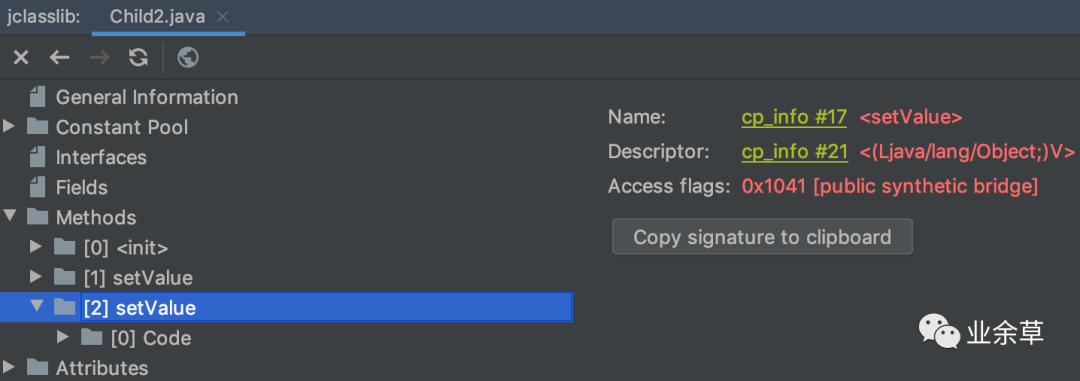
通过调试发现,Child2 类其实有 2 个setValue()方法,入参分别是 String 和 Object

Java 的泛型类型在编译后擦除为 Object。虽然子类指定了父类泛型 T 类型是 String,但编译后 T 会被擦除成为 Object,所以父类 setValue 方法的入参是 Object,value 也是 Object。如果子类 Child2 的 setValue 方法要覆盖父类的 setValue 方法,那入参也必须是 Object。所以,编译器会为我们生成一个所谓的 bridge 桥接方法,实际上是入参为 Object 的 setValue 方法在内部调用了入参为 String 的 setValue 方法,也就是代码里实现的那个方法
使用 jclasslib 工具打开 Child2 类,同样可以看到入参为 Object 的桥接方法上标记了public + synthetic + bridge三个属性。synthetic 代表由编译器生成的不可见代码,bridge 代表这是泛型类型擦除后生成的桥接代码
通过getDeclaredMethods()方法获取到所有方法后,必须同时根据方法名 setValue 和非 isBridge 两个条件过滤,才能实现唯一过滤
Child2 child2 = new Child2();
Arrays.stream(child2.getClass().getMethods())
        .filter(method -> method.getName().equals("setValue") && !method.isBridge())
        .forEach(method -> {
            try {
                method.invoke(child2, "test");
            } catch (Exception e) {
                e.printStackTrace();
            }
        });
System.out.println(child2.toString());
注解可以继承吗?
自定义的注解标注了@Inherited,子类可以自动继承父类的该注解。
笔记总结的不全,只是心血来潮列举了部分。原专栏的很多读者的评论很给力,有些评论比专栏本身内容还精彩!