
无需编程,基于甲骨文oracle数据库零代码生成CRUD增删改查RESTful API接口
甲骨文oracle数据库
回顾
通过之前一篇文章 多数据库支持 的介绍,采用抽象工厂设计模式,已经支持了大象数据库PostgreSQL。之前通过字符串拼接生成DDL SQL语句,比较繁琐。本文开始,引入了FreeMarker模版引擎,通过配置模版实现创建和修改物理表结构SQL语句,简化了大量代码,提高了效率,并且通过配置oracle数据库SQL模版,基于oracle数据库,零代码实现crud增删改查。
FreeMarker简介
FreeMarker是一款模板引擎: 即一种基于模板和要改变的数据,并用来生成输出文本(HTML网页,电子邮件,配置文件,源代码等)的通用工具。 它不是面向最终用户的,而是一个Java类库,是一款程序员可以嵌入他们所开发产品的组件。模板编写为FreeMarker Template Language (FTL)。它是简单的,专用的语言, 不是像PHP那样成熟的编程语言。 那就意味着要准备数据在真实编程语言中来显示,比如数据库查询和业务运算,之后模板显示已经准备好的数据。在模板中,你可以专注于如何展现数据,而在模板之外可以专注于要展示什么数据。
UI界面
通过产品对象为例,无需编程,基于Oracle数据库,通过配置零代码实现CRUD增删改查RESTful API接口和管理UI。
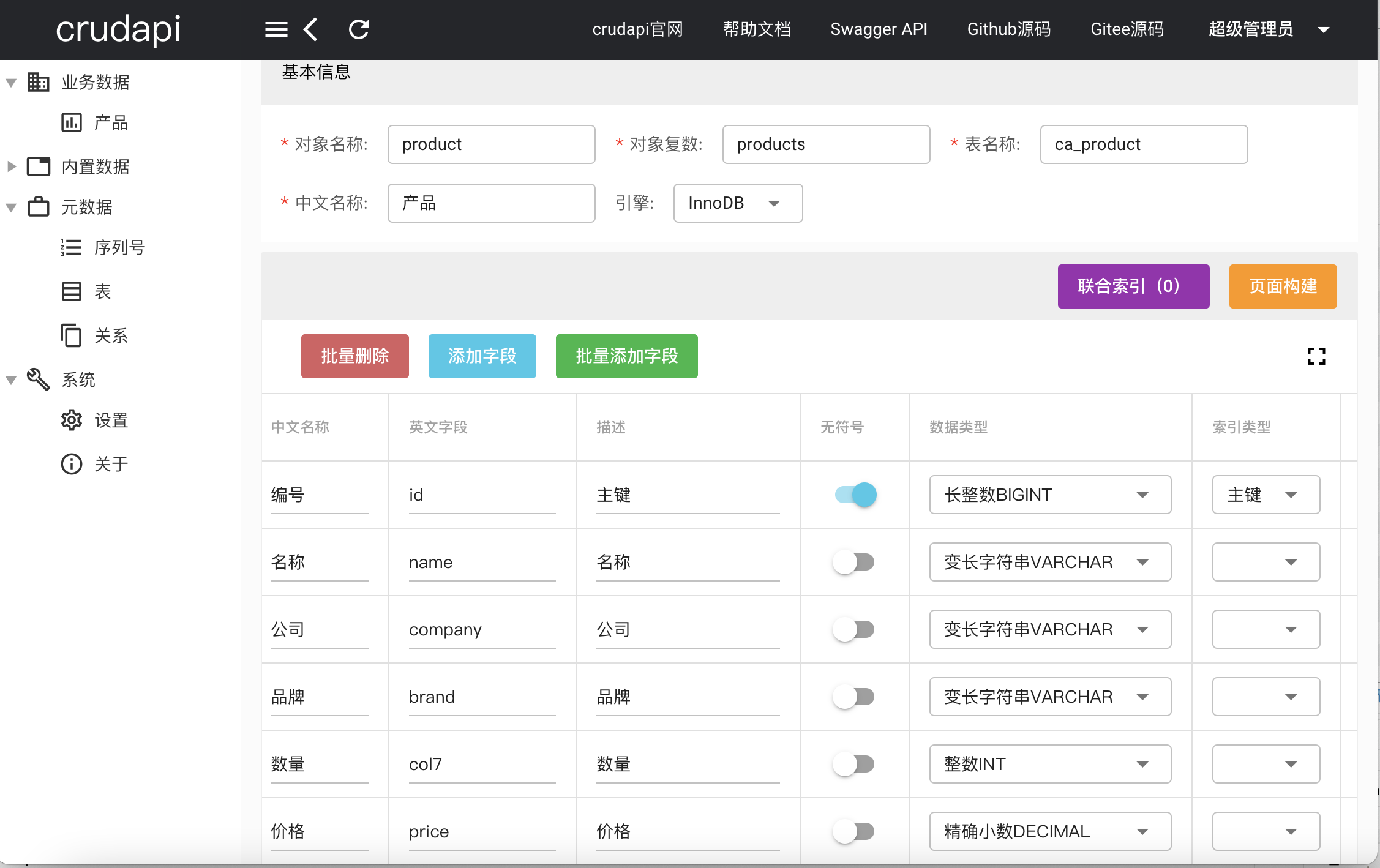 创建产品
创建产品
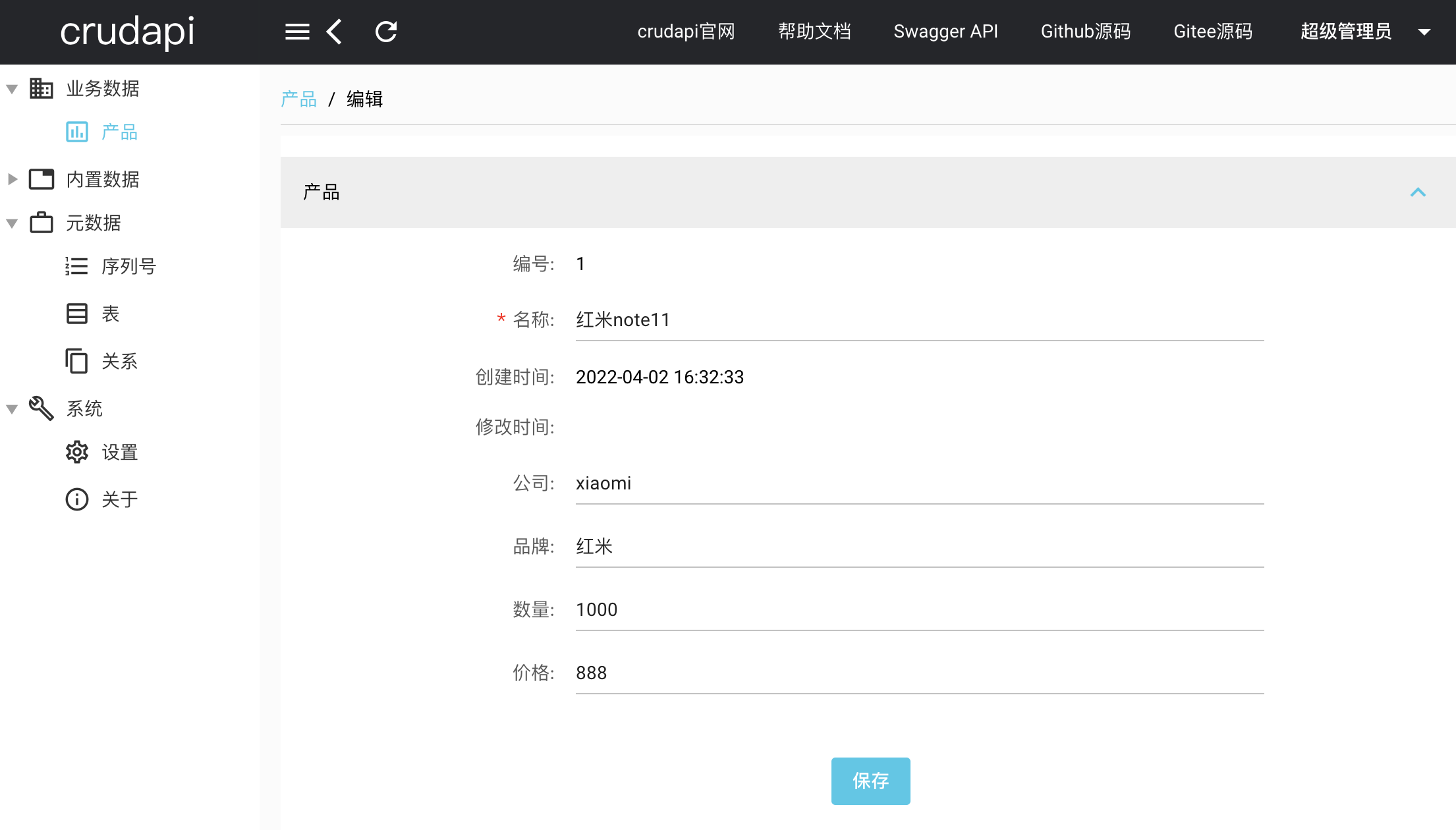 编辑产品数据
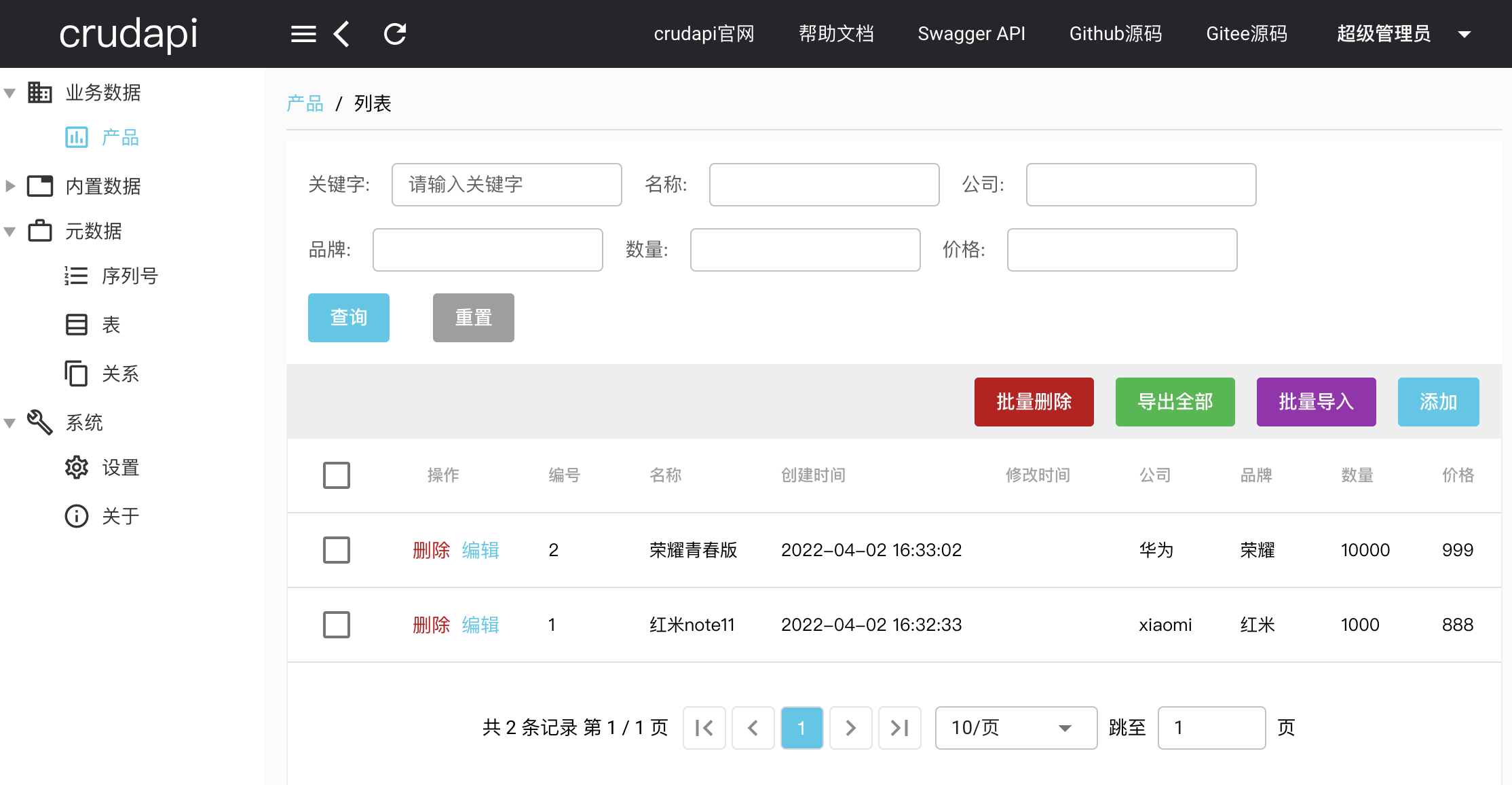 产品数据列表
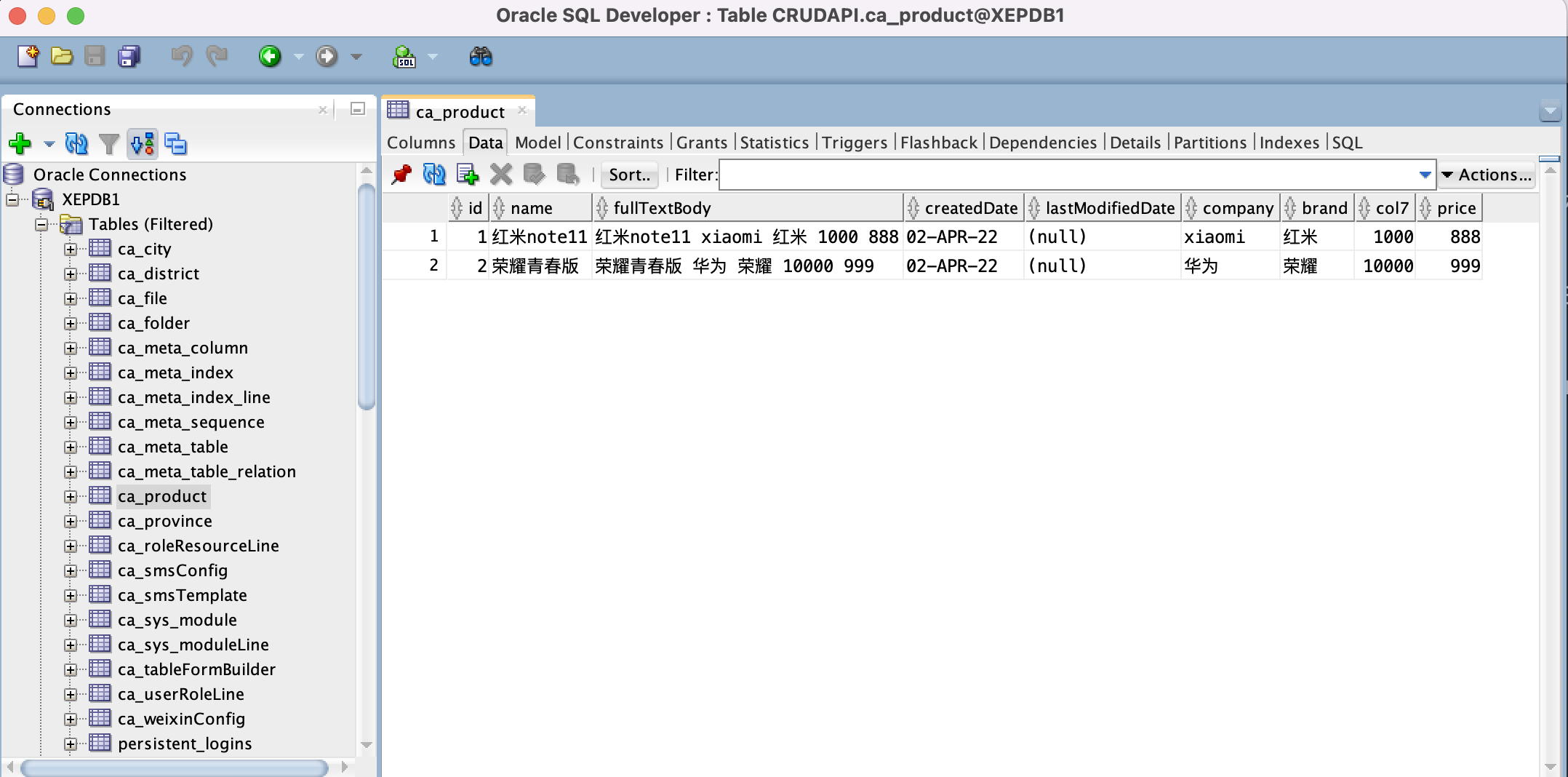 通过Oracle SQL Developer查询Oracle数据
定义元数据对象模型
元数据表ca_meta_table
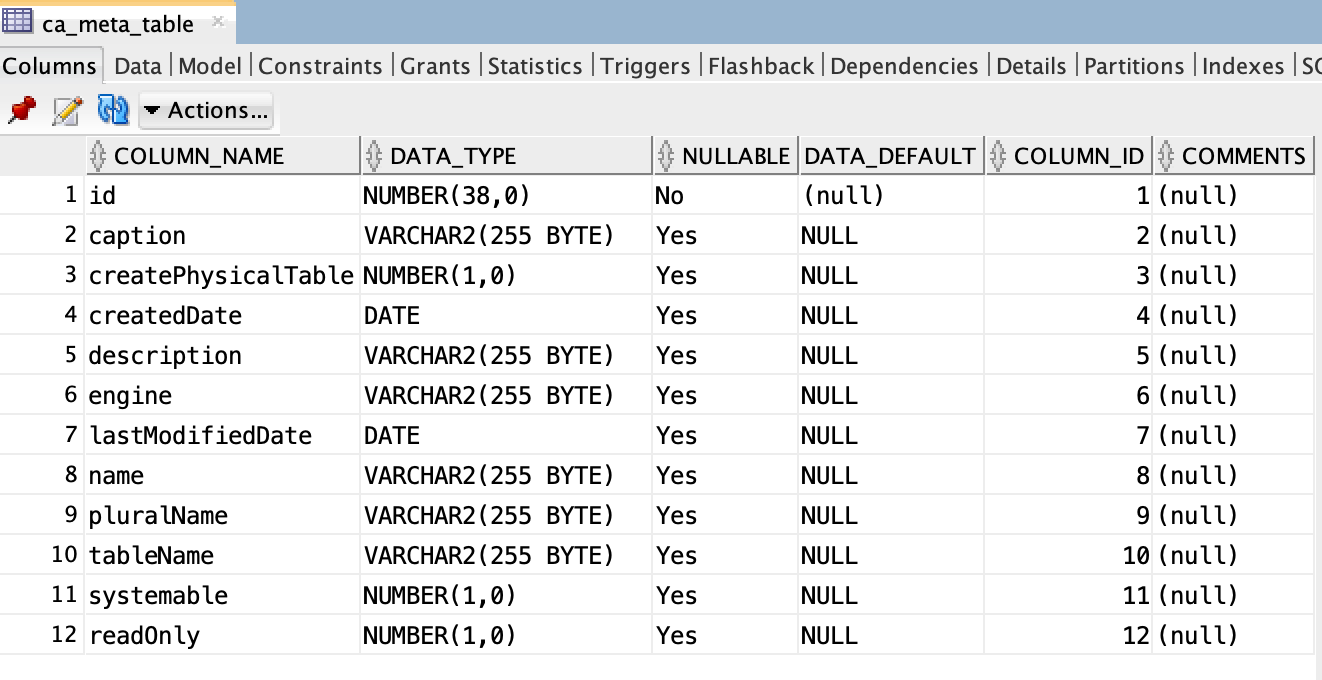 元数据表ca_meta_table,用于记录表的基本信息。
#
TableEntity对象
TableEntity为“元数据表”对象,和ca_meta_table字段对应
public class TableEntity {

    private Long id;


    private String name;


    private String caption;


    private String description;


    private Timestamp createdDate;


    private Timestamp lastModifiedDate;


    private String pluralName;


    private String tableName;


    private EngineEnum engine;


    private Boolean createPhysicalTable;


    private Boolean reverse;


    private Boolean systemable;


    private Boolean readOnly;


    private List<ColumnEntity> columnEntityList;


    private List<IndexEntity> indexEntityList;

}
#
元数据列ca_meta_column
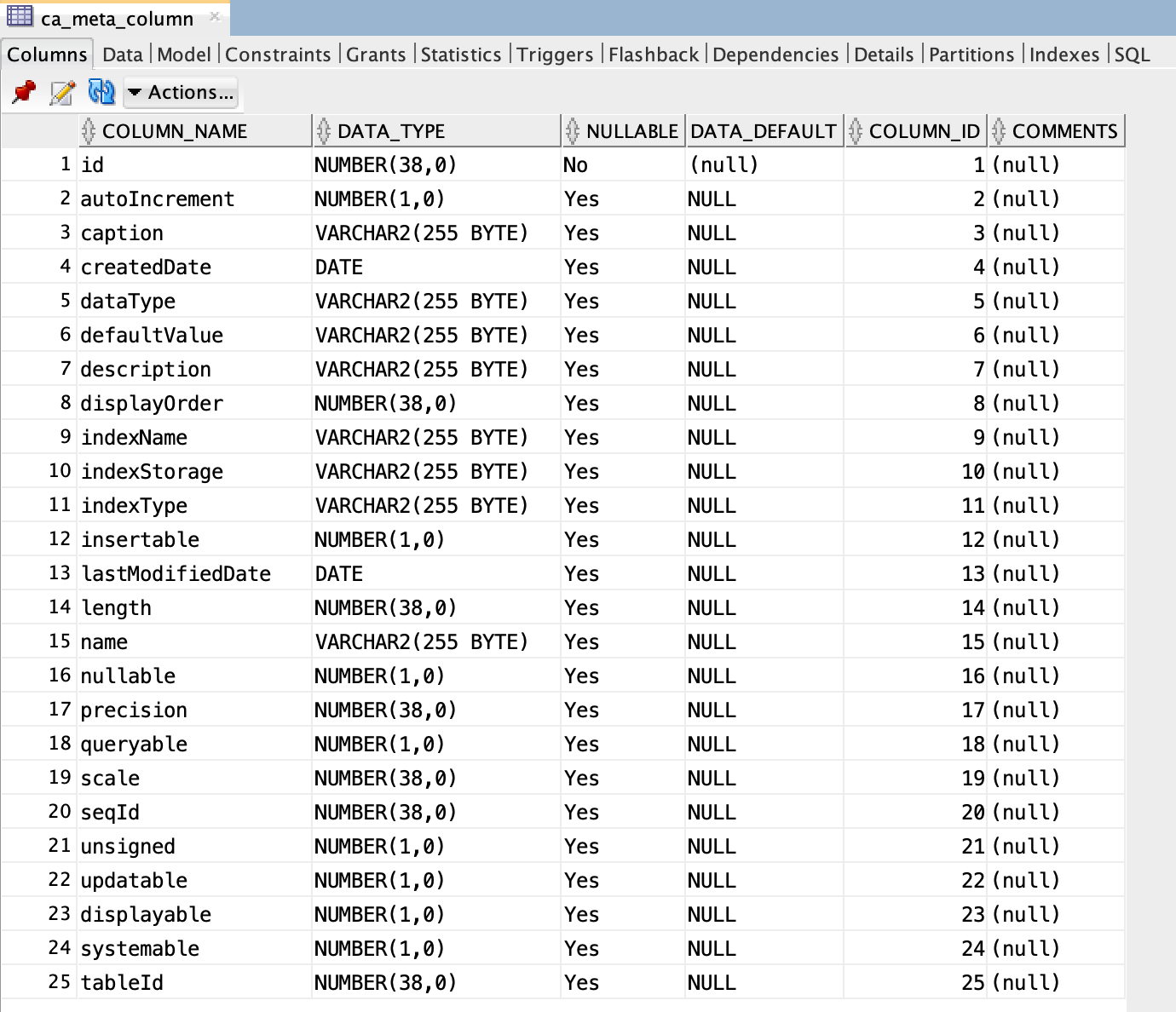 元数据列ca_meta_column,用于记录表字段信息,比如类型,长度,默认值等。
#
ColumnEntity对象
ColumnEntity为“元数据列”对象,和ca_meta_column字段对应
public class ColumnEntity {

  private Long id;


  private String name;


  private String caption;


  private String description;


  private Timestamp createdDate;


  private Timestamp lastModifiedDate;


  private Integer displayOrder;


  private DataTypeEnum dataType;


  private IndexTypeEnum indexType;


  private IndexStorageEnum indexStorage;


  private String indexName;


  private Integer length;


  private Integer precision;


  private Integer scale;


  private String defaultValue;


  private Long seqId;


  private Boolean unsigned;


  private Boolean autoIncrement;


  private Boolean nullable;


  private Boolean insertable;


  private Boolean updatable;


  private Boolean queryable;


  private Boolean displayable;


  private Boolean systemable;


  private Long tableId;

}
#
元数据索引ca_meta_index
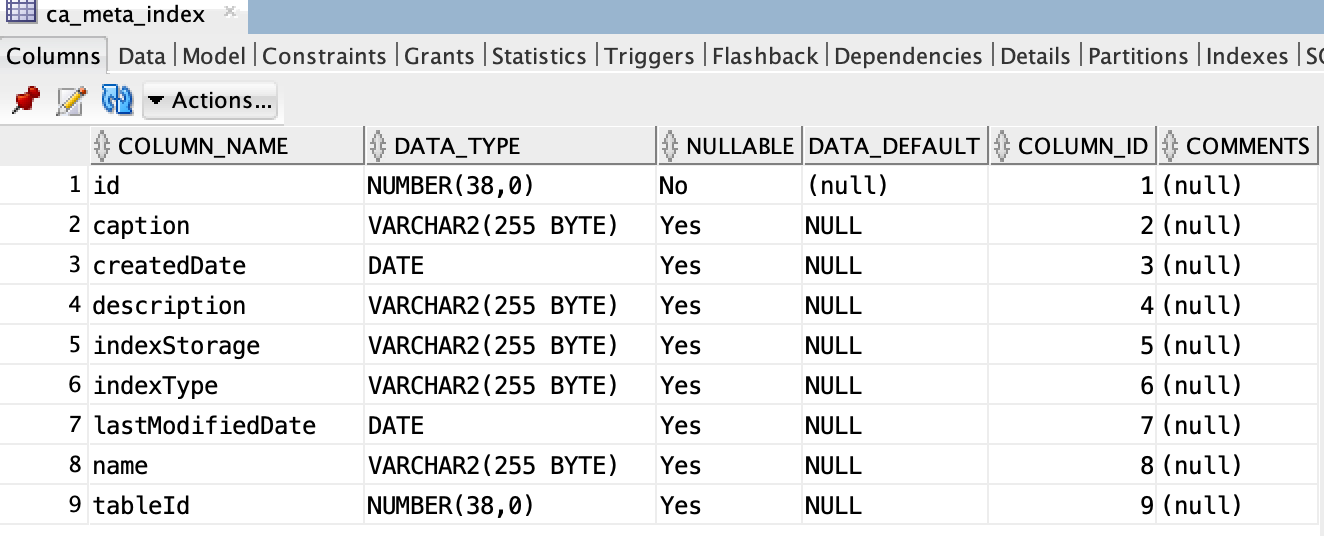 元数据索引ca_meta_index,用于记录表联合索引信息,比如索引类型,名称等。
IndexEntity对象
IndexEntity为“元数据索引”对象,和ca_meta_index字段对应
public class IndexEntity {

  private Long id;


  private String name;


  private String caption;


  private String description;


  private Timestamp createdDate;


  private Timestamp lastModifiedDate;


  private IndexTypeEnum indexType;


  private IndexStorageEnum indexStorage;


  private Long tableId;


  private List<IndexLineEntity> indexLineEntityList;

}
元数据索引行ca_meta_index_line
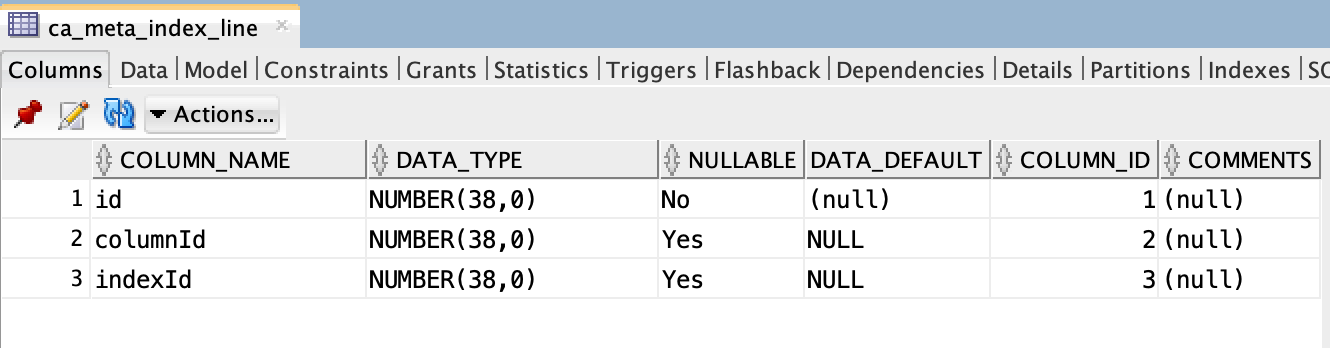 元数据索引行ca_meta_index_line,用于记录表联合索引行信息,一个联合索引可以对应多个联合索引行,表示由多个字段组成。
IndexLineEntity对象
IndexLineEntity“元数据索行”对象,和ca_meta_index_line字段对应
public class IndexLineEntity {

  private Long id;


  private Long columnId;


  private ColumnEntity columnEntity;


  private Long indexId;

}
定义FreeMarker模版
创建表create-table.sql.ftl
CREATE TABLE "${tableName}" (

<#list columnEntityList as columnEntity>

  <#if columnEntity.dataType == "BOOL">

    "${columnEntity.name}" NUMBER(1)<#if columnEntity.defaultValue??> DEFAULT <#if columnEntity.defaultValue == "true">1<#else>0</#if></#if><#if columnEntity.nullable != true> NOT NULL</#if><#if columnEntity_has_next>,</#if>

  <#elseif columnEntity.dataType == "INT">

    "${columnEntity.name}" INT<#if columnEntity.defaultValue??> DEFAULT ${columnEntity.defaultValue}</#if><#if columnEntity.nullable != true> NOT NULL</#if><#if columnEntity.indexType?? && columnEntity.indexType == "PRIMARY"> PRIMARY KEY</#if><#if columnEntity_has_next>,</#if>

  <#elseif columnEntity.dataType == "BIGINT">

    "${columnEntity.name}" INT<#if columnEntity.defaultValue??> DEFAULT ${columnEntity.defaultValue}</#if><#if columnEntity.nullable != true> NOT NULL</#if><#if columnEntity.indexType?? && columnEntity.indexType == "PRIMARY"> PRIMARY KEY</#if><#if columnEntity_has_next>,</#if>

  <#elseif columnEntity.dataType == "FLOAT">

    "${columnEntity.name}" FLOAT<#if columnEntity.defaultValue??> DEFAULT ${columnEntity.defaultValue}</#if><#if columnEntity.nullable != true> NOT NULL</#if><#if columnEntity_has_next>,</#if>

  <#elseif columnEntity.dataType == "DOUBLE">

    "${columnEntity.name}" REAL<#if columnEntity.defaultValue??> DEFAULT ${columnEntity.defaultValue}</#if><#if columnEntity.nullable != true> NOT NULL</#if><#if columnEntity_has_next>,</#if>

  <#elseif columnEntity.dataType == "DECIMAL">

    "${columnEntity.name}" DECIMAL<#if columnEntity.defaultValue??> DEFAULT ${columnEntity.defaultValue}</#if><#if columnEntity.nullable != true> NOT NULL</#if><#if columnEntity_has_next>,</#if>

  <#elseif columnEntity.dataType == "DATE">

    "${columnEntity.name}" DATE<#if columnEntity.defaultValue??> DEFAULT ${columnEntity.defaultValue}</#if><#if columnEntity.nullable != true> NOT NULL</#if><#if columnEntity_has_next>,</#if>

  <#elseif columnEntity.dataType == "TIME">

    "${columnEntity.name}" CHAR(8)<#if columnEntity.defaultValue??> DEFAULT ${columnEntity.defaultValue}</#if><#if columnEntity.nullable != true> NOT NULL</#if><#if columnEntity_has_next>,</#if>

  <#elseif columnEntity.dataType == "DATETIME">

    "${columnEntity.name}" DATE<#if columnEntity.defaultValue??> DEFAULT ${columnEntity.defaultValue}</#if><#if columnEntity.nullable != true> NOT NULL</#if><#if columnEntity_has_next>,</#if>

  <#elseif columnEntity.dataType == "TIMESTAMP">

    "${columnEntity.name}" TIMESTAMP<#if columnEntity.defaultValue??> DEFAULT ${columnEntity.defaultValue}</#if><#if columnEntity.nullable != true> NOT NULL</#if><#if columnEntity_has_next>,</#if>

  <#elseif columnEntity.dataType == "CHAR">

    "${columnEntity.name}" CHAR(${columnEntity.length})<#if columnEntity.defaultValue??> DEFAULT '${columnEntity.defaultValue}'</#if><#if columnEntity.nullable != true> NOT NULL</#if><#if columnEntity.indexType?? && columnEntity.indexType == "PRIMARY"> PRIMARY KEY</#if><#if columnEntity_has_next>,</#if>

  <#elseif columnEntity.dataType == "VARCHAR">

    "${columnEntity.name}" VARCHAR(${columnEntity.length})<#if columnEntity.defaultValue??> DEFAULT '${columnEntity.defaultValue}'</#if><#if columnEntity.nullable != true> NOT NULL</#if><#if columnEntity.indexType?? && columnEntity.indexType == "PRIMARY"> PRIMARY KEY</#if><#if columnEntity_has_next>,</#if>

  <#elseif columnEntity.dataType == "PASSWORD">

    "${columnEntity.name}" VARCHAR(200)<#if columnEntity.defaultValue??> DEFAULT '${columnEntity.defaultValue}'</#if><#if columnEntity.nullable != true> NOT NULL</#if><#if columnEntity_has_next>,</#if>

  <#elseif columnEntity.dataType == "ATTACHMENT">

    "${columnEntity.name}" VARCHAR(4000)<#if columnEntity.defaultValue??> DEFAULT '${columnEntity.defaultValue}'</#if><#if columnEntity.nullable != true> NOT NULL</#if><#if columnEntity_has_next>,</#if>

  <#elseif columnEntity.dataType == "TEXT">

    "${columnEntity.name}" VARCHAR(4000)<#if columnEntity.defaultValue??> DEFAULT '${columnEntity.defaultValue}'</#if><#if columnEntity.nullable != true> NOT NULL</#if><#if columnEntity_has_next>,</#if>

  <#elseif columnEntity.dataType == "LONGTEXT">

    "${columnEntity.name}" LONG<#if columnEntity.defaultValue??> DEFAULT ${columnEntity.defaultValue}</#if><#if columnEntity.nullable != true> NOT NULL</#if><#if columnEntity_has_next>,</#if>

  <#elseif columnEntity.dataType == "BLOB">

    "${columnEntity.name}" BLOB<#if columnEntity.defaultValue??> DEFAULT ${columnEntity.defaultValue}</#if><#if columnEntity.nullable != true> NOT NULL</#if><#if columnEntity_has_next>,</#if>

  <#elseif columnEntity.dataType == "LONGBLOB">

    "${columnEntity.name}" BLOB<#if columnEntity.defaultValue??> DEFAULT ${columnEntity.defaultValue}</#if><#if columnEntity.nullable != true> NOT NULL</#if><#if columnEntity_has_next>,</#if>

  <#else>

    "${columnEntity.name}" VARCHAR(200)<#if columnEntity.defaultValue??> DEFAULT ${columnEntity.defaultValue}</#if><#if columnEntity.nullable != true> NOT NULL</#if><#if columnEntity.indexType?? && columnEntity.indexType == "PRIMARY"> PRIMARY KEY</#if><#if columnEntity_has_next>,</#if>

  </#if>

</#list>

);


<#list columnEntityList as columnEntity>

  <#if columnEntity.indexType?? && columnEntity.indexType == "UNIQUE">

    ALTER TABLE "${tableName}" ADD CONSTRAINT "${columnEntity.indexName}" UNIQUE("${columnEntity.name}");

  </#if>


  <#if columnEntity.indexType?? && (columnEntity.indexType == "INDEX" || columnEntity.indexType == "FULLTEXT")>

    CREATE INDEX "${columnEntity.indexName}" ON "${tableName}" ("${columnEntity.name}");

  </#if>

</#list>


<#if indexEntityList??>

  <#list indexEntityList as indexEntity>

    <#if indexEntity.indexType?? && indexEntity.indexType == "UNIQUE">

      ALTER TABLE "${tableName}" ADD CONSTRAINT "${indexEntity.name}" UNIQUE(<#list indexEntity.indexLineEntityList as indexLineEntity>"${indexLineEntity.columnEntity.name}"<#if indexLineEntity_has_next>,</#if></#list>);

    </#if>


    <#if indexEntity.indexType?? && (indexEntity.indexType == "INDEX" || indexEntity.indexType == "FULLTEXT")>

      CREATE INDEX "${indexEntity.name}" ON "${tableName}" (<#list indexEntity.indexLineEntityList as indexLineEntity>"${indexLineEntity.columnEntity.name}"<#if indexLineEntity_has_next>,</#if></#list>);

    </#if>

  </#list>

</#if>


COMMENT ON TABLE "${tableName}" IS '${caption}';


<#list columnEntityList as columnEntity>

  COMMENT ON COLUMN "${tableName}"."${columnEntity.name}" IS '${columnEntity.caption}';

</#list>
#
模版解析SQL
首先保存元数据信息,下一步传递模版名称和元数据model,动态解析成创建表SQL语句,然后创建物理表,这样元数据和物理表就关联上了。运行时通过解析元数据动态生成insert,select,update,delete等SQL语句,零代码实现业务数据crud功能。
public String processTemplateToString(String database, String templateName, Object dataModel) {

    String str = null;

    StringWriter stringWriter = new StringWriter();

    try {

        Configuration config = new Configuration(Configuration.VERSION_2_3_31);

        config.setNumberFormat("#");

        String templateValue = getTemplate(database, templateName);

        if (templateValue == null) {

          return str;

        }


        Template template = new Template(templateName, templateValue, config);

        template.process(dataModel, stringWriter);


        str = stringWriter.getBuffer().toString().trim();

        log.info(str);

    } catch (Exception e) {

        e.printStackTrace();

        throw new BusinessException(ApiErrorCode.DEFAULT_ERROR, e.getMessage());

    }


    return str;

}


public List<String> toCreateTableSql(TableEntity tableEntity) {

  String createTableSql = processTemplateToString("create-table.sql.ftl", tableEntity);


  if (createTableSql == null) {

    throw new BusinessException(ApiErrorCode.DEFAULT_ERROR, "create-table.sql is empty!");

  }


  List<String> sqls = new ArrayList<String>();

  String[] subSqls = createTableSql.split(";");

  for (String t : subSqls) {

    String subSql = t.trim();

    if (!subSql.isEmpty()) {

      sqls.add(t);

    }

  }


  return sqls;

}


public Long create(TableDTO tableDTO) {

  TableEntity tableEntity = tableMapper.toEntity(tableDTO);

  //TODO

  Long tableId = crudService.create(TABLE_TABLE_NAME, tableEntity);

  List<String> sqlList = crudService.toCreateTableSql(tableEntity);

  for (String sql: sqlList) {

    execute(sql);

  }

  //TODO

  return tableId;

}
#
修改表
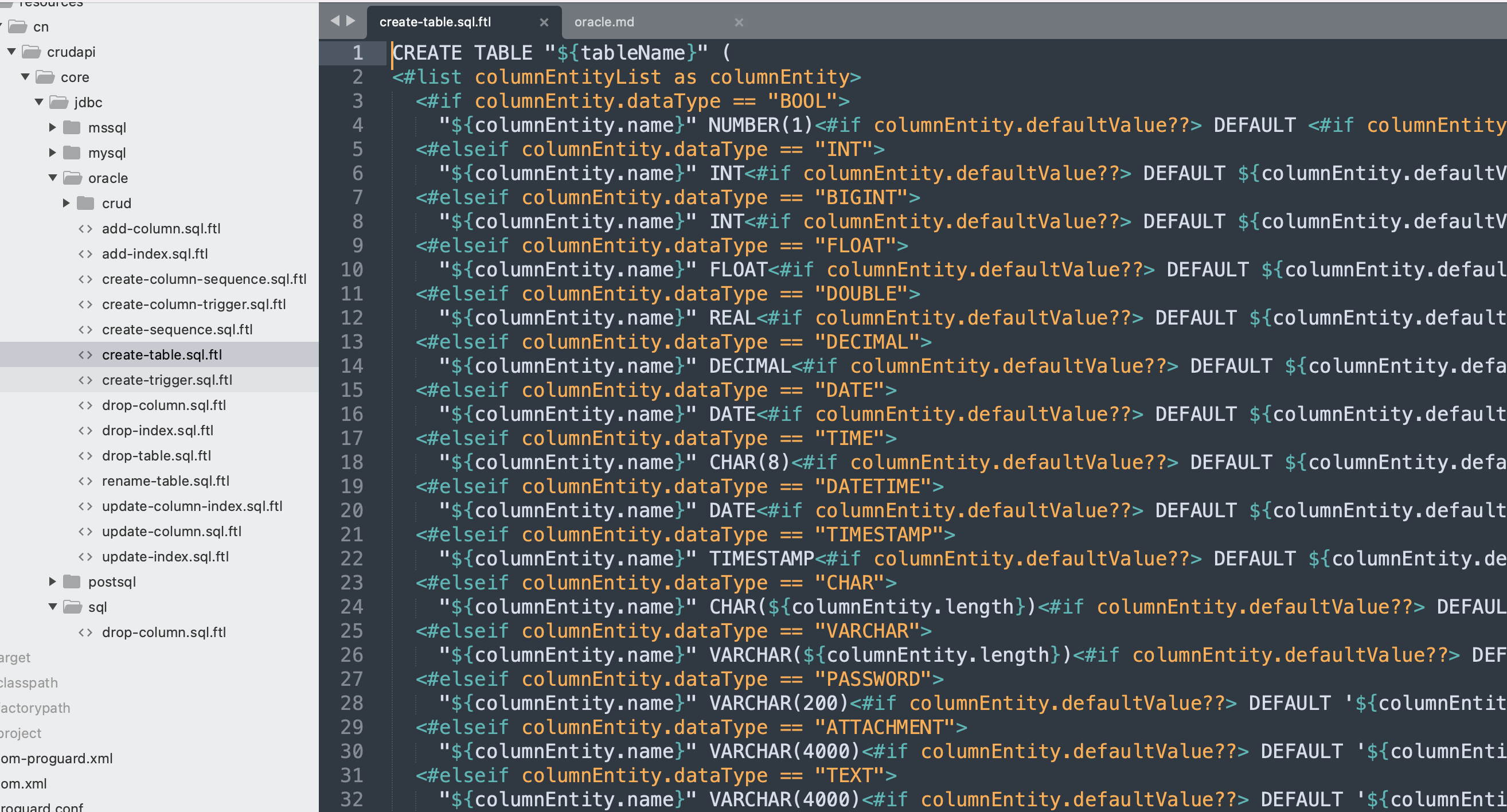 包括表结构和索引的修改,删除等,和创建表原理类似。
application.properties
需要根据需要配置数据库连接驱动,无需重新发布,就可以切换不同的数据库。
#oracle

spring.datasource.url=jdbc:oracle:thin:@//localhost:1521/XEPDB1

spring.datasource.driverClassName=oracle.jdbc.OracleDriver

spring.datasource.username=crudapi

spring.datasource.password=crudapi

spring.datasource.initialization-mode=always

spring.datasource.schema=classpath:schema.sql
#
小结
本文主要介绍了crudapi支持oracle数据库实现原理,并且以产品对象为例,零代码实现了CRUD增删改查RESTful API,后续介绍更多的数据库,比如MSSQL Server,Mongodb等。
实现方式代码量时间稳定性传统开发1000行左右2天/人5个bug左右crudapi系统0行1分钟基本为0
综上所述,利用crudapi系统可以极大地提高工作效率和节约成本,让数据处理变得更简单!
crudapi简介
crudapi是crud+api组合,表示增删改查接口,是一款零代码可配置的产品。使用crudapi可以告别枯燥无味的增删改查代码,让您更加专注业务,节约大量成本,从而提高工作效率。 crudapi的目标是让处理数据变得更简单,所有人都可以免费使用! 无需编程,通过配置自动生成crud增删改查RESTful API,提供后台UI管理业务数据。基于主流的开源框架,拥有自主知识产权,支持二次开发。
demo演示
crudapi属于产品级的零代码平台,不同于自动代码生成器,不需要生成Controller、Service、Repository、Entity等业务代码,程序运行起来就可以使用,真正0代码,可以覆盖基本的和业务无关的CRUD RESTful API。
官网地址:https://crudapi.cn
测试地址:https://demo.crudapi.cn/crudapi/login
附源码地址
GitHub地址
https://github.com/crudapi/crudapi-admin-web
Gitee地址
https://gitee.com/crudapi/crudapi-admin-web
由于网络原因,GitHub可能速度慢,改成访问Gitee即可,代码同步更新。