
我又踩坑了!如何为HttpClient请求设置Content-Type标头?

最近在重构认证代码,认证过程相当常规:
POST   /open-api/v1/user-info?client_id&timstamp&rd=12345&sign=***&method=hmac
content-type: application/json
payload: { "token":"AA2917B0-C23D-40AB-A43A-4C4B61CC7C74"}
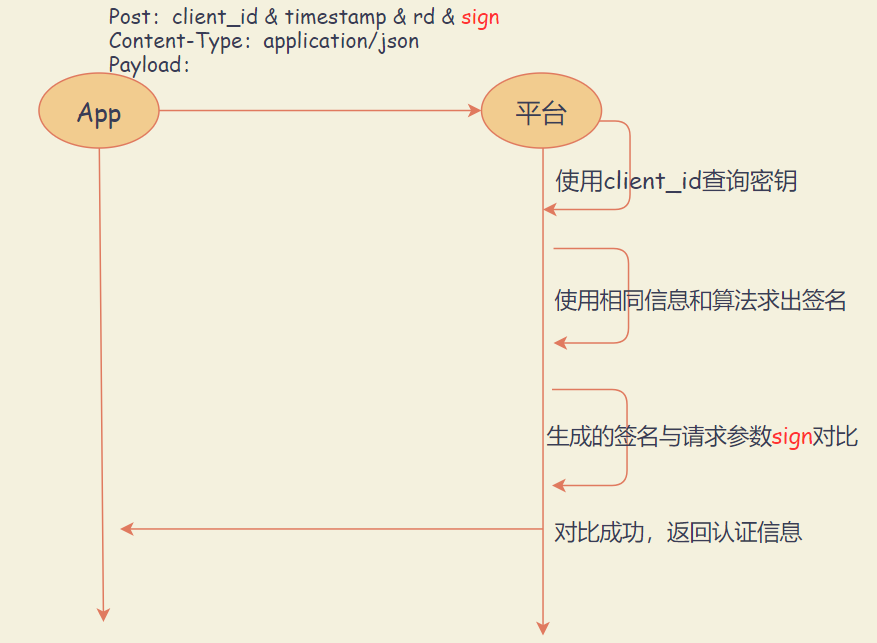
平台显示 :签名校验失败, 排查到平台收到的Post Payload并非预期,阅读本文,解锁正确使用Content-Type标头的姿势。
1. 入坑
下面是构造HttpClient对象、发起请求的代码:
// 初始化HttpClientFactory
context.Services.AddHttpClient("platform", c =>
{
    c.BaseAddress = new Uri("https://alpha-engage.demohost.com/");
    c.DefaultRequestHeaders.Accept
    .Add(new MediaTypeWithQualityHeaderValue("application/json"));
})...

// 产生命名HttpClient,发起请求
 var client = _clientFactory.CreateClient("platform");
 var response = await client.PostAsync($"open-api/v1/user-token/info?{req.AuthString()}",new StringContent(req.ReqPayload.ToString(),Encoding.UTF8) );
平台日志显示,收到的请求payload:
{\"token\":\"AA2917B0-C23D-40AB-A43A-4C4B61CC7C74\"}
额,平台收到的JSON数据被转码了,没有识别出JSON?
明眼人一看,HttpClient请求没有设置Content-Type,接收端没有识别出JSON 格式的payload , 进行了转码,生成了错误签名。
① Content-Type是一个Entity Header,指示资源的mediaType ,可用在请求/响应中
② 代码中new StringContent(req.ReqPayload.ToString(),Encoding.UTF8) 没有指定mediaType参数,故函数会使用text/plain默认值
------------------------------------------
当我尝试添加Content-Type时(下面黄色背景行代码):
context.Services.AddHttpClient("platform", c =>
{
    c.BaseAddress = new Uri("https://alpha-engage.demohost.com/");
    c.DefaultRequestHeaders.Accept
         .Add(new MediaTypeWithQualityHeaderValue("application/json"));//ACCEPT header
    c.DefaultRequestHeaders.Add("content-type", "application/json");
})
此时抛出以下异常:
InvalidOperationException: Misused header name. Make sure request headers are used with
HttpRequestMessage, response headers with HttpResponseMessage, and
content headers with HttpContent objects.
纳尼,HttpContent Headers是啥?Chrome dev tools显示只有两种Header啊?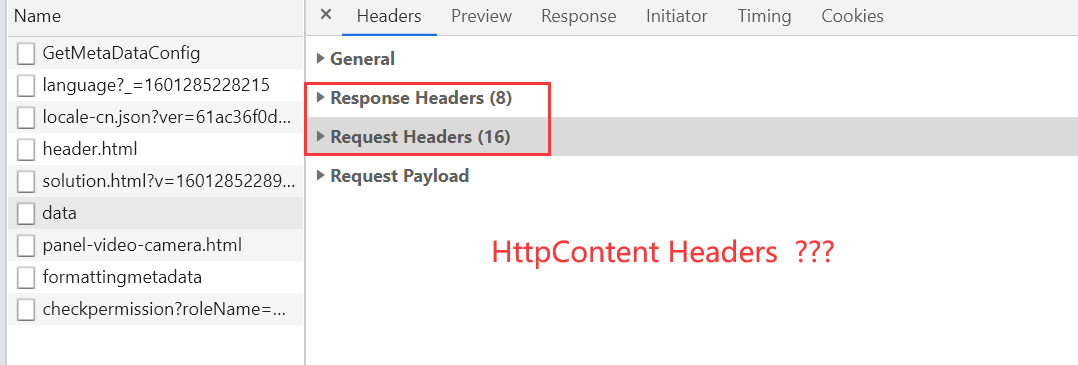
2. 爬坑
官方资料显示:HTTP Headers被分为如下四类:
| --- | 信息 | 举例 | .NET类型 |
|---|---|---|---|
| General Header | 可同时作用在请求/响应中,但是与传输数据无关 | Upgrade、Connection | --- |
| Request Header | 将要获取的资源或客户端本身的信息 | Accept、 Authorization | HttpRequestHeaders |
| Response Header | 响应信息 | Location、ETag | HttpResponseHeaders |
| Entity Header | 实体Body额外的信息 | Content-Length、 Connection | HttpContentHeaders |
Content-Type属于Entity Header的一种,对应.NET类型 HttpContent Header;
虽然Entity Header不是请求标头也不是响应标头,它们还是会包含在请求/响应标头术语中(此说法来自官方)。
所以我们在Chrome DevTools没有看到Entity Headers分组, 却常在请求/响应标头中看到Content-Type标头。
回到上面的异常,.NET 严格区分四种标头,所以c.DefaultRequestHeaders.Add("content-type", "application/json") 尝试将content-type添加到请求头,姿势不正确,.NET提示InvalidOperationException。
3. 填坑
给这个常规的Post请求设置正确的Content-Type标头。
方法① 对HttpRequestMessage对象Content属性添加Header
 using (var request = new HttpRequestMessage())
{
     request.Method = new HttpMethod(method);
     request.RequestUri = new Uri(url);
     request.Content = new StringContent(payload);
     request.Content.Headers.ContentType = new MediaTypeHeaderValue("application/json");
     var response = await _httpClient.SendAsync(request);
     return response;
}
使用HttpClient.SendAsync(request)
方法② 写入HttpContent时传入媒体类型
StringContent某个重载构造函数 : 参数3 可直接设置media type,
var response = await client.PostAsync($"open-api/v1/user-token/info?{req.AuthString()}",new StringContent(req.ReqPayload.ToString(),Encoding.UTF8,"application/json") );
4.干货旁白
小编对于Http协议有知识漏洞,搬砖时一直关注Chrome DevTools,忽略了还有Entity Header一说。
Content-Type 这个实体标头,会出现了请求/响应标头,指示资源的媒体类型。
.NTE针对4种HTTP Header强化了区别,在实际开发中要区别使用。
https://tools.ietf.org/html/rfc2616#page-41
https://developer.mozilla.org/en-US/docs/Glossary/Entity_header

回复 【关闭】学关闭微信朋友圈广告
回复 【实战】获取20套实战源码
回复 【被删】学查看你哪个好友删除了你巧
回复 【访客】学微信查看朋友圈访客记录
回复 【小程序】学获取15套【入门+实战+赚钱】小程序源码
回复 【python】学微获取全套0基础Python知识手册
回复 【2019】获取2019 .NET 开发者峰会资料PPT
回复 【加群】加入dotnet微信交流群
为什么程序员都不喜欢使用 switch ,而是大量的 if……else if ?

PanDownload复活了,60MB/s,目前已开源!