
SpringBoot之旅-启动原理及自定义starter
一、引言
SpringBoot的一大优势就是Starter,由于SpringBoot有很多开箱即用的Starter依赖,使得我们开发变得简单,我们不需要过多的关注框架的配置。
在日常开发中,我们也会自定义一些Starter,特别是现在微服务框架,我们一个项目分成了多个单体项目,而这些单体项目中会引用公司的一些组件,这个时候我们定义Starter,可以使这些单体项目快速搭起,我们只需要关注业务开发。
在此之前我们再深入的了解下SpringBoot启动原理。而后再将如何自定义starter。
二、 启动原理
要想了解启动原理,我们可以Debug模式跟着代码一步步探究,我们从入口方法开始:
public static ConfigurableApplicationContext run(Class<?>[] primarySources,String[] args) {return new SpringApplication(primarySources).run(args);}
这里是创建一个SpringApplication对象,并调用了run方法
2.1 创建SpringApplication对象
public SpringApplication(ResourceLoader resourceLoader, Class<?>... primarySources) {this.resourceLoader = resourceLoader;Assert.notNull(primarySources, "PrimarySources must not be null");//保存主配置类this.primarySources = new LinkedHashSet<>(Arrays.asList(primarySources));//确定web应用类型this.webApplicationType = WebApplicationType.deduceFromClasspath();//从类路径下找到META-INF/spring.factories配置的所有ApplicationContextInitializer;然后保存起来setInitializers((Collection) getSpringFactoriesInstances(ApplicationContextInitializer.class));//从类路径下找到ETA-INF/spring.factories配置的所有ApplicationListenersetListeners((Collection) getSpringFactoriesInstances(ApplicationListener.class));//从多个配置类中找到有main方法的主配置类this.main
从这个方法中可以看出,这个
第一步:保存主配置类。
第二步:确定web应用类型。
第三步:setInitializers方法,这个方法走我们看带入的参数是getSpringFactoriesInstances(ApplicationContextInitializer.class),我们再往下查看getSpringFactoriesInstances
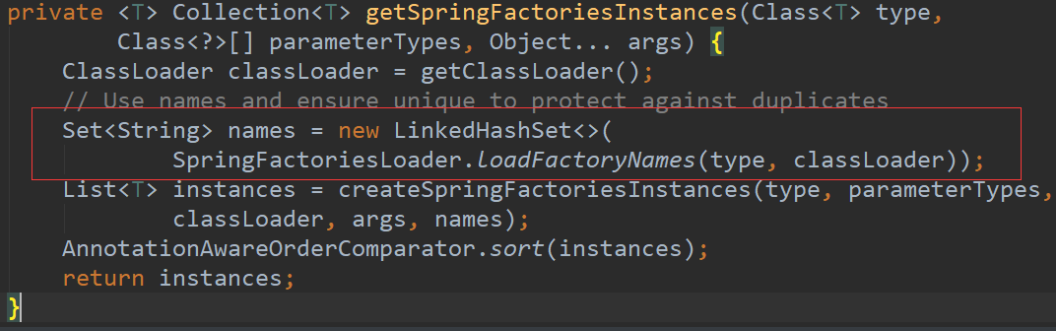
再进入这个方法:

这里就是从类路径下找到META-INF/spring.factories配置的所有ApplicationContextInitializer,然后再保存起来,放开断点,我们可以看到这个时候获取到的
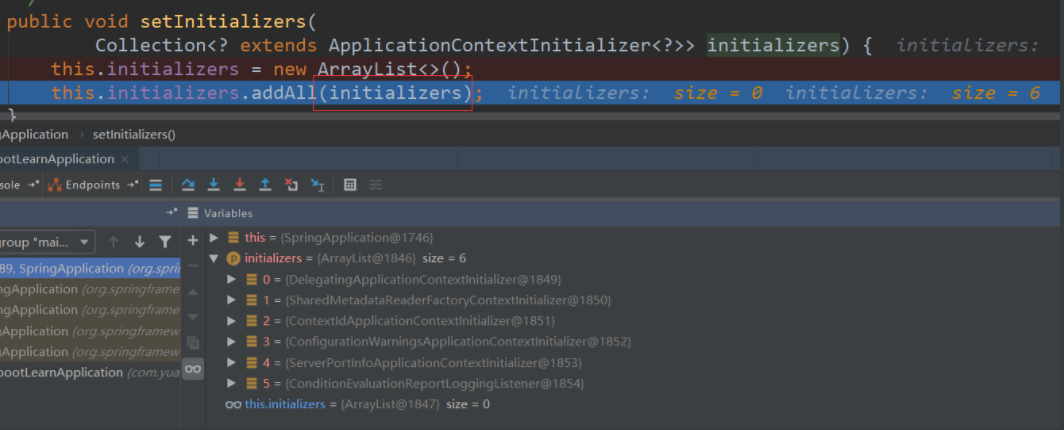
第四步:从类路径下找到ETA-INF/spring.factories配置的所有ApplicationListener,原理也基本类似,进入断点
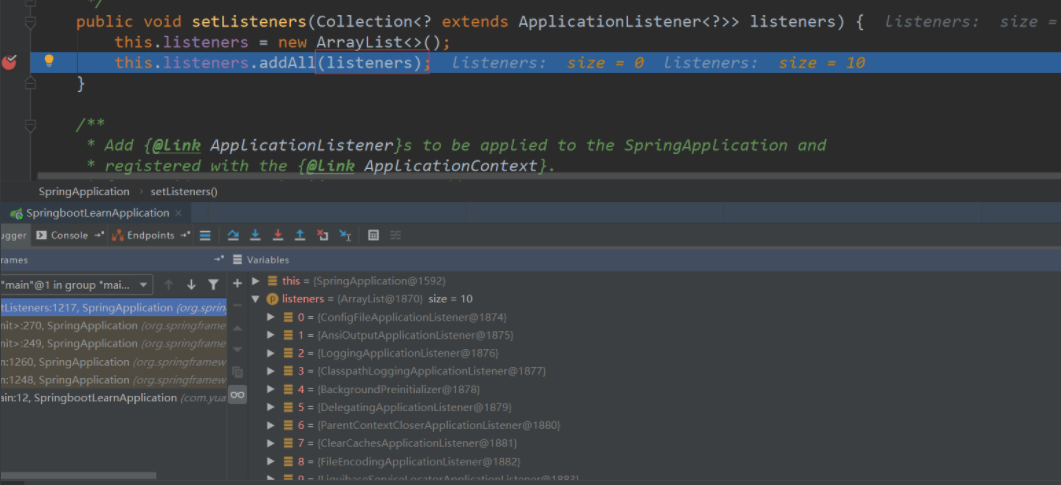
第五步:从多个配置类中找到有main方法的主配置类。这个执行完之后,SpringApplication就创建完成
2.2 run方法
先贴出代码
public ConfigurableApplicationContext run(String... args) {StopWatch stopWatch = new StopWatch();stopWatch.start();ConfigurableApplicationContext context = null;Collection<SpringBootExceptionReporter> exceptionReporters = new ArrayList<>();configureHeadlessProperty();//从类路径下META-INF/spring.factories获取SpringApplicationRunListenersSpringApplicationRunListeners listeners = getRunListeners(args);//回调所有的获取SpringApplicationRunListener.starting()方法listeners.starting();try {//封装命令行参数ApplicationArguments applicationArguments = new DefaultApplicationArguments(args);//准备环境ConfigurableEnvironment environment = prepareEnvironment(listeners,applicationArguments);//创建环境完成后回调SpringApplicationRunListener.environmentPrepared();表示环境准备完成configureIgnoreBeanInfo(environment);//打印Banner图Banner printedBanner = printBanner(environment);//创建ApplicationContext,决定创建web的ioc还是普通的ioccontext = createApplicationContext();//异常分析报告exceptionReporters = getSpringFactoriesInstances(SpringBootExceptionReporter.class,new Class[] { ConfigurableApplicationContext.class }, context);//准备上下文环境,将environment保存到ioc中//applyInitializers():回调之前保存的所有的ApplicationContextInitializer的initialize方法//listeners.contextPrepared(context)//prepareContext运行完成以后回调所有的SpringApplicationRunListener的contextLoaded()prepareContext(context, environment, listeners, applicationArguments,printedBanner);//刷新容器,ioc容器初始化(如果是web应用还会创建嵌入式的Tomcat)//扫描,创建,加载所有组件的地方,(配置类,组件,自动配置)refreshContext(context);afterRefresh(context, applicationArguments);stopWatch.stop();if (this.logStartupInfo) {new StartupInfoLogger(this.mainApplicationClass).logStarted(getApplicationLog(), stopWatch);}//所有的SpringApplicationRunListener回调started方法listeners.started(context);//从ioc容器中获取所有的ApplicationRunner和CommandLineRunner进行回调,//ApplicationRunner先回调,CommandLineRunner再回调callRunners(context, applicationArguments);}catch (Throwable ex) {handleRunFailure(context, ex, exceptionReporters, listeners);throw new IllegalStateException(ex);}try {//所有的SpringApplicationRunListener回调running方法listeners.running(context);}catch (Throwable ex) {handleRunFailure(context, ex, exceptionReporters, null);throw new IllegalStateException(ex);}//整个SpringBoot应用启动完成以后返回启动的ioc容器return context;}
前面的代码不用分析,主要是准备对象,我们从 SpringApplicationRunListeners listeners = getRunListeners(args)开始分析,
第一步:是从类路径下META-INF/spring.factories获取SpringApplicationRunListeners,
这个方法跟前面分析的两个获取配置方法类似。
第二步:回调所有的获取SpringApplicationRunListener.starting()方法。
第三步: 封装命令行参数。
第四步:准备环境,调用prepareEnvironment方法。
第五步:打印Banner图(就是启动时的标识图)。
第六步:创建ApplicationContext,决定创建web的ioc还是普通的ioc。
第七步:异常分析报告。
第八步:准备上下文环境,将environment保存到ioc中,这个方法需要仔细分析下,我们再进入这个方法
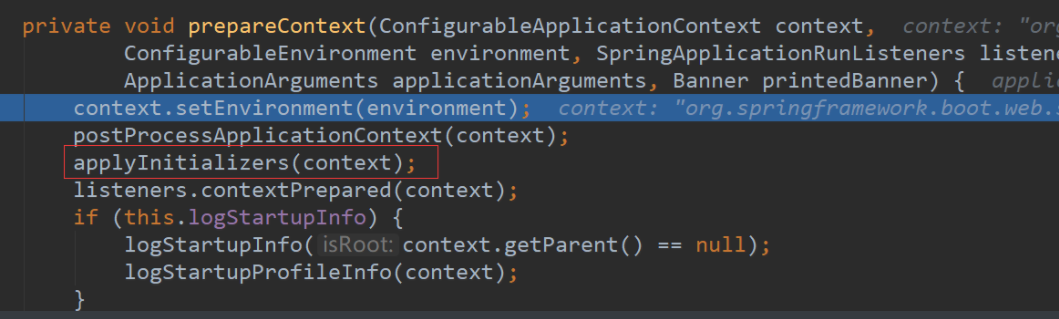
这里面有一个applyInitializers方法,这里是回调之前保存的所有的ApplicationContextInitializer的initialize方法
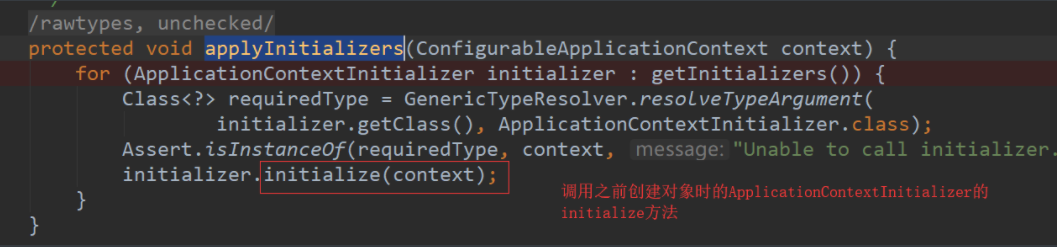
还有一个listeners.contextPrepared(context),这里是回调所有的SpringApplicationRunListener的contextPrepared(),
最后listeners.contextLoaded(context) 是prepareContext运行完成以后回调所有的SpringApplicationRunListener的contextLoaded()。
第九步:刷新容器,ioc容器初始化(如果是web应用还会创建嵌入式的Tomcat),这个就是扫描,创建,加载所有组件的地方,(配置类,组件,自动配置)。
第十步:所有的SpringApplicationRunListener回调started方法。
第十一步:从ioc容器中获取所有的ApplicationRunner和CommandLineRunner进行回调,ApplicationRunner先回调,CommandLineRunner再回调。
第十二步:所有的SpringApplicationRunListener回调running方法。
第十三步:整个SpringBoot应用启动完成以后返回启动的ioc容器。
这就是run的全部过程,想要更详细的了解还需自己去看源码。
三、自定义starter
自定义starter(场景启动器),我们要做的事情是两个:确定依赖和编写自动配置。我们重点要做的就是编写自动配置,我们之前写过一些自动配置,主要是注解配置的使用,主要的注解有:
@Configuration :指定这个类是一个配置类
@ConditionalOnXXX :在指定条件成立的情况下自动配置类生效
@AutoConfigureAfter:指定自动配置类的顺序
@Bean:给容器中添加组件
@ConfigurationPropertie:结合相关xxxProperties类来绑定相关的配置
@EnableConfigurationProperties:让xxxProperties生效加入到容器中
按照这些注解写好自动配置类后,我们还需要进行自动配置的加载,加载方式是将需要启动就加载的自动配置类,配置在META-INF/spring.factories,启动器的大致原理是如此,而启动器的实际设计是有一定模式的,就是启动器模块是一个空 JAR 文件,仅提供辅助性依赖管理,而自动配置模块应该再重新设计一个,然后启动器再去引用这个自动配置模块。Springboot就是如此设计的:
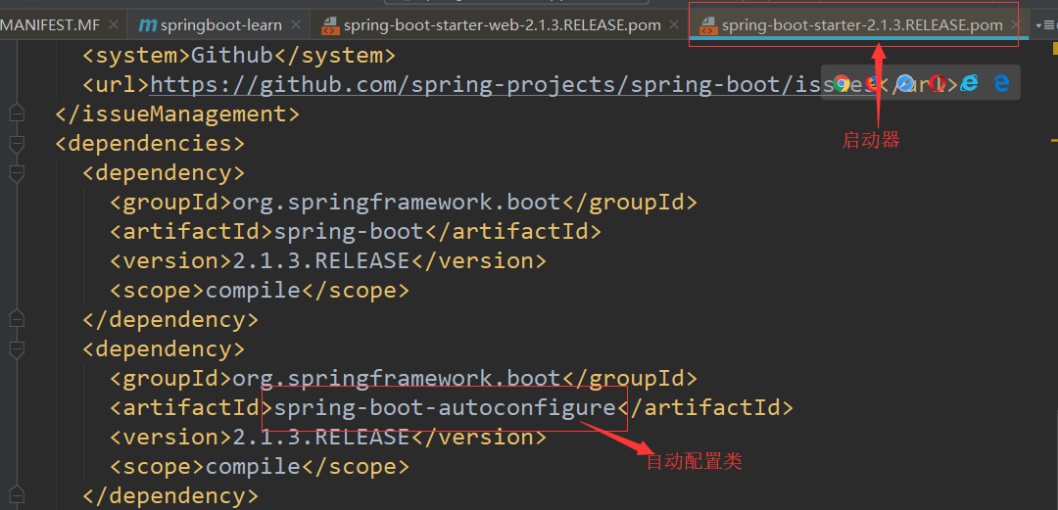
另外还有一个命名规则:
官方命名空间
– 前缀:“spring-boot-starter-”
– 模式:spring-boot-starter-模块名
– 举例:spring-boot-starter-web、spring-boot-starter-actuator、spring-boot-starter-jdbc
自定义命名空间
– 后缀:“-spring-boot-starter”
– 模式:模块-spring-boot-starter
– 举例:mybatis-spring-boot-starter
3.1 创建自定义starter
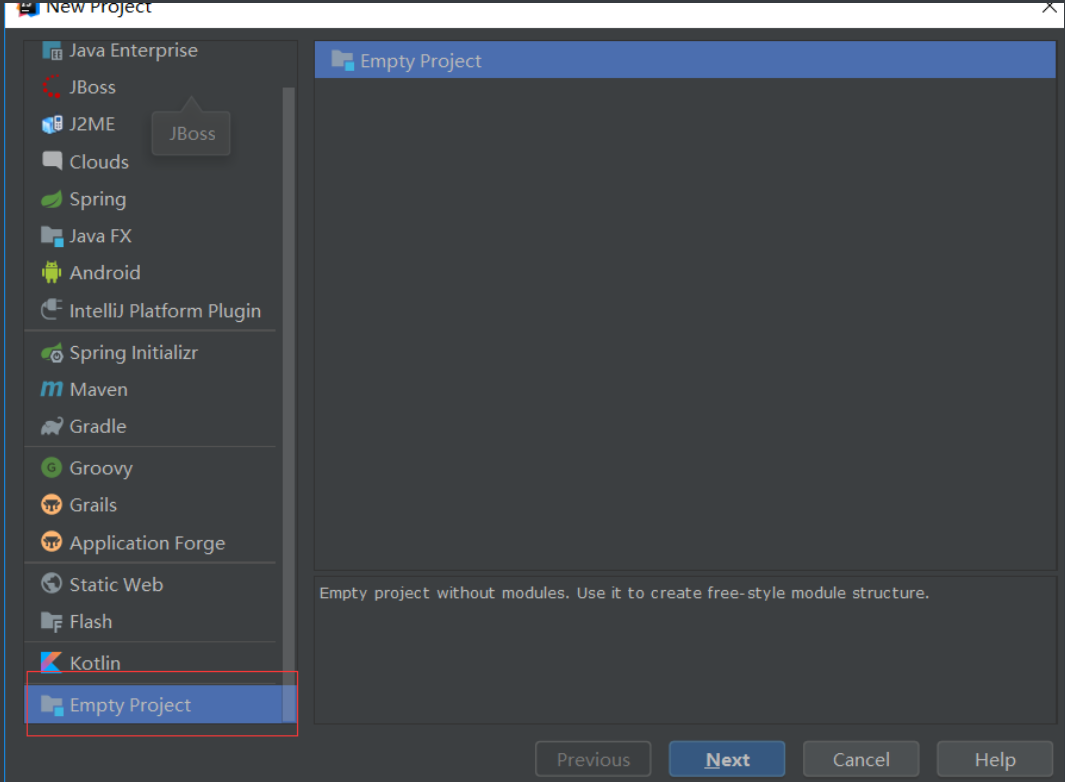
第一步:因为我们需要创建两个模块,所以先新建一个空的项目,然后以模块形式创建两个模块。
第二步:再创建两个模块,一个starter和一个自动配置模块
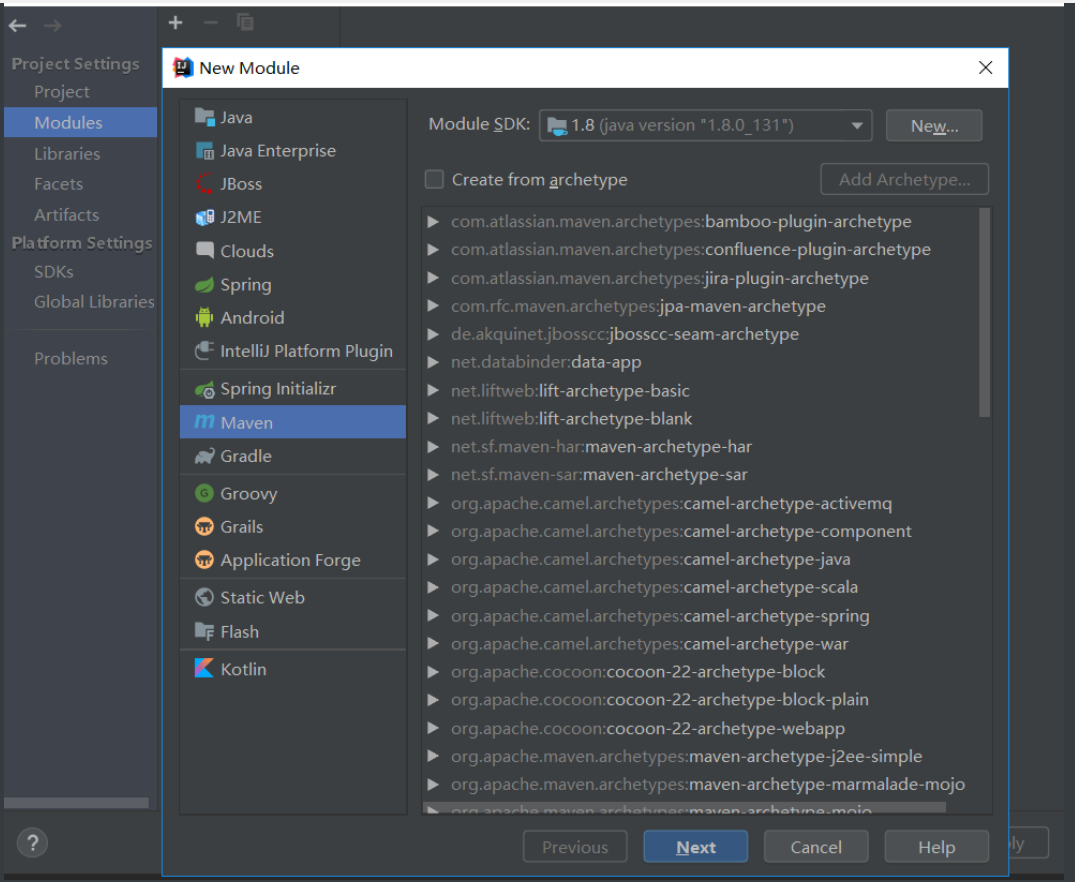
具体的创建过程就不赘述了,就是最简单的项目,去掉不需要的文件,创建完成结构如下:
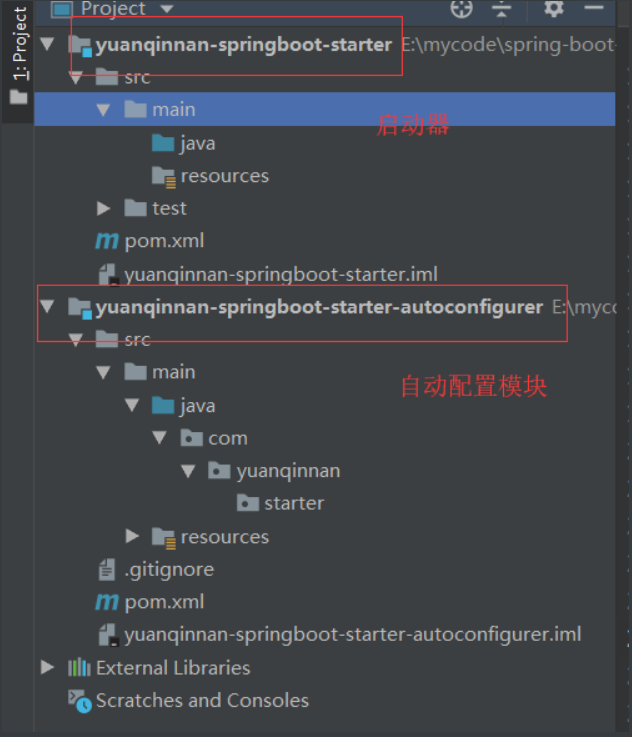
第三步:我们先将自动配置模块导入starter中,让启动模块依赖自动配置模块
启动模块的POM文件加入依赖
<dependencies><!--引入自动配置模块--><dependency><groupId>com.yuanqinnan-starter</groupId><artifactId>yuanqinnan-springboot-starter-autoconfigurer</artifactId><version>0.0.1-SNAPSHOT</version></dependency></dependencies>
自动配置模块的完整POM文件:
<?xml version="1.0" encoding="UTF-8"?><project xmlns="http://maven.apache.org/POM/4.0.0" xmlns:xsi="http://www.w3.org/2001/XMLSchema-instance"xsi:schemaLocation="http://maven.apache.org/POM/4.0.0 http://maven.apache.org/xsd/maven-4.0.0.xsd"><modelVersion>4.0.0</modelVersion><parent><groupId>org.springframework.boot</groupId><artifactId>spring-boot-starter-parent</artifactId><version>2.1.4.RELEASE</version><relativePath/> <!-- lookup parent from repository --></parent><groupId>com.yuanqinnan-starter</groupId><artifactId>yuanqinnan-springboot-starter-autoconfigurer</artifactId><version>0.0.1-SNAPSHOT</version><packaging>jar</packaging><properties><java.version>1.8</java.version></properties><dependencies><!--引入spring-boot-starter;所有starter的基本配置--><dependency><groupId>org.springframework.boot</groupId><artifactId>spring-boot-starter</artifactId></dependency></dependencies></project>
至此,两个项目基本创建完成,现在我们实现简单的配置。
第五步:对自动配置类进行自动配置代码编写
先编写一个配置类,用于配置:
@ConfigurationProperties(prefix = "yuanqinnan.hello")public class HelloProperties {//前缀private String prefix;//后缀private String suffix;public String getPrefix() {return prefix;}public void setPrefix(String prefix) {this.prefix = prefix;}public String getSuffix() {return suffix;}public void setSuffix(String suffix) {this.suffix = suffix;}}
再编写一个服务
public class HelloService {HelloProperties helloProperties;public HelloProperties getHelloProperties() {return helloProperties;}public void setHelloProperties(HelloProperties helloProperties) {this.helloProperties = helloProperties;}public String sayHello(String name) {return helloProperties.getPrefix() + "-" + name + helloProperties.getSuffix();}}
然后再将这个服务注入组件:
@Configuration@ConditionalOnWebApplication //web应用才生效@EnableConfigurationProperties(HelloProperties.class)public class HelloServiceAutoConfiguration {@AutowiredHelloProperties helloProperties;@Beanpublic HelloService helloService(){HelloService service = new HelloService();service.setHelloProperties(helloProperties);return service;}}
这个时候我们的自动配置以及写完,还差最后一步,因为SpringBoot读取自动配置是在META-INF的spring.factories文件中,所以我们还要将我们的自动配置类写入其中
org.springframework.boot.autoconfigure.EnableAutoConfiguration=\com.yuanqinnan.starter.HelloServiceAutoConfiguration
最后的结构如下:
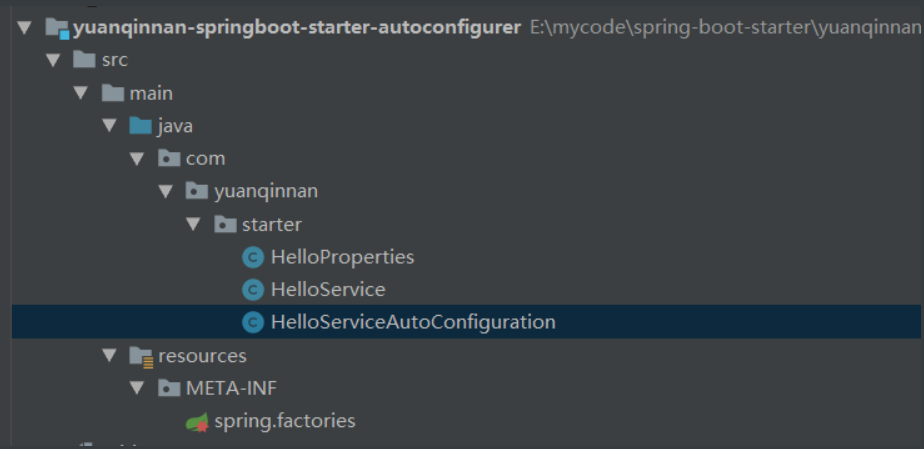
至此,代码以及编写完成,这个时候我们将其装入仓库中,让其他项目引用
3.2 使用自定义starter
创建一个web项目,然后在项目中引入依赖
<!--引入自定义starter--><dependency><groupId>com.yuanqinnan.starter</groupId><artifactId>yuanqinnan-springboot-starter</artifactId><version>1.0-SNAPSHOT</version></dependency>
在application.properties 配置中加上配置:
yuanqinnan.hello.prefix=早安yuanqinnan.hello.suffix=晚安
加入测试:
@AutowiredHelloService helloService;@Testpublic void contextLoads() {System.out.println(helloService.sayHello("世界"));}
这样自定义Starter和引用自定义都已完成,Springboot的核心知识已经总结完成,后面再进行Springboot的一些高级场景整合,如缓存、消息、检索、分布式等。

剩下的就不会给大家一展出来了,以上资料按照一下操作即可获得
——将文章进行转发和评论,关注公众号【Java烤猪皮】,关注后继续后台回复领取口令“ 666 ”即可免费领文章取中所提供的资料。

往期精品推荐
腾讯、阿里、滴滴后台试题汇集总结 — (含答案)
面试:史上最全多线程序面试题!
最新阿里内推Java后端试题
JVM难学?那是因为你没有真正看完整这篇文章

—结束—
关注作者微信公众号 — 《JAVA烤猪皮》
了解了更多java后端架构知识以及最新面试宝典
看完本文记得给作者点赞+在看哦~~~大家的支持,是作者来源不断出文的动力~
评论