firoThe privacy-focused cryptocurrency
Firo








What is Firo?
Firo formerly known as Zcoin, is a privacy focused cryptocurrency that utilizes zero-knowledge proofs which allows users to destroy coins and then redeem them later for brand new ones with no transaction history.
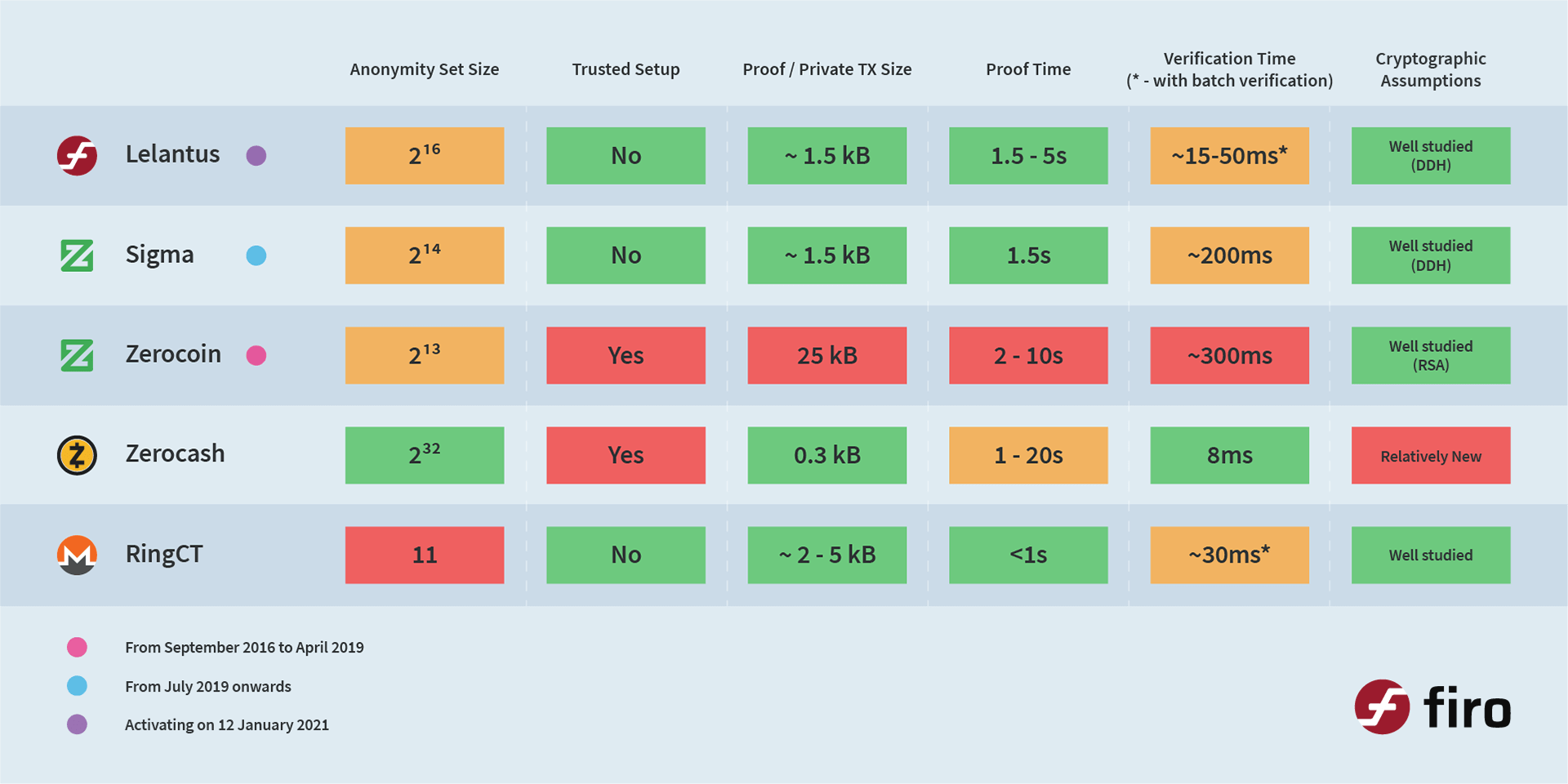
Our research created the Lelantus privacy protocol which supports high anonymity sets without requiring trusted setup and relying only on standard cryptographic assumptions. The Lelantus cryptographic library was audited by Trail of Bits and funded by Firo's CCS. Lelantus' cryptography was also audited by ABDK Consulting.
Firo also utilises Dandelion++ to obscure the originating IP of transactions without relying on any external services such as Tor/i2P.
Firo developed and utilizes Merkle Tree Proofs (MTP) as its Proof-of-Work algorithm which aims to be memory hard with fast verification to encourage mining using commodity hardware.
How Firo’s Privacy Technology Compares to the Competition
Running with Docker
If you are already familiar with Docker, then running Firo with Docker might be the the easier method for you. To run Firo using this method, first install Docker. After this you may continue with the following instructions.
Please note that we currently don't support the GUI when running with Docker. Therefore, you can only use RPC (via HTTP or the firo-cli utility) to interact with Firo via this method.
Pull our latest official Docker image:
docker pull firoorg/firodStart Firo daemon:
docker run --detach --name firod firoorg/firodView current block count (this might take a while since the daemon needs to find other nodes and download blocks first):
docker exec firod firo-cli getblockcountView connected nodes:
docker exec firod firo-cli getpeerinfoStop daemon:
docker stop firodBackup wallet:
docker cp firod:/home/firod/.firo/wallet.dat .Start daemon again:
docker start firodLinux Build Instructions and Notes
Dependencies
-
Update packages
sudo apt-get update
-
Install required packages
sudo apt-get install build-essential libtool autotools-dev automake pkg-config libssl-dev libevent-dev bsdmainutils libboost-all-dev libgmp-dev cmake
-
Install Berkeley DB 4.8
sudo apt-get install software-properties-common

sudo add-apt-repository ppa:bitcoin/bitcoin

sudo apt-get update

sudo apt-get install libdb4.8-dev libdb4.8++-dev
-
Install QT 5
sudo apt-get install libminiupnpc-dev libzmq3-dev

sudo apt-get install libqt5gui5 libqt5core5a libqt5dbus5 qttools5-dev qttools5-dev-tools libprotobuf-dev protobuf-compiler libqrencode-dev
Alternatively, you can use a depends build to handle dependencies.
Build
-
Clone the source:
git clone https://github.com/firoorg/firo
-
Build Firo-core:
Configure and build the headless Firo binaries as well as the GUI (if Qt is found).
You can disable the GUI build by passing
--without-guito configure.
./autogen.sh

./configure

make
Note that the use of a depends build necessitates passing the
--prefixoption to./configure. -
It is recommended to build and run the unit tests:
./configure --enable-tests

make check
macOS Build Instructions and Notes
See (doc/build-macos.md) for instructions on building on macOS.
Windows (64/32 bit) Build Instructions and Notes
See (doc/build-windows.md) for instructions on building on Windows 64/32 bit.
Contributors
Code Contributors
This project exists thanks to all the people who contribute. [Contribute].
Financial Contributors
Become a financial contributor and help us sustain our community. [Contribute]
Individuals
Organizations
Support this project with your organization. Your logo will show up here with a link to your website. [Contribute]