
9 个JSON.stringify 的秘密大多数开发人员却不知道

英文 | https://javascript.plainenglish.io/as-a-front-end-engineer-9-secrets-about-json-stringify-you-should-know-about-e71c175f40d8
作为前端开发工程师,你一定用过JSON.stringify,但你知道它的全部秘密吗?
很久以前,我因此在工作中犯下了无法挽回的错误。如果我早点知道,就不会发生这样的悲剧。
理解 JSON.stringify
基本上,JSON.stringify 将对象转换为 JSON 字符串。同时,JSON.stringify 有如下规则。

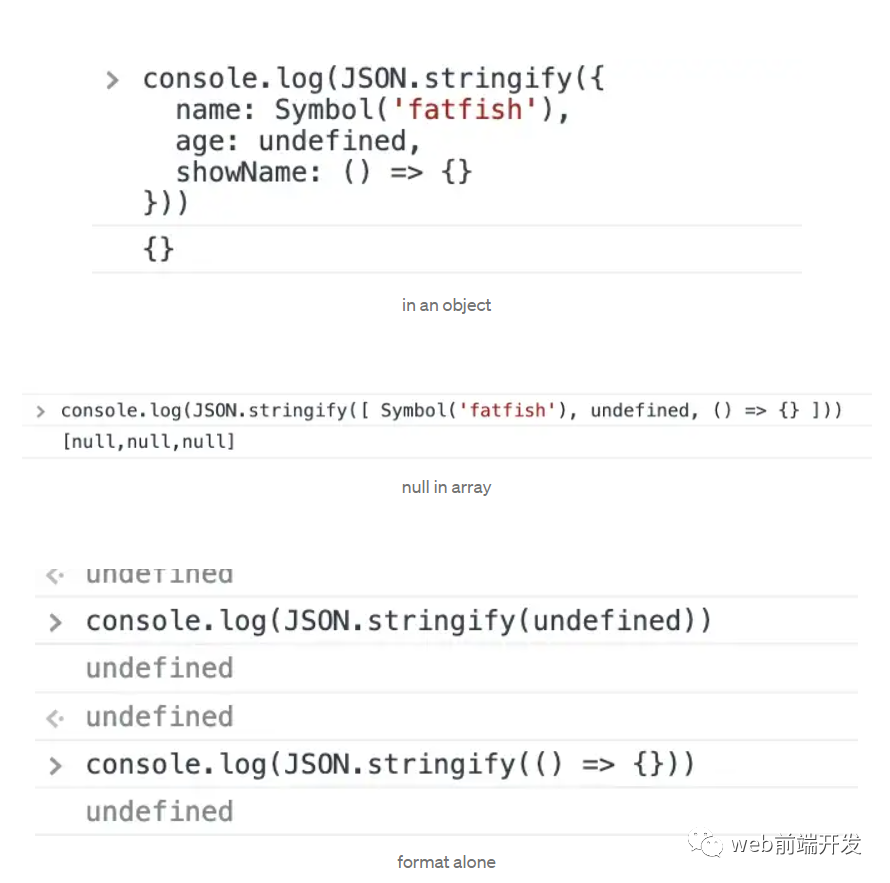
1. undefined、Function 和 Symbol 不是有效的 JSON 值。
如果在转换过程中遇到任何此类值,它们要么被省略(当在对象中找到时),要么更改为 null(当在数组中找到时)。
当传入像 JSON.stringify(function() {}) 或 JSON.stringify(undefined) 这样的“纯”值时,JSON.stringify() 可以返回 undefined。
2.Boolean、Number、String对象在字符串化过程中被转换为对应的原始值,符合传统的转换语义。

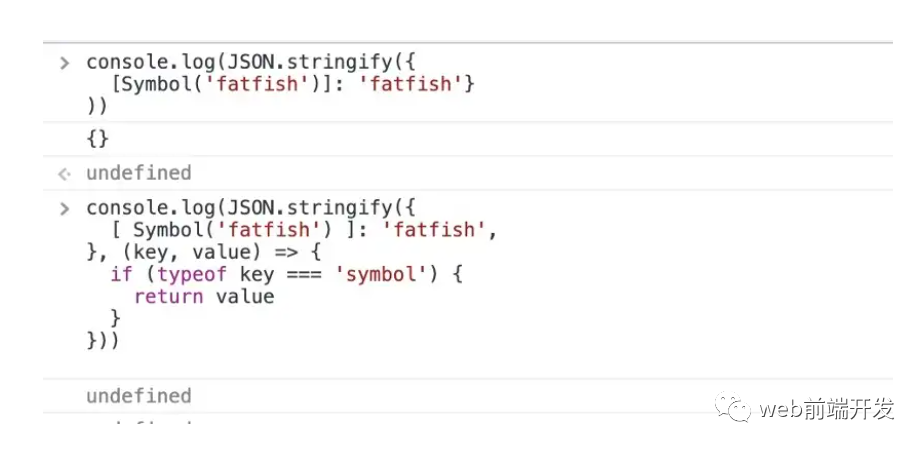
3.所有以符号为键的属性将被完全忽略,即使在使用替换函数时也是如此。
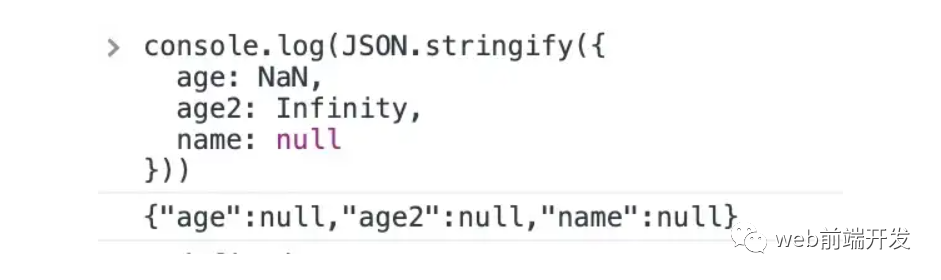
4. 数字 Infinity 和 NaN,以及值 null,都被认为是 null。
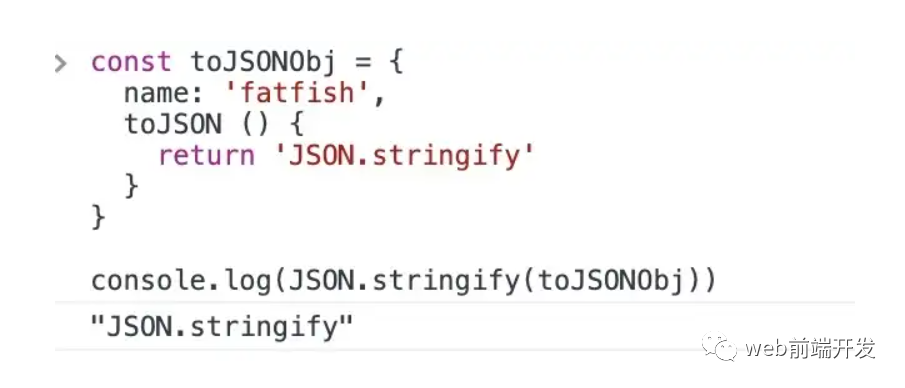
5. 如果该值有一个 toJSON() 方法,它负责定义哪些数据将被序列化。
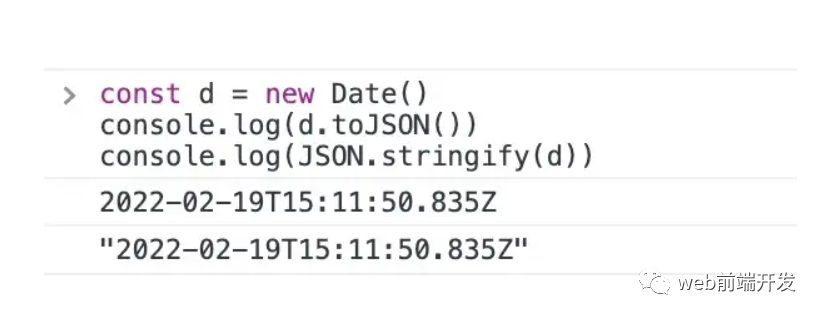
6. Date实例通过返回字符串实现toJSON()函数(同date.toISOString())。
因此,它们被视为字符串。
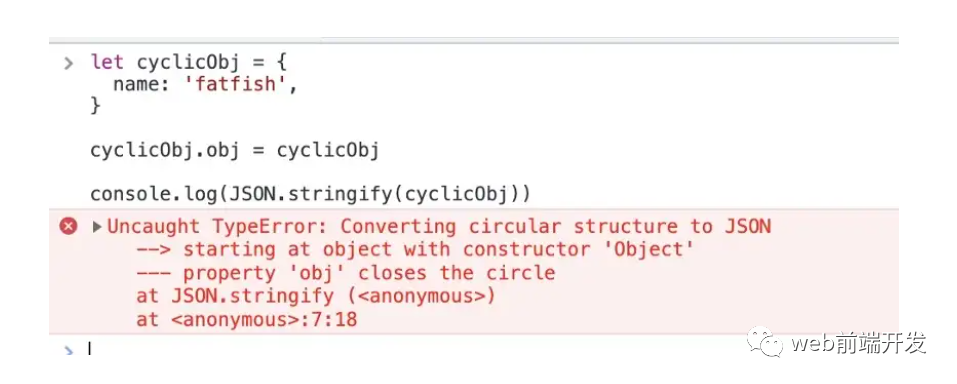
7. 在包含循环引用的对象上执行此方法会抛出错误。
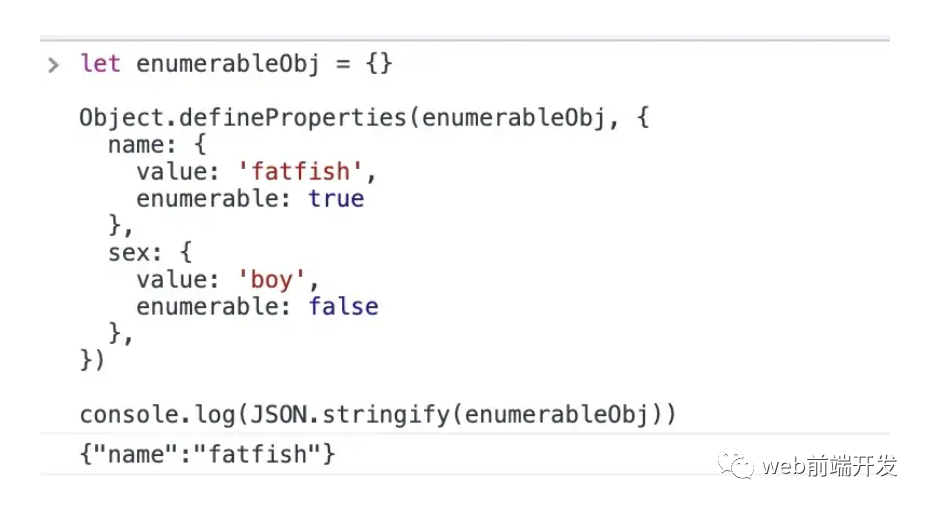
8. 所有其他对象实例(包括 Map、Set、WeakMap 和 WeakSet)将只序列化它们的可枚举属性。
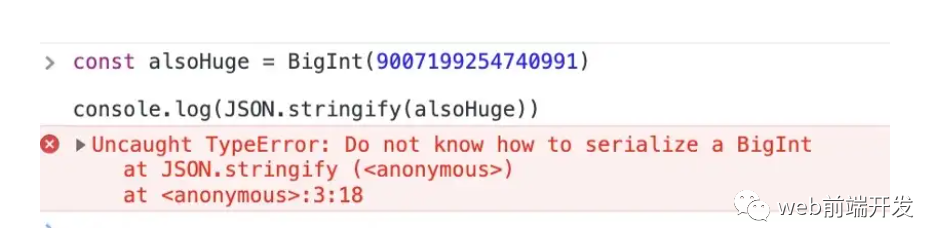
9.尝试转换BigInt类型的值时抛出错误。
自己实现 JSON.stringify
理解功能的最好方法是自己去实现它。 下面我写了一个简单的函数来模拟JSON.stringify。
        const jsonstringify = (data) => {


          // Check if an object has a circular reference


          const isCyclic = (obj) => {


          // Use the Set data type to store detected objects


          let stackSet = new Set()


          let detected = false


          const detect = (obj) => {


            // If it is not an object type, you can skip it directly


            if (obj && typeof obj != 'object') {


              return


            }


            // When the object to be checked already exists in the stackSet, it means that there is a circular reference


            if (stackSet.has(obj)) {


              return detected = true


            }


            // Save the current obj as a stackSet


            stackSet.add(obj)


            for (let key in obj) {


              if (obj.hasOwnProperty(key)) {


                detect(obj[key])


              }


            }


            // After the level detection is completed, delete the current object to prevent misjudgment


            /*


                For example:


                an object's attribute points to the same reference.


                If it is not deleted, it will be regarded as a circular reference


                let tempObj = {


                  name: 'fatfish'


                }


                let obj4 = {


                  obj1: tempObj,


                  obj2: tempObj


                }


              */


            stackSet.delete(obj)


          }


          detect(obj)


          return detected


        }


          // 7#:


          // Executing this method on an object that contains a circular reference throws an error.


          if (isCyclic(data)) {


            throw new TypeError('Converting circular structure to JSON')


          }


          // 9#: An error is thrown when trying to convert a value of type BigInt


          // An error is thrown when trying to convert a value of type bigint


          if (typeof data === 'bigint') {


            throw new TypeError('Do not know how to serialize a BigInt')


          }


          const type = typeof data


          const commonKeys1 = ['undefined', 'function', 'symbol']


          const getType = (s) => {


            return Object.prototype.toString.call(s).replace(/\[object (.*?)\]/, '$1').toLowerCase()


          }


          // not an object


          if (type !== 'object' || data === null) {


            let result = data


            // 4#:The numbers Infinity and NaN, as well as the value null, are all considered null.


            if ([NaN, Infinity, null].includes(data)) {


              result = 'null'


              // 1#:undefined, Function, and Symbol are not valid JSON values.


              // If any such values are encountered during conversion they are either omitted (when found in an object) or changed to null (when found in an array).


              // JSON.stringify() can return undefined when passing in "pure" values like JSON.stringify(function() {}) or JSON.stringify(undefined).


            } else if (commonKeys1.includes(type)) {


              return undefined


            } else if (type === 'string') {


              result = '"' + data + '"'


            }


            return String(result)


          } else if (type === 'object') {


            // 5#: If the value has a toJSON() method, it's responsible to define what data will be serialized.


            // 6#: The instances of Date implement the toJSON() function by returning a string (the same as date.toISOString()).


            // Thus, they are treated as strings.


            if (typeof data.toJSON === 'function') {


              return jsonstringify(data.toJSON())


            } else if (Array.isArray(data)) {


              let result = data.map((it) => {


                // 1#: If any such values are encountered during conversion they are either omitted (when found in an object) or changed to null (when found in an array).


                return commonKeys1.includes(typeof it) ? 'null' : jsonstringify(it)


              })


              return `[${result}]`.replace(/'/g, '"')


            } else {


              // 2#:Boolean, Number, and String objects are converted to the corresponding primitive values during stringification, in accord with the traditional conversion semantics.


              if (['boolean', 'number'].includes(getType(data))) {


                return String(data)


              } else if (getType(data) === 'string') {


                return '"' + data + '"'


              } else {


                let result = []


                // 8#: All the other Object instances (including Map, Set, WeakMap, and WeakSet) will have only their enumerable properties serialized.


                Object.keys(data).forEach((key) => {


                  // 3#: All Symbol-keyed properties will be completely ignored, even when using the replacer function.


                  if (typeof key !== 'symbol') {


                    const value = data[key]


                    // 1#: undefined, Function, and Symbol are not valid JSON values.


                    if (!commonKeys1.includes(typeof value)) {


                      result.push(`"${key}":${jsonstringify(value)}`)


                    }


                  }


                })


                return `{${result}}`.replace(/'/, '"')


              }


            }


          }


        }
还有一个测试
          // 1. Test basic features


        console.log(jsonstringify(undefined)) // undefined


        console.log(jsonstringify(() => { })) // undefined


        console.log(jsonstringify(Symbol('fatfish'))) // undefined


        console.log(jsonstringify((NaN))) // null


        console.log(jsonstringify((Infinity))) // null


        console.log(jsonstringify((null))) // null


        console.log(jsonstringify({


          name: 'fatfish',


          toJSON() {


            return {


              name: 'fatfish2',


              sex: 'boy'


            }


          }


        }))


          // {"name":"fatfish2","sex":"boy"}


          // 2. Compare with native JSON.stringify


        console.log(jsonstringify(null) === JSON.stringify(null));


          // true


        console.log(jsonstringify(undefined) === JSON.stringify(undefined));


          // true


        console.log(jsonstringify(false) === JSON.stringify(false));


          // true


        console.log(jsonstringify(NaN) === JSON.stringify(NaN));


          // true


        console.log(jsonstringify(Infinity) === JSON.stringify(Infinity));


          // true


        let str = "fatfish";


        console.log(jsonstringify(str) === JSON.stringify(str));


          // true


        let reg = new RegExp("\w");


        console.log(jsonstringify(reg) === JSON.stringify(reg));


          // true


        let date = new Date();


        console.log(jsonstringify(date) === JSON.stringify(date));


          // true


        let sym = Symbol('fatfish');


        console.log(jsonstringify(sym) === JSON.stringify(sym));


          // true


        let array = [1, 2, 3];


        console.log(jsonstringify(array) === JSON.stringify(array));


          // true


        let obj = {


          name: 'fatfish',


          age: 18,


          attr: ['coding', 123],


          date: new Date(),


          uni: Symbol(2),


          sayHi: function () {


            console.log("hello world")


          },


          info: {


            age: 16,


            intro: {


              money: undefined,


              job: null


            }


          },


          pakingObj: {


            boolean: new Boolean(false),


            string: new String('fatfish'),


            number: new Number(1),


          }


        }


        console.log(jsonstringify(obj) === JSON.stringify(obj))


          // true


        console.log((jsonstringify(obj)))


          // {"name":"fatfish","age":18,"attr":["coding",123],"date":"2021-10-06T14:59:58.306Z","info":{"age":16,"intro":{"job":null}},"pakingObj":{"boolean":false,"string":"fatfish","number":1}}


        console.log(JSON.stringify(obj))


          // {"name":"fatfish","age":18,"attr":["coding",123],"date":"2021-10-06T14:59:58.306Z","info":{"age":16,"intro":{"job":null}},"pakingObj":{"boolean":false,"string":"fatfish","number":1}}


          // 3. Test traversable objects


        let enumerableObj = {}


        Object.defineProperties(enumerableObj, {


          name: {


            value: 'fatfish',


            enumerable: true


          },


          sex: {


            value: 'boy',


            enumerable: false


          },


        })


        console.log(jsonstringify(enumerableObj))


          // {"name":"fatfish"}


          // 4. Testing circular references and Bigint


        let obj1 = { a: 'aa' }


        let obj2 = { name: 'fatfish', a: obj1, b: obj1 }


        obj2.obj = obj2


        console.log(jsonstringify(obj2))


          // TypeError: Converting circular structure to JSON


        console.log(jsonStringify(BigInt(1)))


          // TypeError: Do not know how to serialize a BigInt
最后
以上就是我今天跟你分享的全部内容,希望你能从今天的文章中学到新的知识。
最后,感谢你的阅读,祝编程愉快!
学习更多技能
请点击下方公众号


评论