
常用Python数据科学库(附代码)
来源:pythonic生物人
本文约7800字,建议阅读10+分钟
本文分享常用Python数据科学库实战代码。
为了大家能够对人工智能常用的 Python 库有一个初步的了解,以选择能够满足自己需求的库进行学习,对目前较为常见的人工智能库进行简要全面的介绍。
NumPy(Numerical Python)是 Python的一个扩展程序库,支持大量的维度数组与矩阵运算,此外也针对数组运算提供大量的数学函数库,Numpy底层使用C语言编写,数组中直接存储对象,而不是存储对象指针,所以其运算效率远高于纯Python代码。我们可以在示例中对比下纯Python与使用Numpy库在计算列表sin值的速度对比:
          import numpy as np


          import math


          import random


          import time


          start = time.time()


          for i in range(10):


              list_1 = list(range(1,10000))


          for j in range(len(list_1)):


                  list_1[j] = math.sin(list_1[j])


          print("使用纯Python用时{}s".format(time.time()-start))


          start = time.time()


          for i in range(10):


              list_1 = np.array(np.arange(1,10000))


              list_1 = np.sin(list_1)


          print("使用Numpy用时{}s".format(time.time()-start))
从如下运行结果,可以看到使用 Numpy 库的速度快于纯 Python 编写的代码:
使用纯Python用时0.017444372177124023s使用Numpy用时0.001619577407836914s
2、OpenCV
OpenCV 是一个的跨平台计算机视觉库,可以运行在 Linux、Windows 和 Mac OS 操作系统上。它轻量级而且高效——由一系列 C 函数和少量 C++ 类构成,同时也提供了 Python 接口,实现了图像处理和计算机视觉方面的很多通用算法。下面代码尝试使用一些简单的滤镜,包括图片的平滑处理、高斯模糊等:
          import numpy as np


          import cv2 as cv


          from matplotlib import pyplot as plt


          img = cv.imread('h89817032p0.png')


          kernel = np.ones((5,5),np.float32)/25


          dst = cv.filter2D(img,-1,kernel)


          blur_1 = cv.GaussianBlur(img,(5,5),0)


          blur_2 = cv.bilateralFilter(img,9,75,75)


          plt.figure(figsize=(10,10))


          plt.subplot(221),plt.imshow(img[:,:,::-1]),plt.title('Original')


          plt.xticks([]), plt.yticks([])


          plt.subplot(222),plt.imshow(dst[:,:,::-1]),plt.title('Averaging')


          plt.xticks([]), plt.yticks([])


          plt.subplot(223),plt.imshow(blur_1[:,:,::-1]),plt.title('Gaussian')


          plt.xticks([]), plt.yticks([])


          plt.subplot(224),plt.imshow(blur_1[:,:,::-1]),plt.title('Bilateral')


          plt.xticks([]), plt.yticks([])


          plt.show()
 OpenCV
 3、Scikit-image
scikit-image是基于scipy的图像处理库,它将图片作为numpy数组进行处理。例如,可以利用scikit-image改变图片比例,scikit-image提供了rescale、resize以及downscale_local_mean等函数。
          from skimage import data, color, io


          from skimage.transform import rescale, resize, downscale_local_mean


          image = color.rgb2gray(io.imread('h89817032p0.png'))


          image_rescaled = rescale(image, 0.25, anti_aliasing=False)


          image_resized = resize(image, (image.shape[0] // 4, image.shape[1] // 4),


                                 anti_aliasing=True)


          image_downscaled = downscale_local_mean(image, (4, 3))


          plt.figure(figsize=(20,20))


          plt.subplot(221),plt.imshow(image, cmap='gray'),plt.title('Original')


          plt.xticks([]), plt.yticks([])


          plt.subplot(222),plt.imshow(image_rescaled, cmap='gray'),plt.title('Rescaled')


          plt.xticks([]), plt.yticks([])


          plt.subplot(223),plt.imshow(image_resized, cmap='gray'),plt.title('Resized')


          plt.xticks([]), plt.yticks([])


          plt.subplot(224),plt.imshow(image_downscaled, cmap='gray'),plt.title('Downscaled')


          plt.xticks([]), plt.yticks([])


          plt.show()

Scikit-image
4、PIL
Python Imaging Library(PIL) 已经成为 Python 事实上的图像处理标准库了,这是由于,PIL 功能非常强大,但API却非常简单易用。但是由于PIL仅支持到 Python 2.7,再加上年久失修,于是一群志愿者在 PIL 的基础上创建了兼容的版本,名字叫 Pillow,支持最新 Python 3.x,又加入了许多新特性,因此,我们可以跳过 PIL,直接安装使用 Pillow。
5、Pillow
使用 Pillow 生成字母验证码图片:
            from PIL import Image, ImageDraw, ImageFont, ImageFilter


            import random


              # 随机字母:


              def rndChar():


            return chr(random.randint(65, 90))


              # 随机颜色1:


              def rndColor():


            return (random.randint(64, 255), random.randint(64, 255), random.randint(64, 255))


              # 随机颜色2:


              def rndColor2():


            return (random.randint(32, 127), random.randint(32, 127), random.randint(32, 127))


              # 240 x 60:


            width = 60 * 6


            height = 60 * 6


            image = Image.new('RGB', (width, height), (255, 255, 255))


              # 创建Font对象:


            font = ImageFont.truetype('/usr/share/fonts/wps-office/simhei.ttf', 60)


              # 创建Draw对象:


            draw = ImageDraw.Draw(image)


              # 填充每个像素:


            for x in range(width):


            for y in range(height):


                    draw.point((x, y), fill=rndColor())


              # 输出文字:


            for t in range(6):


                draw.text((60 * t + 10, 150), rndChar(), font=font, fill=rndColor2())


              # 模糊:


            image = image.filter(ImageFilter.BLUR)


            image.save('code.jpg', 'jpeg')
 验证码
验证码 6、SimpleCV
SimpleCV 是一个用于构建计算机视觉应用程序的开源框架。使用它,可以访问高性能的计算机视觉库,如 OpenCV,而不必首先了解位深度、文件格式、颜色空间、缓冲区管理、特征值或矩阵等术语。但其对于 Python3 的支持很差很差,在 Python3.7 中使用如下代码:
            from SimpleCV import Image, Color, Display


            # load an image from imgur


            img = Image('http://i.imgur.com/lfAeZ4n.png')


            # use a keypoint detector to find areas of interest


            feats = img.findKeypoints()


            # draw the list of keypoints


            feats.draw(color=Color.RED)


            # show the  resulting image.


            img.show()


            # apply the stuff we found to the image.


            output = img.applyLayers()


            # save the results.


            output.save('juniperfeats.png')
会报如下错误,因此不建议在 Python3 中使用:
SyntaxError: Missing parentheses in call to 'print'. Did you mean print('unit test')?
7、Mahotas
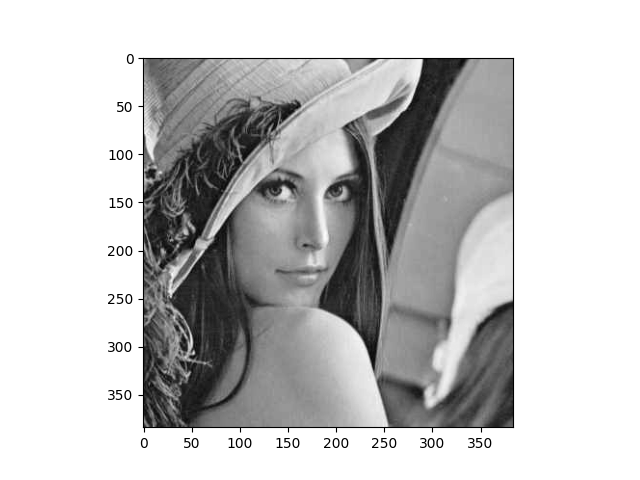
Mahotas 是一个快速计算机视觉算法库,其构建在 Numpy 之上,目前拥有超过100种图像处理和计算机视觉功能,并在不断增长。使用 Mahotas 加载图像,并对像素进行操作:
          import numpy as np


          import mahotas


          import mahotas.demos


          from mahotas.thresholding import soft_threshold


          from matplotlib import pyplot as plt


          from os import path


          f = mahotas.demos.load('lena', as_grey=True)


          f = f[128:,128:]


          plt.gray()


          # Show the data:


          print("Fraction of zeros in original image: {0}".format(np.mean(f==0)))


          plt.imshow(f)


          plt.show()
 Mahotas
 8、Ilastik
Ilastik 能够给用户提供良好的基于机器学习的生物信息图像分析服务,利用机器学习算法,轻松地分割,分类,跟踪和计数细胞或其他实验数据。大多数操作都是交互式的,并不需要机器学习专业知识。
9、Scikit-Learn
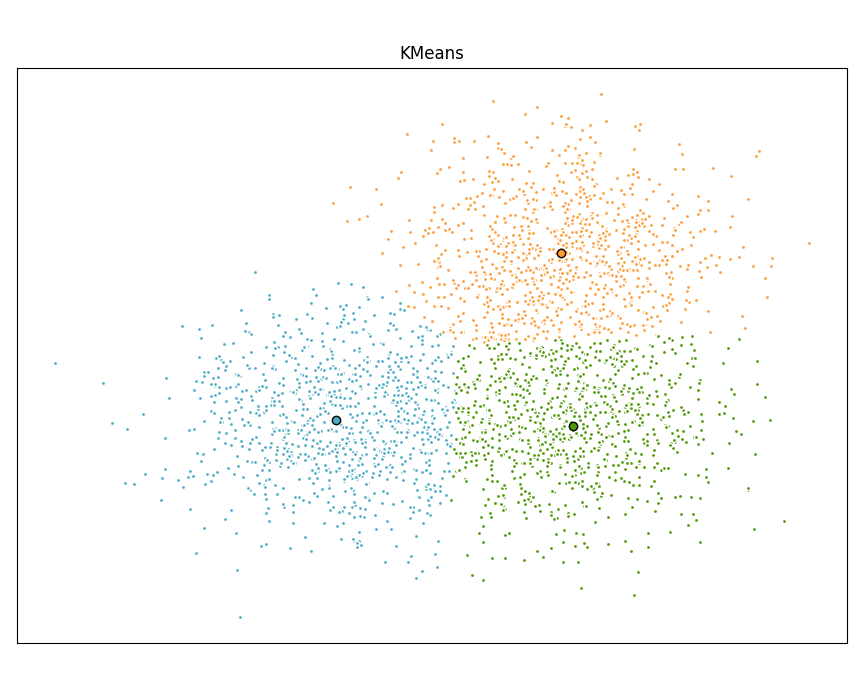
Scikit-learn 是针对 Python 编程语言的免费软件机器学习库。它具有各种分类,回归和聚类算法,包括支持向量机,随机森林,梯度提升,k均值和 DBSCAN 等多种机器学习算法。使用Scikit-learn实现KMeans算法:
          import time


          import numpy as np


          import matplotlib.pyplot as plt


          from sklearn.cluster import MiniBatchKMeans, KMeans


          from sklearn.metrics.pairwise import pairwise_distances_argmin


          from sklearn.datasets import make_blobs


          # Generate sample data


          np.random.seed(0)


          batch_size = 45


          centers = [[1, 1], [-1, -1], [1, -1]]


          n_clusters = len(centers)


          X, labels_true = make_blobs(n_samples=3000, centers=centers, cluster_std=0.7)


          # Compute clustering with Means


          k_means = KMeans(init='k-means++', n_clusters=3, n_init=10)


          t0 = time.time()


          k_means.fit(X)


          t_batch = time.time() - t0


          # Compute clustering with MiniBatchKMeans


          mbk = MiniBatchKMeans(init='k-means++', n_clusters=3, batch_size=batch_size,


                                n_init=10, max_no_improvement=10, verbose=0)


          t0 = time.time()


          mbk.fit(X)


          t_mini_batch = time.time() - t0


          # Plot result


          fig = plt.figure(figsize=(8, 3))


          fig.subplots_adjust(left=0.02, right=0.98, bottom=0.05, top=0.9)


          colors = ['#4EACC5', '#FF9C34', '#4E9A06']


          # We want to have the same colors for the same cluster from the


          # MiniBatchKMeans and the KMeans algorithm. Let's pair the cluster centers per


          # closest one.


          k_means_cluster_centers = k_means.cluster_centers_


          order = pairwise_distances_argmin(k_means.cluster_centers_,


                                            mbk.cluster_centers_)


          mbk_means_cluster_centers = mbk.cluster_centers_[order]


          k_means_labels = pairwise_distances_argmin(X, k_means_cluster_centers)


          mbk_means_labels = pairwise_distances_argmin(X, mbk_means_cluster_centers)


          # KMeans


          for k, col in zip(range(n_clusters), colors):


              my_members = k_means_labels == k


              cluster_center = k_means_cluster_centers[k]


              plt.plot(X[my_members, 0], X[my_members, 1], 'w',


                      markerfacecolor=col, marker='.')


              plt.plot(cluster_center[0], cluster_center[1], 'o', markerfacecolor=col,


                      markeredgecolor='k', markersize=6)


          plt.title('KMeans')


          plt.xticks(())


          plt.yticks(())


          plt.show()
10、SciPy
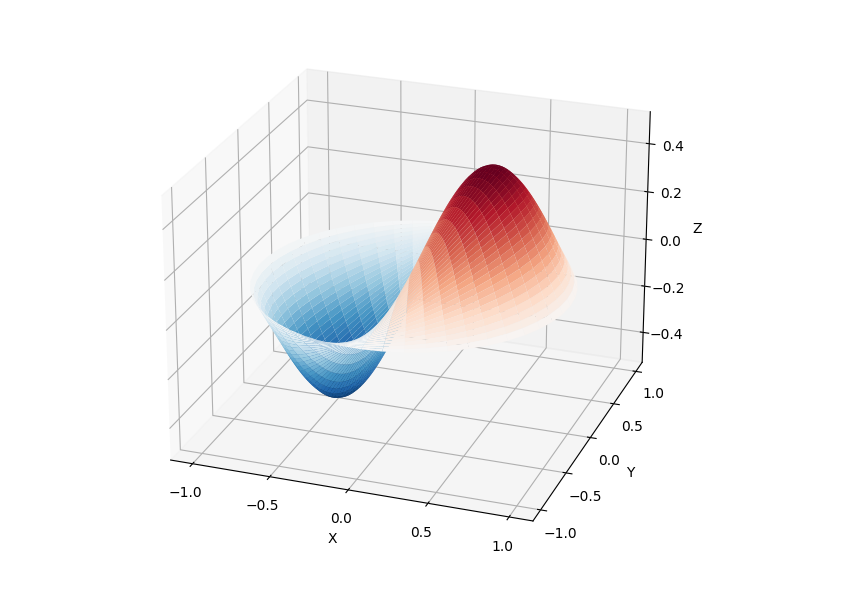
SciPy 库提供了许多用户友好和高效的数值计算,如数值积分、插值、优化、线性代数等。SciPy 库定义了许多数学物理的特殊函数,包括椭圆函数、贝塞尔函数、伽马函数、贝塔函数、超几何函数、抛物线圆柱函数等等。
          from scipy import special


          import matplotlib.pyplot as plt


          import numpy as np


            def drumhead_height(n, k, distance, angle, t):


              kth_zero = special.jn_zeros(n, k)[-1]


          return np.cos(t) * np.cos(n*angle) * special.jn(n, distance*kth_zero)


          theta = np.r_[0:2*np.pi:50j]


          radius = np.r_[0:1:50j]


          x = np.array([r * np.cos(theta) for r in radius])


          y = np.array([r * np.sin(theta) for r in radius])


          z = np.array([drumhead_height(1, 1, r, theta, 0.5) for r in radius])


          fig = plt.figure()


          ax = fig.add_axes(rect=(0, 0.05, 0.95, 0.95), projection='3d')


          ax.plot_surface(x, y, z, rstride=1, cstride=1, cmap='RdBu_r', vmin=-0.5, vmax=0.5)


          ax.set_xlabel('X')


          ax.set_ylabel('Y')


          ax.set_xticks(np.arange(-1, 1.1, 0.5))


          ax.set_yticks(np.arange(-1, 1.1, 0.5))


          ax.set_zlabel('Z')


          plt.show()
 SciPy
SciPy 11、NLTK
NLTK 是构建Python程序以处理自然语言的库。它为50多个语料库和词汇资源(如 WordNet )提供了易于使用的接口,以及一套用于分类、分词、词干、标记、解析和语义推理的文本处理库、工业级自然语言处理 (Natural Language Processing, NLP) 库的包装器。NLTK被称为 “a wonderful tool for teaching, and working in, computational linguistics using Python”。
          import nltk


          from nltk.corpus import treebank


            # 首次使用需要下载


          nltk.download('punkt')


          nltk.download('averaged_perceptron_tagger')


          nltk.download('maxent_ne_chunker')


          nltk.download('words')


          nltk.download('treebank')


          sentence = """At eight o'clock on Thursday morning Arthur didn't feel very good."""


            # Tokenize


          tokens = nltk.word_tokenize(sentence)


          tagged = nltk.pos_tag(tokens)


            # Identify named entities


          entities = nltk.chunk.ne_chunk(tagged)


            # Display a parse tree


          t = treebank.parsed_sents('wsj_0001.mrg')[0]


          t.draw()
NLTK12、spaCy
spaCy 是一个免费的开源库,用于 Python 中的高级 NLP。它可以用于构建处理大量文本的应用程序;也可以用来构建信息提取或自然语言理解系统,或者对文本进行预处理以进行深度学习。
          import spacy


          texts = [


          "Net income was $9.4 million compared to the prior year of $2.7 million.",


          "Revenue exceeded twelve billion dollars, with a loss of $1b.",


            ]


          nlp = spacy.load("en_core_web_sm")


          for doc in nlp.pipe(texts, disable=["tok2vec", "tagger", "parser", "attribute_ruler", "lemmatizer"]):


            # Do something with the doc here


          print([(ent.text, ent.label_) for ent in doc.ents])


          nlp.pipe 生成 Doc 对象,因此我们可以对它们进行迭代并访问命名实体预测:


          [('$9.4 million', 'MONEY'), ('the prior year', 'DATE'), ('$2.7 million', 'MONEY')]


          [('twelve billion dollars', 'MONEY'), ('1b', 'MONEY')]
13、LibROSA
librosa 是一个用于音乐和音频分析的 Python 库,它提供了创建音乐信息检索系统所必需的功能和函数。
            # Beat tracking example


          import librosa


            # 1. Get the file path to an included audio example


          filename = librosa.example('nutcracker')


            # 2. Load the audio as a waveform `y`


            #    Store the sampling rate as `sr`


          y, sr = librosa.load(filename)


            # 3. Run the default beat tracker


          tempo, beat_frames = librosa.beat.beat_track(y=y, sr=sr)


          print('Estimated tempo: {:.2f} beats per minute'.format(tempo))


            # 4. Convert the frame indices of beat events into timestamps


          beat_times = librosa.frames_to_time(beat_frames, sr=sr)
14、Pandas
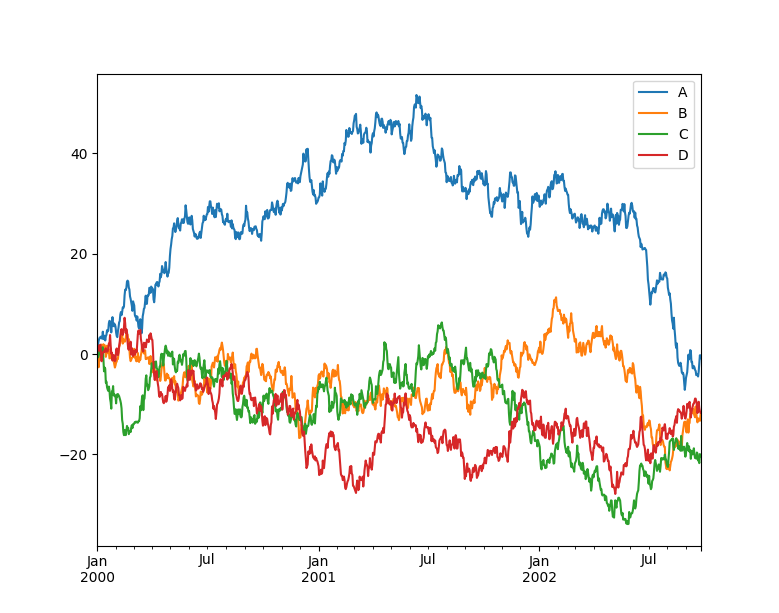
Pandas 是一个快速、强大、灵活且易于使用的开源数据分析和操作工具, Pandas 可以从各种文件格式比如 CSV、JSON、SQL、Microsoft Excel 导入数据,可以对各种数据进行运算操作,比如归并、再成形、选择,还有数据清洗和数据加工特征。Pandas 广泛应用在学术、金融、统计学等各个数据分析领域。
            import matplotlib.pyplot as plt


            import pandas as pd


            import numpy as np


            ts = pd.Series(np.random.randn(1000), index=pd.date_range("1/1/2000", periods=1000))


            ts = ts.cumsum()


            df = pd.DataFrame(np.random.randn(1000, 4), index=ts.index, columns=list("ABCD"))


            df = df.cumsum()


            df.plot()


            plt.show()
 Pandas
 15、Matplotlib
Matplotlib 是Python的绘图库,它提供了一整套和 matlab 相似的命令 API,可以生成出版质量级别的精美图形,Matplotlib 使绘图变得非常简单,在易用性和性能间取得了优异的平衡。使用 Matplotlib 绘制多曲线图:
              # plot_multi_curve.py


            import numpy as np


            import matplotlib.pyplot as plt


            x = np.linspace(0.1, 2 * np.pi, 100)


            y_1 = x


            y_2 = np.square(x)


            y_3 = np.log(x)


            y_4 = np.sin(x)


            plt.plot(x,y_1)


            plt.plot(x,y_2)


            plt.plot(x,y_3)


            plt.plot(x,y_4)


            plt.show()
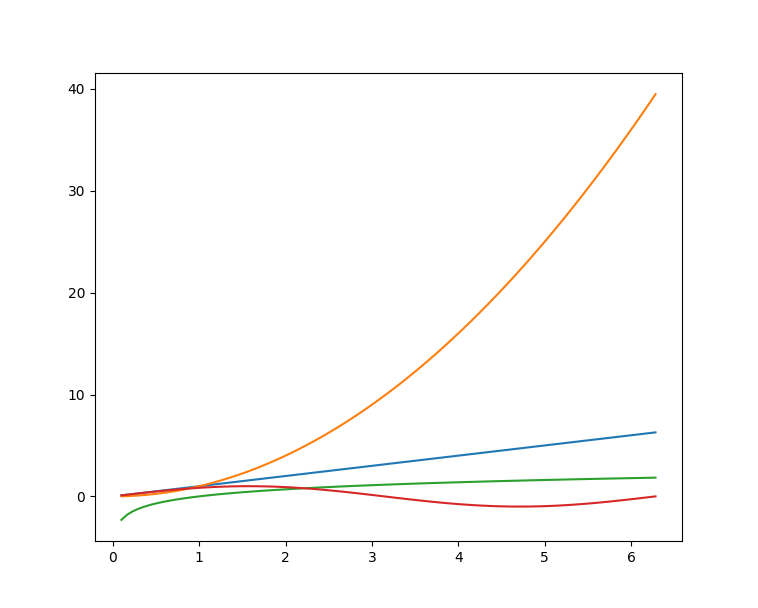 Matplotlib
 16、Seaborn
Seaborn 是在 Matplotlib 的基础上进行了更高级的API封装的Python数据可视化库,从而使得作图更加容易,应该把 Seaborn 视为 Matplotlib 的补充,而不是替代物。
            import seaborn as sns


            import matplotlib.pyplot as plt


            sns.set_theme(style="ticks")


            df = sns.load_dataset("penguins")


            sns.pairplot(df, hue="species")


            plt.show()
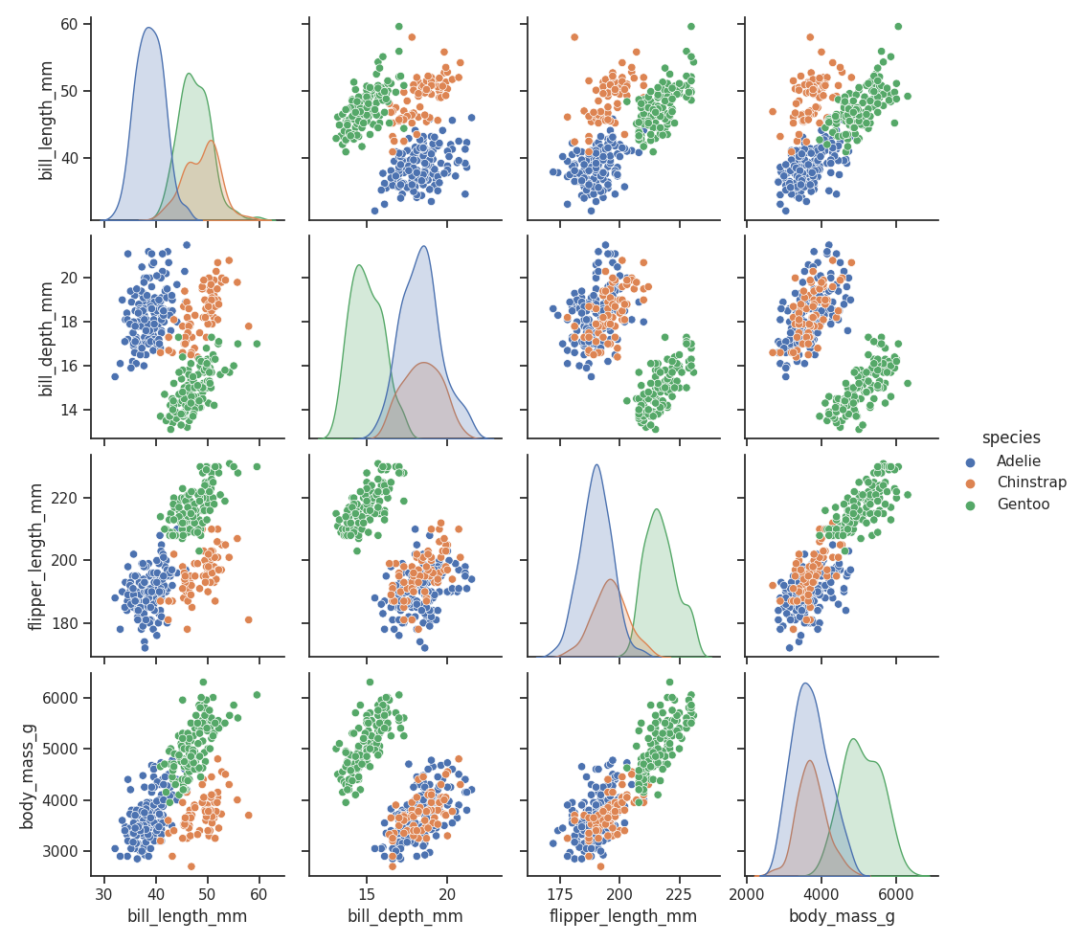 seaborn
 17、Orange
Orange 是一个开源的数据挖掘和机器学习软件,提供了一系列的数据探索、可视化、预处理以及建模组件。Orange 拥有漂亮直观的交互式用户界面,非常适合新手进行探索性数据分析和可视化展示;同时高级用户也可以将其作为 Python 的一个编程模块进行数据操作和组件开发。使用 pip 即可安装 Orange,好评~
pip install orange3
安装完成后,在命令行输入 orange-canvas 命令即可启动 Orange 图形界面:
orange-canvas
启动完成后,即可看到 Orange 图形界面,进行各种操作。
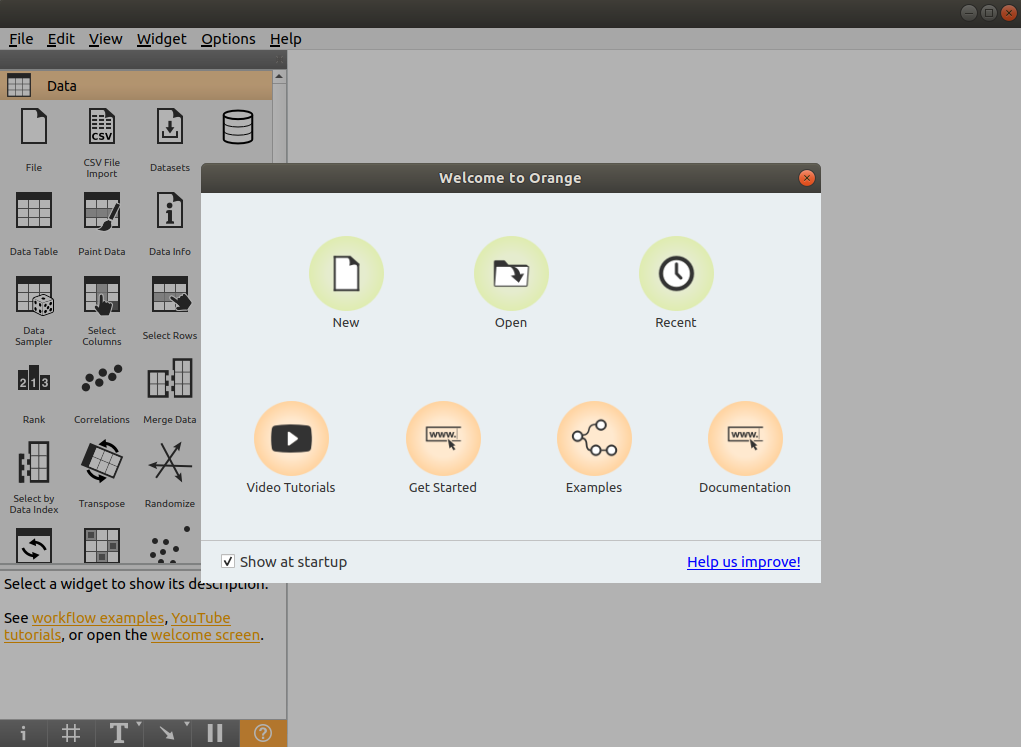 Orange
 18、PyBrain
PyBrain 是 Python 的模块化机器学习库。它的目标是为机器学习任务和各种预定义的环境提供灵活、易于使用且强大的算法来测试和比较算法。PyBrain 是 Python-Based Reinforcement Learning, Artificial Intelligence and Neural Network Library 的缩写。我们将利用一个简单的例子来展示 PyBrain 的用法,构建一个多层感知器 (Multi Layer Perceptron, MLP)。首先,我们创建一个新的前馈网络对象:
            from pybrain.structure import FeedForwardNetwork


            n = FeedForwardNetwork()
接下来,构建输入、隐藏和输出层:
            from pybrain.structure import LinearLayer, SigmoidLayer


            inLayer = LinearLayer(2)


            hiddenLayer = SigmoidLayer(3)


            outLayer = LinearLayer(1)
为了使用所构建的层,必须将它们添加到网络中:
            n.addInputModule(inLayer)


            n.addModule(hiddenLayer)


            n.addOutputModule(outLayer)
可以添加多个输入和输出模块。为了向前计算和反向误差传播,网络必须知道哪些层是输入、哪些层是输出。这就需要明确确定它们应该如何连接。为此,我们使用最常见的连接类型,全连接层,由 FullConnection 类实现:
            from pybrain.structure import FullConnection


            in_to_hidden = FullConnection(inLayer, hiddenLayer)


            hidden_to_out = FullConnection(hiddenLayer, outLayer)
与层一样,我们必须明确地将它们添加到网络中:
            n.addConnection(in_to_hidden)


            n.addConnection(hidden_to_out)
所有元素现在都已准备就位,最后,我们需要调用.sortModules()方法使MLP可用:
n.sortModules()
这个调用会执行一些内部初始化,这在使用网络之前是必要的。
19、Milk
MILK(MACHINE LEARNING TOOLKIT) 是 Python 语言的机器学习工具包。它主要是包含许多分类器比如 SVMS、K-NN、随机森林以及决策树中使用监督分类法,它还可执行特征选择,可以形成不同的例如无监督学习、密切关系传播和由 MILK 支持的 K-means 聚类等分类系统。使用 MILK 训练一个分类器:
          import numpy as np


          import milk


          features = np.random.rand(100,10)


          labels = np.zeros(100)


            features[50:] += .5


            labels[50:] = 1


          learner = milk.defaultclassifier()


          model = learner.train(features, labels)


            # Now you can use the model on new examples:


          example = np.random.rand(10)


          print(model.apply(example))


          example2 = np.random.rand(10)


          example2 += .5


          print(model.apply(example2))
20、TensorFlow
TensorFlow 是一个端到端开源机器学习平台。它拥有一个全面而灵活的生态系统,一般可以将其分为 TensorFlow1.x 和 TensorFlow2.x,TensorFlow1.x 与 TensorFlow2.x 的主要区别在于 TF1.x 使用静态图而 TF2.x 使用Eager Mode动态图。这里主要使用TensorFlow2.x作为示例,展示在 TensorFlow2.x 中构建卷积神经网络 (Convolutional Neural Network, CNN)。
import tensorflow as tf
from tensorflow.keras import datasets, layers, models
(train_images, train_labels), (test_images, test_labels) = datasets.cifar10.load_data()
train_images, test_images = train_images / 255.0, test_images / 255.0
model = models.Sequential()
model.add(layers.Conv2D(32, (3, 3), activation='relu', input_shape=(32, 32, 3)))
model.add(layers.MaxPooling2D((2, 2)))
model.add(layers.Conv2D(64, (3, 3), activation='relu'))
model.add(layers.MaxPooling2D((2, 2)))
model.add(layers.Conv2D(64, (3, 3), activation='relu'))
model.add(layers.Flatten())
model.add(layers.Dense(64, activation='relu'))
model.add(layers.Dense(10))
model.compile(optimizer='adam',
loss=tf.keras.losses.SparseCategoricalCrossentropy(from_logits=True),
metrics=['accuracy'])
history = model.fit(train_images, train_labels, epochs=10,
validation_data=(test_images, test_labels))
21、PyTorch
PyTorch 的前身是 Torch,其底层和 Torch 框架一样,但是使用 Python 重新写了很多内容,不仅更加灵活,支持动态图,而且提供了 Python 接口。
            # 导入库


          import torch


          from torch import nn


          from torch.utils.data import DataLoader


          from torchvision import datasets


          from torchvision.transforms import ToTensor, Lambda, Compose


          import matplotlib.pyplot as plt


            # 模型构建


          device = "cuda" if torch.cuda.is_available() else "cpu"


          print("Using {} device".format(device))


            # Define model


            class NeuralNetwork(nn.Module):


            def __init__(self):


                  super(NeuralNetwork, self).__init__()


                  self.flatten = nn.Flatten()


                  self.linear_relu_stack = nn.Sequential(


                      nn.Linear(28*28, 512),


                      nn.ReLU(),


                      nn.Linear(512, 512),


                      nn.ReLU(),


                      nn.Linear(512, 10),


                      nn.ReLU()


                  )


            def forward(self, x):


                  x = self.flatten(x)


                  logits = self.linear_relu_stack(x)


          return logits


          model = NeuralNetwork().to(device)


            # 损失函数和优化器


          loss_fn = nn.CrossEntropyLoss()


          optimizer = torch.optim.SGD(model.parameters(), lr=1e-3)


            # 模型训练


            def train(dataloader, model, loss_fn, optimizer):


              size = len(dataloader.dataset)


          for batch, (X, y) in enumerate(dataloader):


                  X, y = X.to(device), y.to(device)


            # Compute prediction error


                  pred = model(X)


                  loss = loss_fn(pred, y)


            # Backpropagation


                  optimizer.zero_grad()


                  loss.backward()


                  optimizer.step()


          if batch % 100 == 0:


                      loss, current = loss.item(), batch * len(X)


                      print(f"loss: {loss:>7f}  [{current:>5d}/{size:>5d}]")
22、Theano
Theano 是一个 Python 库,它允许定义、优化和有效地计算涉及多维数组的数学表达式,建在 NumPy 之上。在 Theano 中实现计算雅可比矩阵:
          import theano


          import theano.tensor as T


          x = T.dvector('x')


          y = x ** 2


          J, updates = theano.scan(lambda i, y,x : T.grad(y[i], x), sequences=T.arange(y.shape[0]), non_sequences=[y,x])


          f = theano.function([x], J, updates=updates)


          f([4, 4])
23、Keras
Keras 是一个用 Python 编写的高级神经网络 API,它能够以 TensorFlow, CNTK, 或者 Theano 作为后端运行。Keras 的开发重点是支持快速的实验,能够以最小的时延把想法转换为实验结果。
from keras.models import Sequential
from keras.layers import Dense
model = Sequential()
model.add(Dense(units=64, activation='relu', input_dim=100))
model.add(Dense(units=10, activation='softmax'))
model.compile(loss='categorical_crossentropy',
optimizer='sgd',
metrics=['accuracy'])
model.fit(x_train, y_train, epochs=5, batch_size=32)
24、Caffe
在 Caffe2 官方网站上,这样说道:Caffe2 现在是 PyTorch 的一部分。虽然这些 api 将继续工作,但鼓励使用 PyTorch api。
25、MXNet
MXNet 是一款设计为效率和灵活性的深度学习框架。它允许混合符号编程和命令式编程,从而最大限度提高效率和生产力。使用 MXNet 构建手写数字识别模型:
            import mxnet as mx


            from mxnet import gluon


            from mxnet.gluon import nn


            from mxnet import autograd as ag


            import mxnet.ndarray as F


              # 数据加载


            mnist = mx.test_utils.get_mnist()


            batch_size = 100


            train_data = mx.io.NDArrayIter(mnist['train_data'], mnist['train_label'], batch_size, shuffle=True)


            val_data = mx.io.NDArrayIter(mnist['test_data'], mnist['test_label'], batch_size)


              # CNN模型


              class Net(gluon.Block):


            def __init__(self, **kwargs):


            super(Net, self).__init__(**kwargs)


            self.conv1 = nn.Conv2D(20, kernel_size=(5,5))


            self.pool1 = nn.MaxPool2D(pool_size=(2,2), strides = (2,2))


            self.conv2 = nn.Conv2D(50, kernel_size=(5,5))


            self.pool2 = nn.MaxPool2D(pool_size=(2,2), strides = (2,2))


            self.fc1 = nn.Dense(500)


            self.fc2 = nn.Dense(10)


            def forward(self, x):


                    x = self.pool1(F.tanh(self.conv1(x)))


                    x = self.pool2(F.tanh(self.conv2(x)))


              # 0 means copy over size from corresponding dimension.


              # -1 means infer size from the rest of dimensions.


                    x = x.reshape((0, -1))


                    x = F.tanh(self.fc1(x))


                    x = F.tanh(self.fc2(x))


            return x


            net = Net()


              # 初始化与优化器定义


              # set the context on GPU is available otherwise CPU


            ctx = [mx.gpu() if mx.test_utils.list_gpus() else mx.cpu()]


            net.initialize(mx.init.Xavier(magnitude=2.24), ctx=ctx)


            trainer = gluon.Trainer(net.collect_params(), 'sgd', {'learning_rate': 0.03})


              # 模型训练


              # Use Accuracy as the evaluation metric.


            metric = mx.metric.Accuracy()


            softmax_cross_entropy_loss = gluon.loss.SoftmaxCrossEntropyLoss()


            for i in range(epoch):


              # Reset the train data iterator.


                train_data.reset()


            for batch in train_data:


                    data = gluon.utils.split_and_load(batch.data[0], ctx_list=ctx, batch_axis=0)


                    label = gluon.utils.split_and_load(batch.label[0], ctx_list=ctx, batch_axis=0)


                    outputs = []


              # Inside training scope


                    with ag.record():


            for x, y in zip(data, label):


                            z = net(x)


              # Computes softmax cross entropy loss.


                            loss = softmax_cross_entropy_loss(z, y)


              # Backpropogate the error for one iteration.


                            loss.backward()


                            outputs.append(z)


                    metric.update(label, outputs)


                    trainer.step(batch.data[0].shape[0])


              # Gets the evaluation result.


                name, acc = metric.get()


              # Reset evaluation result to initial state.


                metric.reset()


                print('training acc at epoch %d: %s=%f'%(i, name, acc))
26、PaddlePaddle
飞桨 (PaddlePaddle) 以百度多年的深度学习技术研究和业务应用为基础,集深度学习核心训练和推理框架、基础模型库、端到端开发套件、丰富的工具组件于一体。是中国首个自主研发、功能完备、开源开放的产业级深度学习平台。使用 PaddlePaddle 实现 LeNtet5:
              # 导入需要的包


            import paddle


            import numpy as np


            from paddle.nn import Conv2D, MaxPool2D, Linear


              ## 组网


            import paddle.nn.functional as F


              # 定义 LeNet 网络结构


              class LeNet(paddle.nn.Layer):


            def __init__(self, num_classes=1):


            super(LeNet, self).__init__()


              # 创建卷积和池化层


              # 创建第1个卷积层


            self.conv1 = Conv2D(in_channels=1, out_channels=6, kernel_size=5)


            self.max_pool1 = MaxPool2D(kernel_size=2, stride=2)


              # 尺寸的逻辑:池化层未改变通道数;当前通道数为6


              # 创建第2个卷积层


            self.conv2 = Conv2D(in_channels=6, out_channels=16, kernel_size=5)


            self.max_pool2 = MaxPool2D(kernel_size=2, stride=2)


              # 创建第3个卷积层


            self.conv3 = Conv2D(in_channels=16, out_channels=120, kernel_size=4)


              # 尺寸的逻辑:输入层将数据拉平[B,C,H,W] -> [B,C*H*W]


              # 输入size是[28,28],经过三次卷积和两次池化之后,C*H*W等于120


            self.fc1 = Linear(in_features=120, out_features=64)


              # 创建全连接层,第一个全连接层的输出神经元个数为64, 第二个全连接层输出神经元个数为分类标签的类别数


            self.fc2 = Linear(in_features=64, out_features=num_classes)


              # 网络的前向计算过程


            def forward(self, x):


                    x = self.conv1(x)


              # 每个卷积层使用Sigmoid激活函数,后面跟着一个2x2的池化


                    x = F.sigmoid(x)


                    x = self.max_pool1(x)


                    x = F.sigmoid(x)


                    x = self.conv2(x)


                    x = self.max_pool2(x)


                    x = self.conv3(x)


              # 尺寸的逻辑:输入层将数据拉平[B,C,H,W] -> [B,C*H*W]


                    x = paddle.reshape(x, [x.shape[0], -1])


                    x = self.fc1(x)


                    x = F.sigmoid(x)


                    x = self.fc2(x)


            return x
27、CNTK
CNTK(Cognitive Toolkit) 是一个深度学习工具包,通过有向图将神经网络描述为一系列计算步骤。在这个有向图中,叶节点表示输入值或网络参数,而其他节点表示对其输入的矩阵运算。CNTK 可以轻松地实现和组合流行的模型类型,如 CNN 等。CNTK 用网络描述语言 (network description language, NDL) 描述一个神经网络。简单的说,要描述输入的 feature,输入的 label,一些参数,参数和输入之间的计算关系,以及目标节点是什么。
NDLNetworkBuilder=[
run=ndlLR
ndlLR=[
# sample and label dimensions
SDim=$dimension$
LDim=1
features=Input(SDim, 1)
labels=Input(LDim, 1)
# parameters to learn
B0 = Parameter(4)
W0 = Parameter(4, SDim)
B = Parameter(LDim)
W = Parameter(LDim, 4)
# operations
t0 = Times(W0, features)
z0 = Plus(t0, B0)
s0 = Sigmoid(z0)
t = Times(W, s0)
z = Plus(t, B)
s = Sigmoid(z)
LR = Logistic(labels, s)
EP = SquareError(labels, s)
# root nodes
FeatureNodes=(features)
LabelNodes=(labels)
CriteriaNodes=(LR)
EvalNodes=(EP)
OutputNodes=(s,t,z,s0,W0)
编辑:黄继彦
机器学习算法与Python实战P5:Matplotlib&Seaborn
可能是全网最全的速查表:Python机器学习ChatGPT线性代数微积分概率统计
评论